Loading...

Research deep dive · 16 min read
How to Use Ticker Lab
A complete walkthrough of Ticker Lab: the volatility read, plan tiles, contract picker, payoff chart, what-if sliders, and P&L heat matrix explained with real screenshots from AAPL at $343.58.
Open the tool →Hey guys, Art from TraderMatrix here. Ticker Lab is the options workbench I go to when I have a ticker in mind and want to know two things: whether options on that name are cheap or expensive right now, and which specific contract does the best job expressing whatever thesis I am building. This guide walks through every section of the page, with real data from an AAPL session, so you understand what the numbers mean and what to do with them.
The lab lives at /ticker-lab, which routes to /ticker-search/SYMBOL/lab once you load a symbol. You can navigate to it directly or reach it through the Lab link in the ticker menu on any chart or flow page.
The short version:
- The volatility read tells you whether options on a name are cheap or expensive before you look at a single strike.
- Pick a plan first. The chain re-ranks itself around your plan, surfacing the best-fit contracts for that strategy type at the top.
- The trade card gives you five numbers before you touch an order ticket: what you pay, breakeven, max profit, max loss, and the current-time estimated P&L.
- The payoff chart has two lines. The solid line is value at expiry. The dashed line is the mark-to-market value right now, accounting for theta and the current IV.
- The P&L heat matrix shows your forward profit and loss across every price and date combination out to expiry. Read it before committing to size.
- Position Doctor and Hedge Shopper are in the "More on SYMBOL" section at the bottom. Both have their own full guides.
What this page is and what it isn't
Ticker Lab is not a signal generator. It does not tell you to buy or sell a name. What it does is take a ticker you already have a view on and help you figure out which options structure fits that view most efficiently, given the current volatility environment.
The options calculator at /calculator is free and available without a subscription. It builds any structure from manual inputs, which is useful for quick math. The Lab is the premium version of that workflow: it pulls the live chain, fits a fair-value model to the entire volatility surface, scores every in-window contract for how far its implied volatility sits above or below fair value, and assembles fully-priced multi-leg structures ranked by a composite score. It adds the what-if sliders, the P&L heat matrix, the Greeks, the stress-test tabs, and a set of panels for deeper work on specific names.
If you want to quickly check what a long call pays at a given price, use the calculator. If you want to know which call on a specific name is the most mispriced right now and how a covered-call structure around it would behave across the next 60 days of price and time, use the Lab.
The volatility read
This is the first section on the page when you load a symbol. On the AAPL session in the screenshot, it shows three panels across the top of the screen.
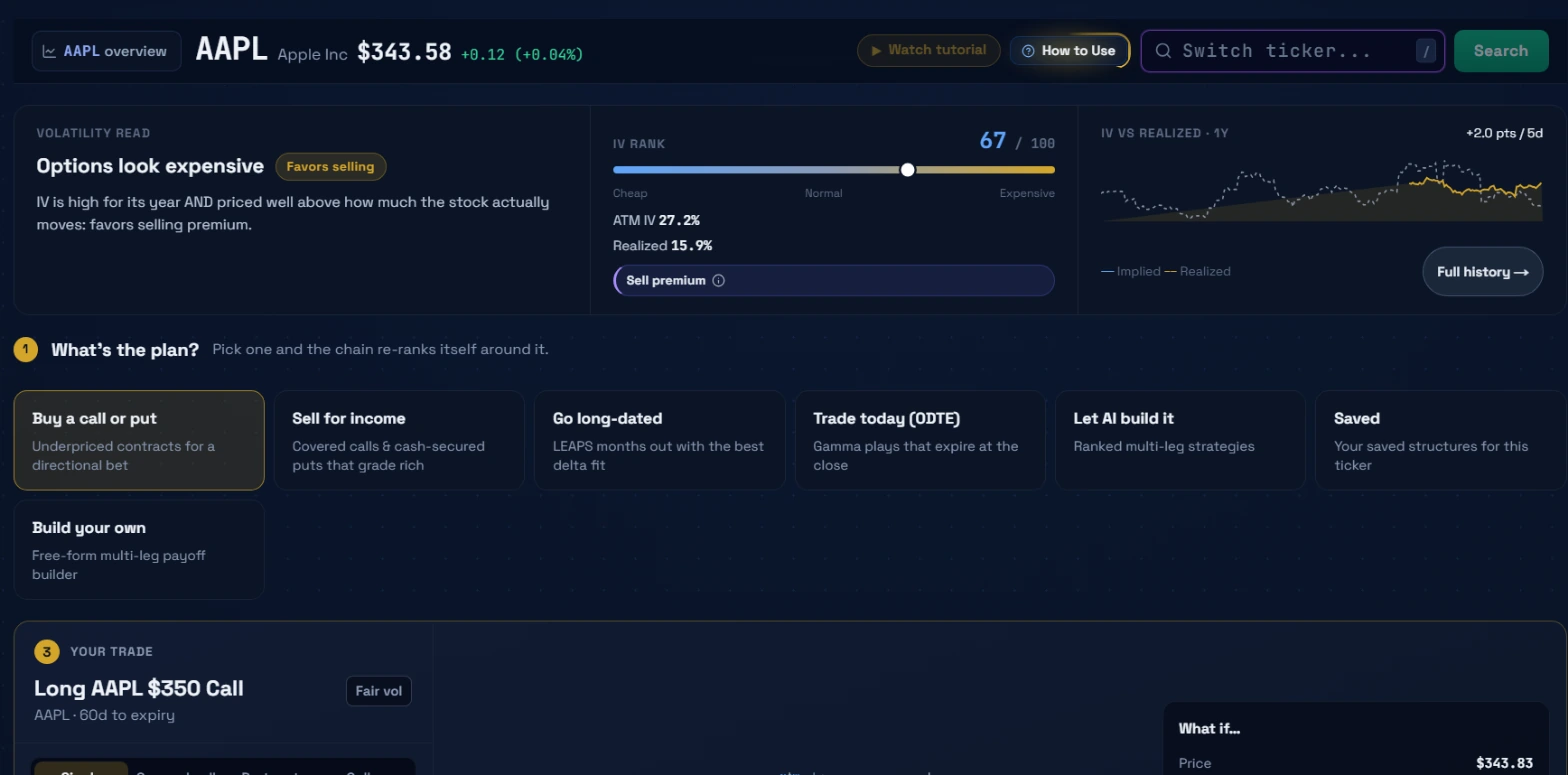 The volatility read across the three panels, and the plan tiles below. AAPL at $343.58, IV Rank 67/100. The model places this in the expensive range for the year.
Left panel: the verdict
The left panel gives you the summary verdict in plain language. On this session it reads "Options look expensive" with an amber chip labeled "Favors selling." Below that: "IV is high for its year AND priced well above how much the stock actually moves: favors selling premium."
The two conditions it checks are IV rank and the relationship between implied and realized volatility. Both have to point the same direction for the verdict to firm up. A high IV rank means options are expensive relative to where they have traded over the past year. IV significantly above realized vol means options are priced as if the stock will move more than it actually tends to. When both conditions hold simultaneously, the model calls it expensive. When both point the other way, it calls it cheap. When they conflict, the verdict reads neutral.
Middle panel: the numbers
The middle panel gives you the raw inputs. On this AAPL session: IV Rank 67/100, ATM IV 27.2%, Realized Vol 15.9%. Below those, a slider runs from "Cheap" on the left through "Normal" in the middle to "Expensive" on the right. The circle on the slider sits at 67, clearly in the expensive zone.
The ATM IV vs Realized spread here is substantial: 27.2% implied against 15.9% realized. That 11-point gap is the premium sellers are being paid for risk that historically has not materialized at that magnitude. The middle panel also shows a "Sell premium" suggestion chip, consistent with the left panel's verdict.
Right panel: the 1-year chart
The right panel shows a year of implied volatility versus realized volatility as a sparkline. The yellow line is implied vol; the dotted white line is realized. The note "+2.0 pts / 5d" tells you implied vol rose 2 vol points over the last five sessions. A "Full history" button expands this to a full chart view.
The chart matters for context the current rank number cannot provide on its own. A 67 IV Rank looks elevated, but if the sparkline shows vol spent most of the prior year between 70 and 90 and only recently dropped to this level, the current read is actually low for this name's own historical range. Read the chart alongside the rank.
Step 1: pick a plan
Below the volatility read is the plan picker, labeled "What's the plan? Pick one and the chain re-ranks itself around it." There are seven tiles.
Buy a call or put:directional buy lens, 21-120 DTE, delta target 0.50. The chain re-ranks to surface the cheapest (most negative richCheapScore) in-window contracts, which are the ones where IV sits furthest below fair value.
Sell for income:premium sell lens, 7-45 DTE, delta target 0.30. The chain re-ranks to surface the richest contracts. These are what you write when doing covered calls, cash-secured puts, or credit spreads. The model ranks by IV richness so the most overpriced contract in the in-window range shows up first.
Go long-dated:LEAPS lens, 180-1095 DTE, delta target 0.75. Ranks the highest-delta deep-ITM contracts in the LEAPS window. These behave most like stock, decay slowly, and are the classic equity-substitute structure. A LEAPS lens switch also resets the loaded expiration to the nearest in-window date, since a 30 DTE chain has nothing useful to show here.
Trade today (0DTE):0 to 2 DTE, delta target 0.20. Gamma plays that expire at or near the close. These contracts have the highest rate of time decay and the fastest gamma response to price moves. The 0DTE population historically has weaker directional follow-through than 15-30 DTE contracts as a group.
Let AI build it:opens the AI Strategist view instead of the raw chain. The Strategist fetches fully-priced multi-leg structures ranked by a composite of probability of profit, reward-to-risk ratio, directional alignment, and IV edge. Eight archetypes: long call, long put, bull call spread, bear call spread, bull put spread, cash-secured put, covered call, iron condor. You can filter by direction (bullish, bearish, neutral, or auto) or sort by score or probability of profit.
Saved:your previously saved structures for this ticker. A saved structure reloads into the payoff diagram exactly as you left it, including any entry price you typed.
Build your own:free-form multi-leg builder. Pick any combination of legs without a lens filter.
The plan you pick persists across ticker changes in the same session. If you switch from AAPL to NVDA while on the Sell for income plan, the chain for NVDA loads pre-ranked on the premium sell lens.
Step 2: pick the contract
Below the plan tiles is the contract picker, labeled according to your plan ("Pick the contract to buy" on the buy lens, for example). This section has two sub-views.
The chain table:a mirrored layout with calls on the left, the strike price down the middle, puts on the right. Each cell shows the contract's bid, ask, and midpoint, plus a rich/cheap grade chip when the contract has been scored. The chip values are: very_rich, rich, neutral, cheap, very_cheap.
The grade reflects the richCheapScore the Edge Xray model computed for that contract relative to a fair-value IV surface fitted to the whole chain. The richCheapScore runs from -100 to +100. Positive means IV is above fair value; the contract is overpriced. Negative means IV is below fair value; the contract is cheaper than the model suggests it should be. A score near zero means fairly priced with no clear edge in either direction. The sign is the direction; the magnitude is the conviction.
An executionScore (0-100) pairs with the richCheapScore. It measures spread tightness and market depth. A contract can have a richCheapScore of +80 but an executionScore of 25, meaning you identified a genuinely overpriced contract in a market too illiquid to fill without giving back the edge in slippage. Target executionScore 75 or higher before sizing up.
The leaderboard sits above the chain table and shows the top fits for your chosen plan, ranked by lens score. On the Sell for income lens, the contracts at the top have the highest richCheapScore with decent execution, meaning the most overpriced contracts in the 7-45 DTE window at a fillable spread. On the Buy a call lens, the top rows have the most negative richCheapScore, the cheapest IV in the 21-120 DTE range.
Clicking any contract in the leaderboard or chain table loads it into every widget simultaneously: the payoff chart, the P&L heat matrix, the risk matrix, and the target map. One click, every panel updates.
The expiration row below the chain table shows all available dates. The selected one is highlighted. Switching lens resets the expiration to the nearest in-window date automatically, which is why the leaderboard sometimes changes its loaded expiry when you switch plans.
Step 3: the trade card and payoff chart
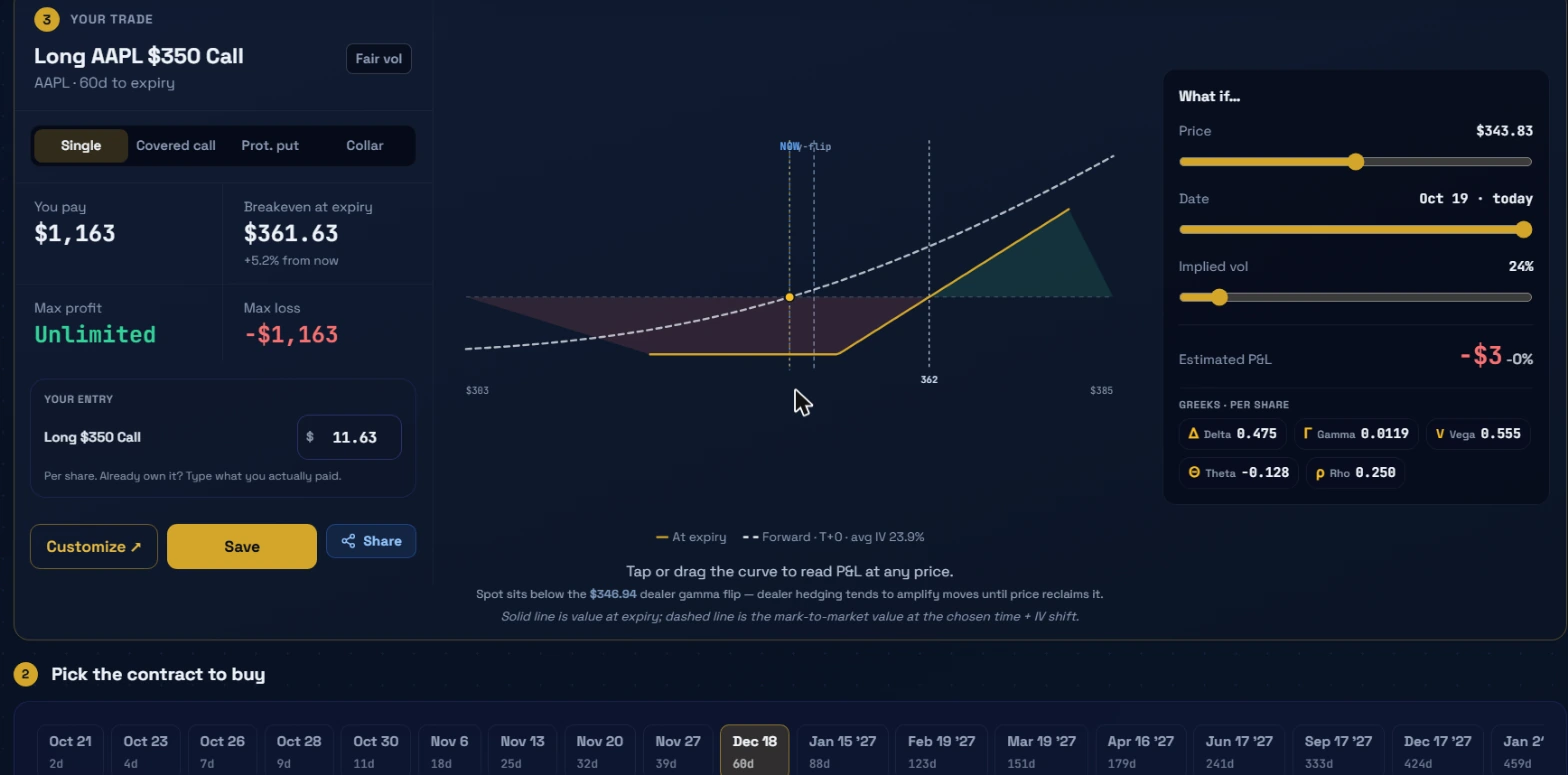 The trade card with the payoff chart. Solid line is value at expiry; the dashed line is the current mark-to-market. The vertical dashed line at $346.94 is the dealer gamma flip, labeled below the chart.
When you pick a contract, the trade card loads in Step 3 with five numbers, a chart, and a set of sliders.
The five numbers:
You pay:the total cost of the structure, in dollars. On a single long call, this is the premium times 100. On a credit spread, it shows the net credit received. AAPL $350 Call at $11.63 per share comes to $1,163 total for one contract.
Breakeven at expiry:the price the underlying needs to reach at expiry for the structure to break even. For a long call, this is strike plus premium paid: $350 + $11.63 = $361.63. The percentage below it (+5.2% from now) tells you how far the stock needs to move from the current spot price for this trade to reach breakeven.
Max profit:the theoretical maximum gain. For a long call, this is unlimited. For a credit spread, it is the net premium received. For a covered call, it is capped at the strike minus cost basis plus the premium collected.
Max loss:the worst-case outcome. For a long call, that is the full premium paid. For a cash-secured put, it is the strike price minus the premium received. The lab shows exact dollar figures, not percentages, so you know before placing anything what the maximum damage is per contract.
Your entry field
Below the main stats is a line reading "Long $350 Call" with a dollar figure for the entry price. This pre-fills with the current market mid. If you already own the contract and paid a different price, type the actual amount here. The payoff chart, P&L matrix, and estimated P&L all update to reflect the basis you typed, so you can model your real position rather than a hypothetical entry. The label below says "Per share. Already own it? Type what you actually paid."
Position type tabs
Above the trade card is a row of tabs: Single, Covered call, Prot. put, Collar. These apply a position template to the selected contract. If you picked a call and tap "Covered call," the card immediately loads a two-leg structure: long 100 shares of the underlying plus short the selected call. The payoff chart, all five numbers, and the Greeks update to reflect the combined position without you having to build the second leg manually.
The payoff chart
The chart shows two lines. The solid yellow line is P&L at expiry: the classic hockey-stick shape for a long call, flat below the strike at the maximum loss and rising linearly above it. The dashed white line is the forward mark-to-market value at the current time and IV, labeled "Forward · T+0 · avg IV 23.9%." The dashed line sits above the solid line everywhere to the right of the kink, because you have not yet lost the remaining time value in the contract. As you drag the Date slider toward expiry, the dashed line sinks toward the solid line.
The vertical dashed line at $346.94 is the dealer gamma flip, pulled from the platform's GEX data for this ticker. The note below the chart reads that spot sits below the $346.94 dealer gamma flip, and that dealer hedging tends to amplify moves until price reclaims it. This annotation is context, not a directional call. It sits on the chart because the flip's location affects how options market makers delta-hedge, which in turn affects intraday price behavior.
Tap or drag anywhere on the chart to read the P&L at that specific price point.
What-if sliders
To the right of the chart are three sliders.
Price:drag to see what the trade is worth if the underlying moves to a different price. The Estimated P&L figure below the sliders updates as you drag. On the screenshot, the price slider sits at $343.83 and the Estimated P&L reads -$3 (-0%). The contract has barely moved from where it was entered.
Date:drag from today's date toward the expiration date. As you drag right, theta eats the contract's time value. The forward line on the chart collapses toward the expiry line. Running the slider from today to expiry shows you the full arc of what holding through time does to P&L at each price level.
Implied vol:drag to shift IV up or down. At 24% implied vol, the dashed line sits where it sits. Drag IV down to 15% and the long call loses value even if the stock does not move, because the optionality embedded in the premium shrinks. Drag IV up and the contract's mark-to-market rises. For premium sellers, this runs in reverse: a covered call gains value when IV drops because the short leg gets cheaper to buy back.
Greeks (per share)
Below the Estimated P&L are five Greeks for the current structure. On the AAPL $350 Call: Delta 0.475, Gamma 0.0119, Vega 0.555, Theta -0.128, Rho 0.250.
Delta 0.475 means this contract moves approximately $0.47 for every $1 move in AAPL. Theta -0.128 means the contract loses roughly $0.13 per day in time value. Vega 0.555 means a 1-point rise in implied vol adds about $0.56 to the contract's value. Gamma 0.0119 is the rate at which delta changes; a high-gamma position can shift delta rapidly on a large price move. These are real-time model outputs for the structure as currently configured.
The Save button stores the structure (ticker, legs, entry prices, and the expected-move band) to your saved list. Customize opens the free-form builder so you can add or remove legs. Share generates a shareable payoff chart image, and is withheld when you have typed your own entry price since that figure is private to your cost basis.
The P&L heat matrix
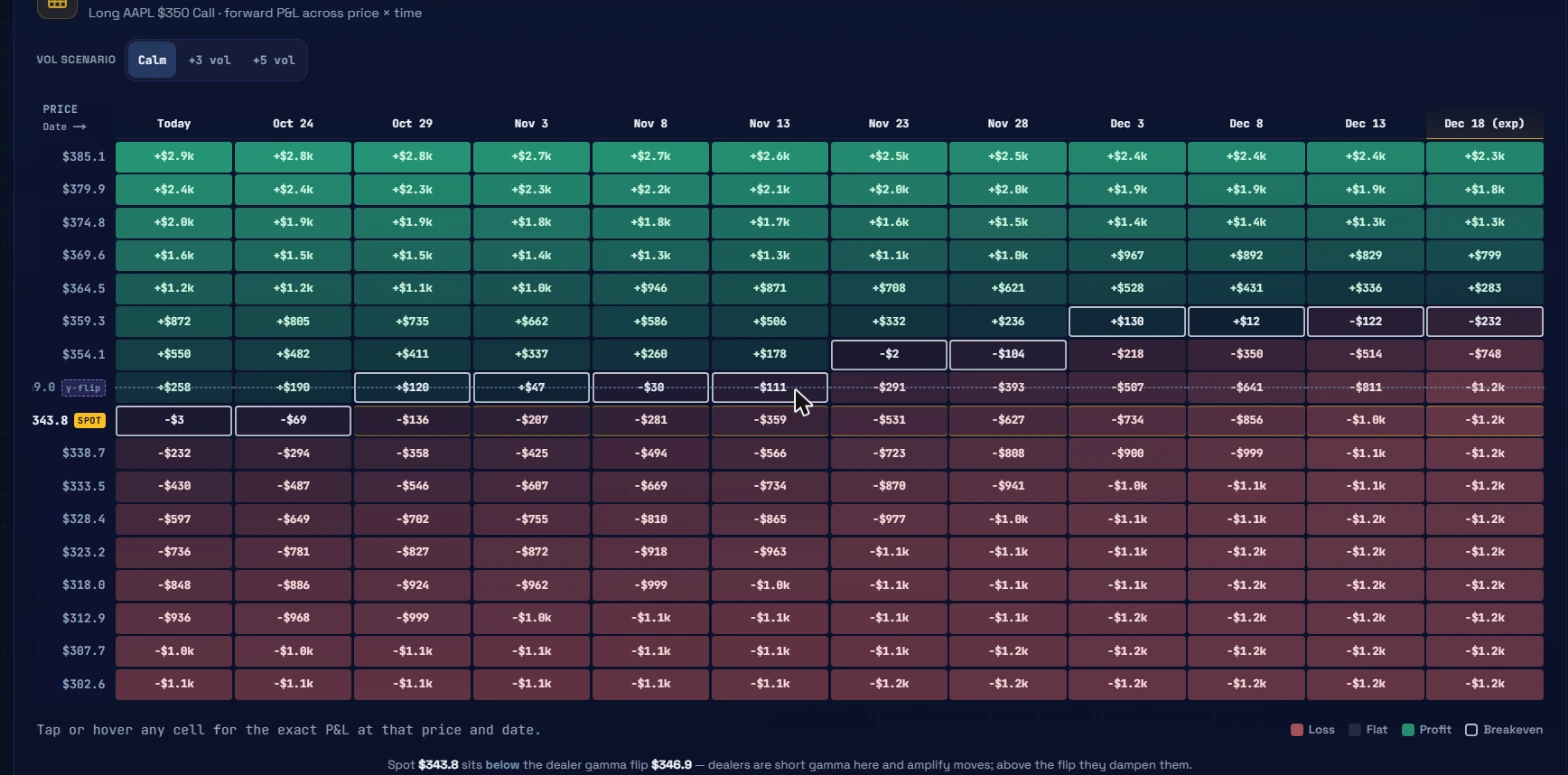 The P&L heat matrix. Each cell is the theoretical P&L at that price on that date. The SPOT row shows where you sit right now. Green cells are profitable; red cells are losses.
The P&L heat matrix is the section I look at most carefully before deciding on size. It shows a grid where each row is a price level and each column is a date. Every cell displays the estimated profit or loss for the loaded structure if the underlying is at that price on that date.
On the AAPL $350 Call example, the matrix runs from $302.6 at the bottom to $385.1 at the top in price, and from Today through Dec 18 (the expiration date) in time. Reading across the current spot row at $343.8 (labeled SPOT in a gold box), the values go: Today -$3, Oct 24 -$69, Oct 29 -$136, Nov 3 -$207, Nov 8 -$281, Nov 13 -$359, and so on, reaching -$1.2k at expiry if the stock stays flat. That is theta decay visualized directly: every column to the right loses a little more, all else equal, because time value bleeds.
Reading up the columns: at $385.1 and today, the cell shows +$2.9k. At $385.1 and expiry, it shows +$2.3k. The green band at the top of the matrix shows that the trade is profitable for any price level above roughly $360-370, with the profit shrinking slightly toward expiry on the highest rows because some of the option premium is time value that decays away even as the stock rallies.
The row labeled "γ-flip" at the $346.9 level corresponds to the dealer gamma flip. The bottom note reads that spot sits below the dealer gamma flip at $346.9, that dealers are short gamma below it and amplify moves, and that above the flip they dampen them.
Vol scenario tabs
Above the matrix are three tabs: Calm, +3 vol, +5 vol. Calm is the baseline, using the current IV surface. The +3 vol and +5 vol tabs reprice every cell after adding 3 or 5 percentage points to implied vol. For a long option, rising vol increases every cell's value, making the greens greener and softening some of the reds. For a credit spread, rising vol moves all cells in the other direction, which is useful to see before you commit to selling premium into an environment that might get more volatile.
Tap or hover any cell to read the exact P&L figure.
The risk matrix
The risk matrix tab reprices the structure across a grid of underlying price and vol-shock scenarios simultaneously. Where the P&L matrix shows time progression across a fixed vol surface, the risk matrix holds the date constant and varies both price and IV together. It answers questions like: what happens to this iron condor if the stock drops 10% and vol spikes 8 points at the same time? The matrix shows the answer in a single read.
The risk matrix is most useful for multi-leg structures, where the interaction between the legs on a vol spike is not obvious from inspecting each leg separately.
The "More on SYMBOL" section
At the bottom of the page is a collapsible section labeled "More on SYMBOL" with four panels.
Exposure Profile:shows the gamma exposure map for the ticker, including the gamma flip level, net GEX, and how dealer hedging flows are likely to behave around key strikes. This is the same GEX data that populates the payoff chart's flip annotation, shown here with the full profile across the chain.
Flow Panel:shows recent unusual-activity prints for the ticker, pulled from the same flow data as Live Flow and Unusual Activity. Useful when you have picked a contract and want to check whether institutional flow has been building in that name recently.
Position Doctor:diagnoses an existing position by fetching the current chain, pricing where you stand today versus your entry, and flagging whether the position is in a zone where rolling or closing might be worth modeling. If you already hold something on this name and want a structured read on it, the Position Doctor guide covers the full workflow.
Hedge Shopper:finds protective structures around an existing long equity or long options position. It scores hedging options by cost, coverage, and efficiency rather than by IV edge, since hedges do not need to be cheap to be effective. The Hedge Shopper guide covers how to use it.
Two worked workflows
Workflow 1: sell income on a name with elevated IV
AAPL is showing IV Rank 67/100, ATM IV 27.2%, Realized 15.9%. The volatility read says "Options look expensive." You have a neutral-to-slightly-bullish view; you are not expecting a big directional move but you want to collect some premium.
Pick "Sell for income" from the plan tiles. The chain loads with the 7-45 DTE window active and ranked by richCheapScore. The leaderboard shows the top-ranked contract with a score of +78, heatGrade very_rich, executionScore 84. That is the contract the model sees as most overpriced in the in-window range with a spread tight enough to fill well.
Click the leaderboard row. The trade card loads. Apply the "Covered call" template if you hold the underlying. Read the five numbers: what you receive, the breakeven above which you get called away, max profit (the premium received), max loss (mitigated by owning the stock). Run the Date slider to expiry to see where the flat region ends and where assignment risk begins.
Open the P&L heat matrix. Read the Calm tab first. Find the row corresponding to the strike and confirm the matrix shows profit in the flat area above your entry. Then open +3 vol and check whether a vol spike would materially change the picture. For a covered call the vol effect on the short leg is adverse if you hold to expiry, but if you would close at a 50% profit threshold the matrix shows that exit point clearly.
Workflow 2: find the best-fitting long call before an expected move
You expect a ticker to move over the next 4-8 weeks but you are not sure on the magnitude. You want a long call but not at the cost of paying excess IV.
Open the ticker in the Lab. Check the IV Rank. If it reads below 30, the buy lens is likely to find contracts below fair value. Pick "Buy a call or put." The chain loads ranked with the cheapest in-window calls at the top.
Read the richCheapScore on the top leaderboard rows. A score of -35 or lower on a call means the model believes IV on that contract is meaningfully below fair value. An executionScore of 75+ confirms you can fill it without the spread eating the modeled edge.
Click the top leaderboard contract. Check the trade card: the breakeven, the max loss, and what the Date slider shows at mid-term. Then open the P&L matrix. Find the row for a price 8-10% above current spot. Read across the date columns. That shows how much the trade is worth at a reasonable target move on different holding periods. Compare that to the max loss visible in the bottom-left of the matrix. That comparison is the risk/reward picture for this structure.
Common mistakes
Picking a plan after looking at the chain
If you open the chain first and then switch plans, the leaderboard re-ranks and contracts that appeared near the top may move down or disappear. Pick the plan that matches your thesis first, then look at what the leaderboard surfaces. The plan selection is where the framing happens; the leaderboard is the output.
Reading richCheapScore as a direction call
A richCheapScore of +78 on a call tells you the call's implied volatility is overpriced relative to the model. It does not tell you the stock is going down. The contract can be both overpriced in IV terms and go up significantly in dollar value if the stock rallies hard enough. RichCheapScore measures IV mispricing. It has nothing to say about which direction the underlying will move.
Switching lenses without confirming the expiry reset
Every lens has its own DTE window. When you switch from "Buy a call" (21-120 DTE) to "Go long-dated" (180-1095 DTE), the currently loaded expiration resets to the nearest in-window LEAPS date. If the leaderboard looks thin or empty after a lens switch, check the expiration row. The short-dated expiry from the previous lens is gone; the new one needs to be within the LEAPS window.
Looking at only the payoff chart and not the matrix
The payoff chart shows the at-expiry outcome and the current mark-to-market. What it does not show cleanly is what happens when your holding period ends before expiry. If you would close at 50% profit or after 30 days, reading the payoff chart at expiry shows you a scenario that may not match your actual plan. The P&L matrix shows every date, including the ones you are actually likely to exit on.
Ignoring executionScore on larger size
On a 10-contract fill, a bid-ask spread of $0.25 wide costs $250 in slippage. A richCheapScore that looks attractive can be fully negated by a spread that wide. The executionScore is there precisely because a theoretically good trade can be a bad trade in practice if the market for that contract is thin. Set a floor of 75+ before sizing up.
What the tool doesn't tell you
The Lab tells you about IV mispricing and structure math. It does not forecast direction.
A contract with a richCheapScore of +85 on the sell side still loses money if the stock makes a large move against your short. The model's edge is in the volatility pricing, not in predicting what the underlying does next. Use the Lab to find the most efficient structure for a thesis you already hold, not to generate the thesis itself.
The lab also does not tell you anything about earnings timing. Check earnings dates before writing options on any name; the premium often includes an earnings-event component that the fair-value model cannot fully capture. A contract that scores as very_rich may look that way precisely because the market is pricing in a scheduled catalyst you have not accounted for.
The richCheapScore models fair IV from the current term structure and historical vol surface. When that surface is unstable, such as in the weeks around a large macro event, the model's fair-value assumptions can be off in ways the score does not reflect. The score is a guide, not a guarantee.
How Ticker Lab connects to the rest of the platform
The Lab is the structure workbench. The other tools answer different questions.
| Tool | What it surfaces | Use it when |
|---|---|---|
| Unusual Activity (guide) | Individual anomalous options prints | You want to know which names have unusual institutional flow |
| Live Flow (guide) | Dollar-weighted flow per ticker | Checking the aggregate directional lean before building a thesis |
| Heat Map (guide) | Sector-level flow as a visual grid | Confirming whether a single-name read fits a broader rotation |
| GEX | Dealer gamma exposure map | Placing your strike relative to the gamma flip before finalizing the structure |
| Position Doctor | Diagnosis of an existing position | You already hold something and want to know whether to roll, close, or hold |
| Hedge Shopper | Protective structures around a position | You want to add downside protection to an existing holding |
The typical sequence is: flow tells you which names have unusual activity, the volatility read confirms whether options on that name are cheap or expensive, and the Lab translates the directional view into the specific structure with the most efficient IV profile.
Options involve substantial risk of loss, including potentially more than the amount you put in. Nothing on this page or in this guide is financial advice. The Lab's scores, payoff charts, and P&L figures are tools for modeling outcomes; they do not predict what the underlying will do. Manage position sizing carefully, particularly on structures with undefined risk.