Smart Tools deep dive · 16 min read
How to Use My Alerts
A complete walkthrough of the My Alerts hub at /alerts. Every trigger type, delivery option, stream toggle, and the fired log explained, with real data from the sample board shown in the screenshot.
Open the tool →Hey guys, Art from TraderMatrix here. Today I want to walk through My Alerts, which lives at /alerts in the nav. This is the page I keep armed and then largely forget about until something fires. The whole premise is simple: instead of refreshing a feed and hoping you catch a print at the right moment, you define the condition once, and the platform tells you when it happens.
This guide covers every piece of the page, every trigger type, the delivery path, and how to build a few real workflows on top of it.
The short version:
- My Alerts watches for flow, price, technical and gamma-level conditions on your specific tickers and fires a Discord DM plus a browser push when something matches.
- Triggers are grouped by ticker on the left. The fired log on the right is your delivery audit.
- The score floor for flow alerts can be set between 42 and 100. Start at 85. Drop it only if a week passes with no alerts on a name where you expected activity.
- The PAUSED state keeps the trigger alive without firing. Use it when you want to take a name off watch temporarily without deleting the alert.
- If Discord DMs are blocked, a health banner at the top of the page tells you. Fix that first.
- Apex magnet shift alerts tell you when the dominant level on a name changes; the other triggers watch price, flow and your positions.
What this page is and what it isn't
My Alerts is not a duplicate of the Unusual Activity feed. Unusual Activity shows every print that cleared the global score threshold across all tickers, updated continuously. If you watch that page, you're reading the whole tape for the whole market.
My Alerts narrows that to the specific tickers you care about, at the specific conditions you defined, delivered directly to you whether you have the app open or not. A $4.3M bearish sweep on SPY at 9:40 AM only reaches you from My Alerts if you armed a flow alert on SPY. The same print lands in Unusual Activity regardless.
The other distinction is trigger type. My Alerts handles flow alerts, but it also handles price targets, technical conditions like RSI and MACD cross, movement thresholds, and Apex magnet shift notifications. Those last four have nothing to do with options flow. You can arm an alert that fires when a stock crosses a price you set, or when it moves more than a percentage in either direction, with no flow reading involved at all.
The result: My Alerts runs while you do other things. You come back to a fired log showing exactly what happened and when it was delivered.
The page layout: two panels
The page splits into two main areas.
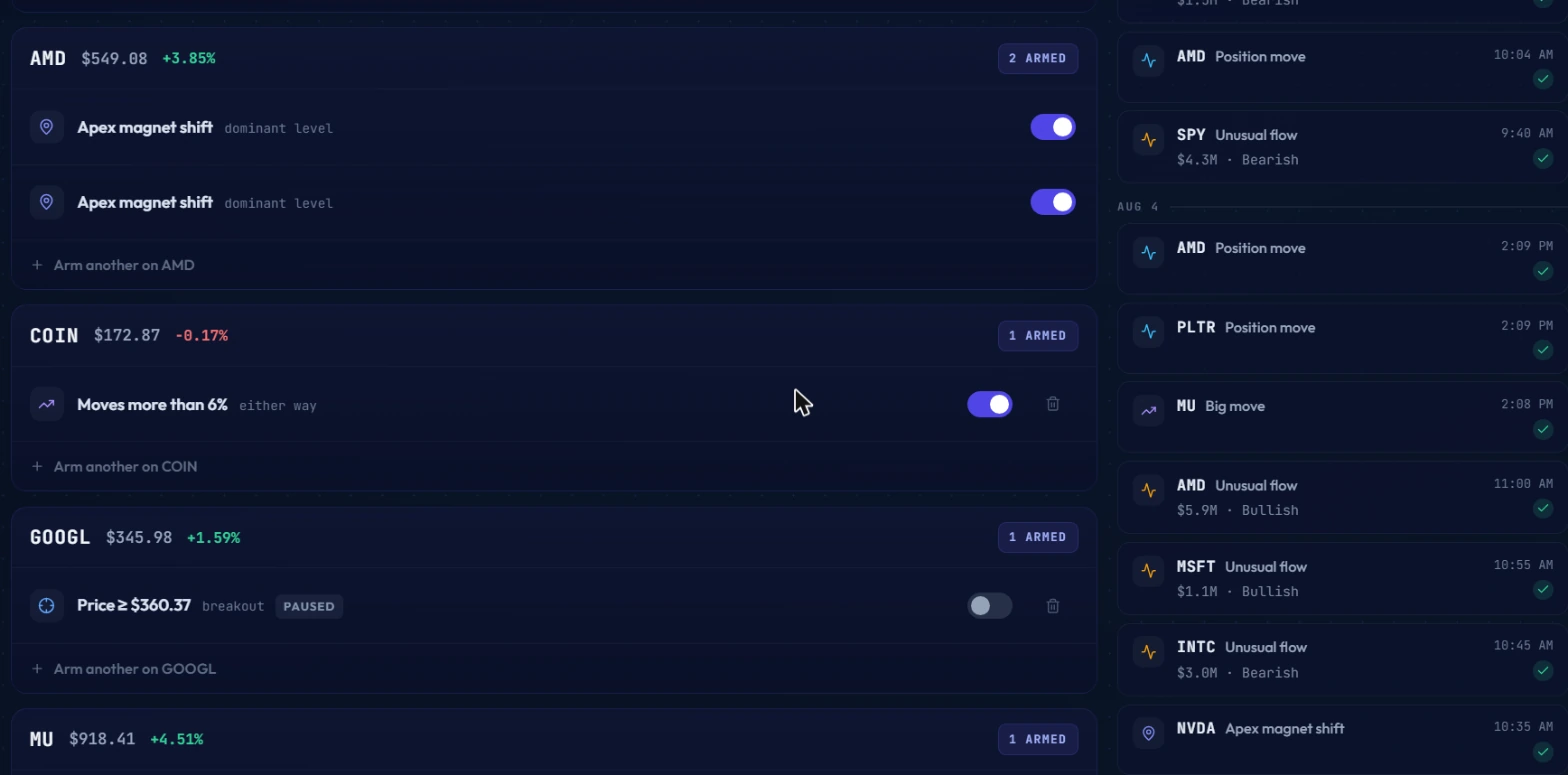
The left panel is the trigger board. Every armed trigger lives here, grouped by ticker. AMD sits at the top of the screenshot with two triggers underneath: both are Apex magnet shift alerts, both toggled on. Below that, COIN has one trigger armed, a "Moves more than 6% either way" alert, toggle on. GOOGL has a price alert set at $360.37 with a "breakout" label, but the toggle is gray and it shows PAUSED. Below that, MU has one trigger armed.
Each ticker header shows the current price and daily change. That context matters when you're scanning your board before the open and deciding whether to adjust a level.
The right panel is the fired log. Every alert that has fired appears here in reverse chronological order. The screenshot shows AMD Position move at 10:04 AM, SPY Unusual flow at 9:40 AM ($4.3M Bearish), and below an AUG 4 date divider: AMD Position move at 2:09 PM, PLTR Position move at 2:09 PM, MU Big move at 2:08 PM, AMD Unusual flow at 11:00 AM ($5.9M Bullish), MSFT Unusual flow at 10:55 AM ($1.1M Bullish), INTC Unusual flow at 10:45 AM ($3.0M Bearish), and NVDA Apex magnet shift at 10:35 AM. Every row has a checkmark. That checkmark is the delivery confirmation. The alert fired and was delivered successfully.
 Sample board of popular tickers. Nothing shown here is a recommendation.
The DM health banner
Before you arm a single alert, one thing to verify: Discord DM delivery. The page shows a health banner at the very top when Discord is refusing messages from server members. This happens silently on Discord's side. Your alert fires normally, the platform sends the DM, and Discord drops it without telling anyone.
The fix is in Discord settings, under Privacy and Safety. Enable "Allow direct messages from server members." Takes about 20 seconds. Check the banner on your first visit to My Alerts and again any time you expected an alert and didn't receive one.
The browser push notification path is separate. If Discord is blocked, you can still receive push notifications in the browser. But push requires you to have granted the browser permission, and it only works when your device is on. The two delivery paths are independent. Having both armed is the reliable setup.
Trigger types explained
There are four categories of triggers you can arm on any ticker.
Flow alerts (unusual options flow)
This is the trigger most people arm first. You pick a ticker, set a score floor between 42 and 100, and optionally set a premium floor. When an options print lands on that ticker and clears both thresholds, the alert fires.
The score floor matters. The absolute minimum the platform accepts is 42. The threshold most useful in practice is 85. A print scoring 85 is in the high-conviction range. At 100, you're catching only the rarest, most anomalous prints. At 42, you're catching a lot of borderline flow that generates noise.
Start at 85. If a week goes by and a ticker you expected activity on has stayed silent, drop to 80. Don't go below 70 without a specific reason. You can also add sentiment filtering: bullish only, bearish only, or both directions.
The alert content you receive in Discord shows the ticker, the sentiment, and the premium size. The SPY alert in the fired log shows $4.3M Bearish. That's the summary line. You can open the flow feed and filter to that ticker to see every individual print behind it.
Price targets
A price target fires when the last traded price crosses a level you set. You can specify above or below. The alert re-arms after a pullback, so it won't fire once and then go silent if the stock crosses your level repeatedly over several sessions.
The GOOGL trigger in the screenshot is set at Price >= $360.37 with a "breakout" label showing the context you gave it when you armed it. It's currently PAUSED, not deleted, meaning the level is saved and can be re-armed with a single toggle when you want it watching again.
Price targets are straightforward to set. The harder part is deciding what level means something. A round number often does not. A level where you can see prior highs, or a key gamma level from the GEX page, is a more defensible place to set a price alert than a level picked without reference to the chart.
Movement alerts
This is the "Moves more than X% either way" trigger type visible on COIN in the screenshot: "Moves more than 6% either way." These fire when the intraday move crosses the threshold in either direction. COIN's alert is on, meaning a 6%+ intraday swing triggers a notification regardless of whether it's a gap-up or a selloff.
This type works well on names you know are volatile but want to monitor without watching all day. Setting the threshold too low generates constant noise. Setting it at 6-8% on a name like COIN gives you a meaningful structural move, not routine daily chop.
Technical triggers
This is the broadest category. The full list of conditions: RSI above or below a threshold (14-day RSI, defaults to 70 for overbought and 30 for oversold), MA cross up or down with configurable fast and slow periods, new 52-week high or low, volume spike above a multiple of the recent average (defaults to 2x), IV rank above or below a threshold, MACD cross up or down, VWAP reclaim or lose, and seven candlestick patterns: bull engulfing, bear engulfing, hammer, shooting star, and doji.
Each condition has sensible defaults you can adjust to match how you trade.
The candlestick conditions fire on a completed bar at the time of the check. A hammer at the end of a downtrend on a thinly traded stock is not the same signal as a hammer on a large-cap with meaningful volume. The alert fires the same way in both cases. Whether it means anything depends on context you bring yourself.
Apex magnet shift
This is its own category, separate from the technical triggers. AMD has two Apex magnet shift alerts in the screenshot, both armed. The Apex levels system identifies the dominant gamma exposure levels for a symbol, the price points where options open interest is most heavily concentrated and where price tends to magnetize. When the dominant level shifts, an Apex alert fires.
Treat an Apex alert as a map update, not a price alert. An Apex shift is a structural update to your support and resistance map for that name. It tells you the gamma environment changed. It's not an entry signal on its own. The most useful response to an Apex alert is opening the Apex Magnet Scanner and checking where the new dominant level sits relative to current price.
Having two Apex alerts on AMD both set to "dominant level" in the screenshot means both fire at once on the same event. You can stack multiple triggers on the same ticker to cover different conditions, but two identical triggers on the same name just duplicate the notification. One per trigger type per ticker is the clean setup.
Stream toggles and the global pause
Every trigger has its own on/off toggle. Toggle it off and the alert won't fire until you turn it back on. The trigger is preserved exactly as you set it, including all parameters. This is the PAUSED state visible on GOOGL's price alert in the screenshot.
There are two reasons to pause instead of delete. First, if a trade thesis is on hold but not abandoned, you don't want to rebuild the alert from scratch when you come back to the name. Second, if you're stepping away from markets for a day and don't want to be interrupted, pausing individual alerts is cleaner than deleting everything.
The platform also has a global pause switch that pauses all alerts at once. When it's on, no triggers fire from any ticker across any stream. Use it when going offline deliberately, heading into a period where alerts would be disruptive, or troubleshooting a delivery issue before re-enabling everything. The fired log still keeps its history of past alerts after a global pause; nothing is erased.
Per-stream preferences let you pause an entire category of alerts independently. You can receive flow alerts and price targets while keeping all technical triggers paused, then flip one switch to re-enable technical triggers when you want them back. You're not managing individual rules in that mode. You're managing a set of delivery switches by category.
Arming a new alert: the "+ Arm another" row
Each ticker section in the left panel ends with a "+ Arm another on [ticker]" link. Clicking it opens the trigger creation form for that ticker.
You can also ask Arya to arm an alert conversationally. "Arm a flow alert on NVDA, score 85 or higher, premium over $500K, bullish only." Arya handles the parameters and sets it up without you manually navigating the form. This is faster when you already know what you want and don't want to open the form.
You are not limited to one trigger per ticker. AMD in the screenshot has two. A ticker can carry a flow alert, a price target, and a technical trigger all simultaneously. They're independent rows in the trigger board. Each fires on its own condition.
Three workflows
Arming a breakout level
You've been watching GOOGL at a resistance level. The stock has been consolidating below it for two weeks. You want an alert the moment it crosses.
Go to My Alerts, find GOOGL in the trigger board or add it by searching in the arm-new form. Set a price target with direction "above" at your level. Label it "breakout" so you remember the context when it fires. Arm it. Close the tab.
When GOOGL crosses your level, the alert fires to Discord and push. You get the notification, open the flow feed, filter to GOOGL, and check whether any unusual flow accompanied the move. That check takes 60 seconds. If flow confirms the breakout, you have double confirmation. If there's no flow, the price cross alone is what you have.
The PAUSED state on GOOGL's alert in the screenshot shows this pattern in practice: the level was set, the stock moved without crossing it, and the alert was paused temporarily rather than deleted. The level and the context label are preserved for when the thesis is active again.
Arming Apex magnet alerts on a core list
You hold positions in three names. You want to know when the dominant gamma level shifts on any of them, because a shift changes where price is likely to pin or reject.
Add one Apex magnet shift alert to each of the three tickers. Set each to "dominant level." When any of the three has a gamma structure change, you get a Discord DM with the ticker and the nature of the shift. You then open the Apex Magnet Scanner to see where the new dominant level sits.
This workflow doesn't require you to monitor the Apex page continuously. You set the alerts and receive a push when the market structure on one of your names changes.
Quieting noisy streams
You've been running flow alerts on 12 tickers at a score floor of 70. You're getting 30 alerts a day. You stop reading them.
The right fix is two changes: raise the score floor per ticker, and reduce the ticker list to names where you have an active thesis. Aim for 5 to 8 tickers. Arm only the ones you'd actually trade this week.
For names where you want awareness but not urgency, switch the trigger to a price target or a technical condition. An RSI oversold alert on a name you'd want to buy at a discount is lower noise than a flow alert at score 70 on the same name. You'll receive fewer alerts and read all of them.
The per-stream toggle also helps here. If you're getting too many flow alerts but want to keep price targets active, pause the flow stream while you recalibrate your ticker list. Turn it back on when the list is cleaner.
How My Alerts connects to the rest of the platform
My Watchlist (guide) is the right starting point for building your ticker list. If you've already organized your watchlist by conviction level or thesis type, building your alert board from those tickers is straightforward.
Arya can arm alerts conversationally and can also explain what a specific trigger type does if you're deciding which condition fits your setup. When an alert fires, asking Arya to pull context on that ticker gives you the flow and gamma picture without navigating multiple pages manually.
Discord Alerts runs in parallel and is a different system. Discord Alerts sends channel-level notifications for platform-wide high-conviction events to the trading server, independent of what you've set in My Alerts. My Alerts fires only on your specific tickers and conditions. Discord Alerts reach everyone in the server. Both can fire at once on the same ticker if the conditions overlap.
Common mistakes
Arming too many tickers at too low a threshold
This is the fastest way to destroy the usefulness of the system. When alerts arrive constantly, you stop reading them. You start treating the Discord DM as noise the same way you'd treat a generic notification you've tuned out.
The fix is a stricter ticker list, not a lower threshold. Arm 5 to 8 tickers with an active thesis. Remove names when the thesis expires. Add them back when a new thesis forms. The board should feel curated, not comprehensive.
Forgetting about the global pause
You paused all alerts before a trip, came back, and forgot to re-enable the switch. You've been missing alerts for three days. The fired log still shows history, but the gap in recent activity is the sign something is off.
If My Alerts ever goes quiet on names where you'd expect activity, check the global pause switch first. Then check the individual toggle on each ticker. Then check the DM health banner for delivery issues. Those three checks cover the most common reasons an alert doesn't reach you.
Acting on the alert before checking context
An alert fires. You open a position immediately. Later you find out the sweep that triggered the alert was a hedge on a correlated name, not a directional bet.
Every time a flow alert fires, open the Unusual Activity feed and filter to that ticker before acting. Check how many prints there are, whether the sentiment is consistent, and whether the prints are near-money with meaningful DTE. An alert is permission to look, not permission to trade.
What this tool doesn't tell you
My Alerts fires on conditions. It doesn't tell you why those conditions are present.
A $5.9M bullish unusual flow print on AMD, visible in the fired log, could be a fresh directional bet. It could also be a roll, a hedge against a short equity position, or a market maker covering their book. The alert fires the same way in all four cases. The score, the premium, and the sentiment are data points. They narrow the interpretation. They don't resolve it.
The fired log also doesn't tell you what happened between the alert firing and you seeing it. If you received a flow alert at 10:14 AM and you're looking at it at 2:30 PM, the price environment has already changed. The alert is historical context at that point, not a live call to action. Check where price is now relative to where it was when the print landed.
One thing I haven't fully worked out yet: whether the right score floor should vary by how liquid a ticker's options are. A score 85 print on SPY is a very different event from a score 85 print on a mid-cap with 40,000 contracts a day of average options volume. Both clear the same threshold, but the underlying activity they represent is not comparable. I track this on names I know well, but there's no automatic adjustment for options liquidity in the current system. It's worth keeping in mind when you're interpreting flow alerts on less-liquid names.
Options trading involves real risk of loss, including more than the amount invested. Nothing in this guide is financial advice. Alert thresholds, ticker names, and examples throughout are illustrative and do not represent platform defaults or recommendations. Options can expire worthless. Past flow patterns do not predict future price movements.