Loading...

Smart Tools deep dive · 14 min read
How to Use My Watchlist
A complete walkthrough of the My Watchlist board: the three summary cards, heat score, five category profiles, per-name alert flags, and how to build a morning routine around a focused list of your names.
Open the tool →Hey guys, Art from TraderMatrix here. The page I want to walk through today is My Watchlist, found at /watchlist. This is the one I check before I look at anything else in the morning, not because it has the most data on the platform, but because it has data on the names I actually care about. The full flow feed covers hundreds of names per session. My Watchlist filters that down to whatever I put there.
The short version:
- My Watchlist is a persistent filter, not a screener. You put names in; the board shows what those names are doing.
- The heat score is a 0-100 composite of six inputs: RVOL, net premium, gap, earnings proximity, technical grade, and community trending rank. The board sorts by heat.
- Five category profiles tailor the column set to your strategy: Swing, Day Trade, CSP, LEAPS, and Earnings. The "Reading as" selector switches profiles and saves the change to your list.
- Free accounts get one list of up to 3 tickers. Paid accounts get up to 12 lists, 150 tickers per list, and 500 tickers total across all your lists.
- Per-name alerts (price target, Apex level, movement, gamma flip) notify you on Discord. Without them you are checking manually. With them you are being told.
What this page is and what it isn't
The full Unusual Activity feed surfaces every qualifying options print across the market, scored and ranked by how anomalous the execution looks. On an active session that is 200 or more names. There is no expectation that you know any of them before they appear.
My Watchlist does the opposite. It starts from a list you built ahead of time, names you already have a thesis on or positions you are already managing, and tells you what those specific names are doing. The flow is still flowing for everyone else. The watchlist just hides it.
That difference matters for how you use each page. Unusual Activity answers "is anything unusual happening in the market right now?" My Watchlist answers "is anything unusual happening on names I care about?" Both are worth checking, and neither substitutes for the other.
The watchlist is also not a screener. A screener like Ticker Search runs rules across the whole market to find names matching criteria. The watchlist only surfaces names you already put there. If a name is not on your list, it is not on the board.
Key point: A watchlist of 150 names is not a focused list. It is the full feed with labels. Prune aggressively. When a position closes or a thesis is done, remove the ticker. The actionable range is somewhere between 15 and 25 names. Above 50 and the morning scan starts to feel like work.
The board briefing
The top section of the page is the briefing. It loads before the rows and gives you three pieces of information without requiring you to read a single row.
The header line reads the current date and time in ET, with a LIVE indicator confirming the board is pulling current data. Below that is the headline, which is the single most useful number on the page.
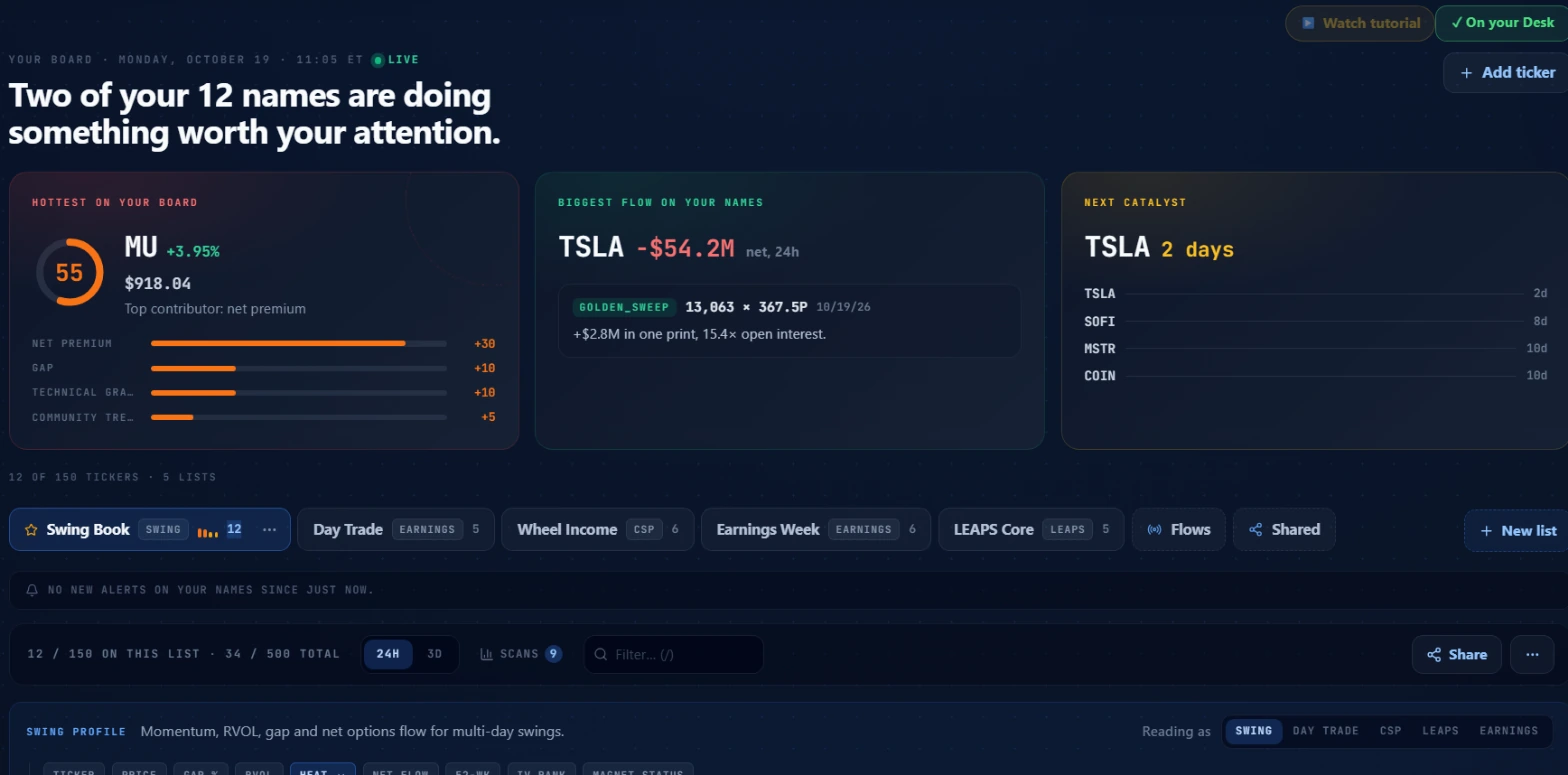 Sample board of popular tickers. Not a recommendation. The headline counts names with a heat score at or above the attention threshold of 45.
The headline counts how many names on your active list have a heat score at or above 45, which is where the score moves out of the idle range. "Two of your 12 names are doing something worth your attention" means 10 of the 12 names on this list are quiet and only two have cleared the threshold. On most mornings that is exactly what you want: a short list of names worth investigating and a long list you can ignore for the day.
Below the headline are three summary cards.
HOTTEST ON YOUR BOARD
This card shows the name with the highest heat score on the active list. The ring on the left is the score itself, a number from 0 to 100, with color bands that map to signal intensity. Red at 70 or above. Orange from 45 to 69. Amber from 25 to 44. Gray below 25.
To the right of the ring you see the ticker, today's gap percentage, and the current price. Below that the card says "Top contributor:" followed by whichever of the six inputs drove the score highest. The horizontal bars below the line confirm this, showing the relative contribution of each input.
In the sample board screenshot, MU is at heat 55, driven by net premium. The bars show net premium as the leading contributor, with gap and technical grade adding smaller amounts.
This card gives you a one-second answer to "which name on my list should I look at first?" before you read any row.
BIGGEST FLOW ON YOUR NAMES
The middle card shows the name with the largest net options premium on your list over the selected time window (24 hours or 3 days, controlled by the toggle in the filter bar).
Net premium is bullish dollars minus bearish dollars. A negative number means more premium traded on the bearish side. In the sample board, TSLA shows minus $54.2M net over 24 hours: about $54 million more in bearish options premium crossed the tape on TSLA than bullish.
Below the net figure you see the single largest individual print for that name: the trade type, the volume, the strike and expiry, and how the volume compares to existing open interest. In the sample: a GOLDEN_SWEEP of 13,063 contracts at the 367.5 put strike, representing 15.4 times the open interest on that contract.
This card tells you where the real money is on your names, not just which name has the highest composite score.
NEXT CATALYST
The third card lists names on your list with upcoming earnings, sorted by proximity. The card shows the closest date prominently and then lists the next three. In the sample board, TSLA reports in 2 days, SOFI in 8 days, MSTR and COIN in 10 days each.
This card matters because earnings proximity is one of the six heat score inputs. It is also context that changes how you read any flow or movement data on a name. A name that looks quietly bearish three days before earnings is different from the same name six weeks out.
If nothing on your board reports in the next two weeks, the card says so. That is information too: a list with no near-term catalysts has a different risk character than one with three names reporting in the next ten days.
List tabs and navigation
Below the briefing, the tab bar shows every named list you have created, plus two virtual tabs on the right.
Each real list tab shows the list name, its category label, and the number of tickers it holds. In the sample screenshot, the active list is "Swing Book" with 12 tickers and the Swing category. Next to it: "Day Trade" with 5 tickers, "Wheel Income" (CSP, 6 tickers), "Earnings Week" (EARNINGS, 6), and "LEAPS Core" (LEAPS, 5).
The two virtual tabs at the far right are Flows and Shared. Flows is the Followed Flows view, backed by flow sources you have followed rather than a ticker list you built manually. Shared shows watchlists others have shared with you. Neither virtual tab has heat scores or per-name alert flags; they are separate views.
The + New list button creates a new named list. Paid accounts can hold up to 12 lists. Free accounts are limited to one.
The status bar below the tabs shows the list-level and account-level counts: "12 / 150 ON THIS LIST · 34 / 500 TOTAL." The per-list cap for paid accounts is 150 tickers. The account-wide cap is 500 tickers across all your lists. Both counters update as you add or remove tickers. The briefing footer reads the totals a slightly different way: "12 OF 150 TICKERS · 5 LISTS."
Pressing keys 1 through 9 while the board is open switches to the list at that position in the tab bar.
The filter bar
The filter bar sits directly below the alert digest strip. From left to right:
24H / 3D toggle: switches the flow window. 24H shows net premium and flow data from the last 24 hours. 3D shows a rolling three-day read. This toggle affects the net premium column, the biggest flow card, and the heat score's net premium input.
SCANS button: shows a count of how many scanner hits your names are currently generating. In the sample screenshot this reads "SCANS 9," meaning nine separate scanner hits across the names on this list. Click it to see which names appeared in which scans.
Filter search: type a partial symbol to narrow the visible rows without changing which list you are on.
Share button: at the far right, opens a modal to create a share link for the current list.
Row anatomy
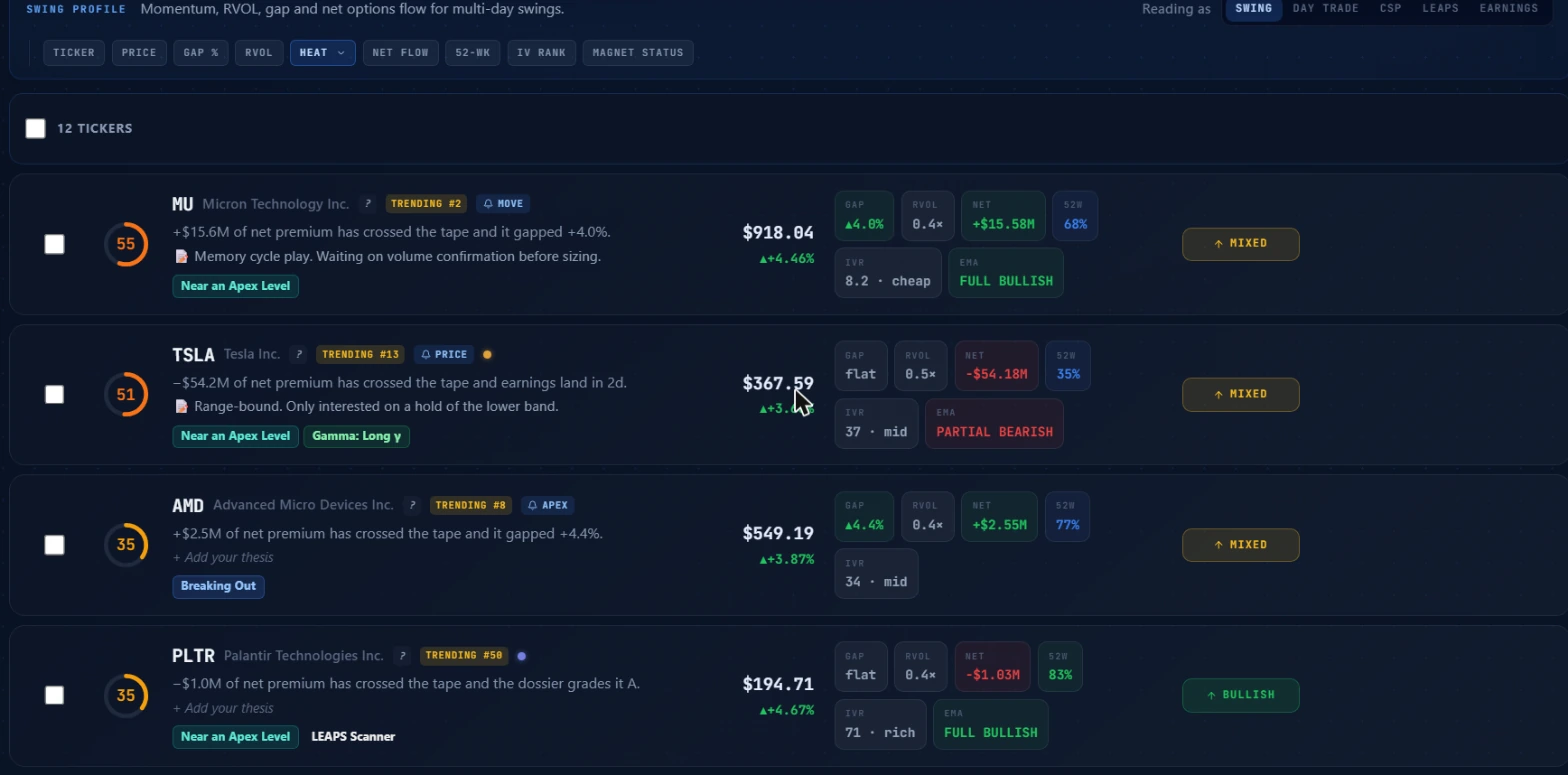 Sample board of popular tickers. Not a recommendation. Rows are sorted by heat, highest first.
Each row carries a lot of information. Let me walk through a full row using MU from the sample board.
Heat ring
The circle on the left side of the row contains the heat score. For MU in the sample this is 55, shown in orange. The ring fill represents the score as a proportion of 100. A full orange ring at 55 means the score cleared the attention threshold and sits in the mid-range of the orange band. Gray is idle. Amber is warming. Orange is worth a look. Red means multiple inputs are elevated at once.
Badges
Immediately to the right of the ticker name are two kinds of badges.
Trending badges like "TRENDING #2" on MU reflect community discussion signals. These are one of the six heat score inputs and also tell you that other people on the platform are watching the same name.
Alert flag badges like "MOVE" on MU, "PRICE" on TSLA, and "APEX" on AMD appear when you have an alert armed on that specific ticker. MOVE means a movement alert is active. PRICE means a price target is set with notifications on. APEX means an Apex level alert is armed. I will cover how to configure these below.
One-line flow summary
Below the badges is a single sentence automatically generated from the heat score's inputs, describing why the row scored as it did. For MU in the sample: "+$15.6M of net premium has crossed the tape and it gapped +4.0%." For TSLA: "-$54.2M of net premium has crossed the tape and earnings land in 2d." These sentences read the same inputs the ring draws from, so the sentence cannot cite something the score did not count.
Thesis note
Below the auto-generated sentence is a line you control. On MU the sample shows "Memory cycle play. Waiting on volume confirmation before sizing." On TSLA: "Range-bound. Only interested on a hold of the lower band." On names without a note, the row shows "+ Add your thesis." These notes are freeform text you write and they persist across sessions.
Thesis notes are the most underused part of the row. A name you added for a specific reason that you have not written down is a name you will eventually misread. Write the thesis when you add the ticker, not after the position has already moved.
Scanner badges
Below the thesis note are colored scanner hit badges. "Near an Apex Level" on MU and TSLA means those names are close to a key dealer-positioning apex level. "Breaking Out" on AMD means it matched the breaking-out scanner. "LEAPS Scanner" on PLTR means it appeared in the LEAPS screener. These reflect the same scanner runs shown in the SCANS count in the filter bar.
Metric chips
The right side of each row shows the metric columns for the active category profile. On the swing profile these are:
| Column | What it shows |
|---|---|
| PRICE | Current price and today's percentage change |
| GAP % | Today's gap from the prior close, when a gap was detected |
| RVOL | Today's volume divided by the name's average volume |
| HEAT | The heat score, same number as the ring |
| NET FLOW | Net bullish minus bearish premium in dollars over the active window |
| 52-WK | Where the current price sits in the name's 52-week range, as a percentage |
| IV RANK | Current implied volatility as a percentile of the name's 52-week IV range, plus a zone label (cheap, mid, rich) |
| MAGNET STATUS | Dealer positioning read from Apex levels. Swing and day trade profiles only |
| EMA | The EMA stack reading for the name. Swing and day trade profiles only |
Clicking any column header re-sorts the table by that column.
Verdict pill
At the far right edge of each row is a verdict pill with a directional arrow and a label such as BULLISH, PARTIAL BEARISH, or MIXED. This reflects the available signal data on the name from the current session.
The heat score explained
The heat score is the number the board sorts by. It runs from 0 to 100 and is built from six inputs, each with its own point range.
| Input | Max points | What earns maximum |
|---|---|---|
| Relative volume (RVOL) | 30 | RVOL at or above 3x the 30-day average |
| Net premium | 30 | Net options premium at or above $5M in either direction |
| Gap | 15 | Gap of 5% or more from prior close |
| Earnings proximity | 15 | Earnings date within 3 days |
| Technical grade | 10 | Dossier grades the name A |
| Community trending | 5 | Name is trending in the community |
There is also a penalty: names with net bearish premium of $250K or more lose 5 points. That keeps a name with heavy bearish flow from ranking alongside names with genuinely mixed or bullish signals.
The score adds those components and caps at 100. Below 25 the ring is gray: idle. From 25 to 44 it turns amber: something is happening but has not crossed the attention threshold. From 45 to 69 it is orange: this name is doing something worth a second look. At 70 and above it is red, meaning multiple inputs are elevated simultaneously.
Key point: The score is context-aware. The same RVOL on a name with no gap, no nearby earnings, and no net premium lands lower than a name that has all of those together. A single big contributor can move a name up the list even without others, but the board is designed to surface names where several inputs are speaking at once.
Watch out: RVOL of 3x with only $50K in net premium earns 30 points on RVOL and 4 on premium, totaling around 34 before other inputs. That is an amber ring, not yet at the attention threshold. Volume alone is necessary but not sufficient. Check the net premium column before acting on RVOL by itself.
Category profiles
The category you assign to a list changes which columns the table shows. Switch it with the "Reading as" chips in the top-right corner of the filter row. Changing the profile saves the change to the list.
Swing (default): price, gap, RVOL, heat, net flow, 52-week range, IV rank, plus EMA stack and Magnet Status. Default sort: heat highest first. For multi-day momentum setups.
Day Trade: price, gap, RVOL, heat, net flow, IV rank, plus EMA stack and Magnet Status. Default sort: RVOL highest first. For intraday setups where relative volume is the primary filter.
CSP (Cash-Secured Put): price, IV rank, the best candidate put's IV, credit per contract, strike and distance from spot, weekly return on capital (ROC), and earnings countdown. Default sort: CSP ROC highest first. No EMA stack or Magnet Status -- those are trend signals, and a CSP seller's decision is about strike cushion and premium, not trend direction.
LEAPS: price, IV rank, 52-week range, valuation, net flow, earnings countdown, plus EMA stack. Default sort: alphabetical. For long-dated call positions where cheap IV, trend health, and the earnings calendar are the key variables.
Earnings: price, earnings countdown, expected move, net flow, heat. Default sort: earnings date, soonest first. Neither EMA stack nor Magnet Status -- earnings is an event read, not a trend read.
Try this: Build a separate named list for each active strategy and assign the matching profile at creation time. Your CSP list in CSP mode surfaces a candidate put for every name in the table -- specific strike, credit, and weekly ROC -- so you can scan the whole list without opening a single options chain manually.
Per-name alert flags
Each ticker on any list can have up to four alert types armed independently. Expand a row and open its alert settings to configure these.
Price target alert: set one or two price targets, each with a direction (above or below). Toggle notifications on for each arm. When price crosses the target in the configured direction, you receive a Discord message. The two-arm design lets you watch a breakout level and a stop level on the same name at the same time.
Apex level alert: toggle on and the platform notifies you when the name enters a proximity zone around one of its key Apex dealer-positioning levels. You do not specify the level; the platform determines where they sit from the options chain.
Movement alert: toggle on and optionally set a custom percentage threshold. When the stock moves more than that percentage in either direction, you receive a notification. If you leave the threshold blank, the platform uses its default.
Gamma flip alert: toggle on and you receive a notification when the name crosses its gamma flip level, where dealer hedging pressure shifts from supportive to resistive or the reverse.
Key point: All alert notifications go to Discord. To receive them, your Discord account must be linked. If you haven't done that yet, the My Alerts page is where to set it up.
Autopilot suggestions
On paid accounts, the platform maintains an autopilot queue that surfaces names for you to consider adding. Sources include what you have searched in the platform and what you have asked Arya. When the queue has candidates, they appear in a row above the ticker list: ticker, the reason the platform surfaced it, and one-click accept or dismiss.
Nothing gets added to your list without you clicking accept. The suggestions are proposals, not automatic additions. Dismiss any you don't want and they clear from the queue. If the suggestions panel is visible, you can collapse it with the chevron button and it will stay collapsed across sessions.
Three workflows
Morning board scan
At 8:45 AM before the open, read the briefing first. Check the headline: how many names have cleared the attention threshold? Check the Next Catalyst card: which names have earnings coming up, and does the direction in the Biggest Flow card match what you would expect given the event? Then switch the flow window to 3D to see whether any names have been carrying a persistent lean across multiple sessions.
After the open settles, come back around 9:45 or 10:00 AM. By then the first genuine directional flow has usually separated from the opening mechanics. Re-read the headline. If a new name crossed the attention threshold since the pre-market check, click through to that row, read the one-line summary, check the scanner badges, and decide whether it warrants a deeper look in Ticker Lab.
Building a list for a specific strategy
Create a separate named list for each strategy and assign the right category profile at creation time. A CSP list with the CSP profile immediately shows candidate put data for every name in the table, pulling the manual chain lookup out of your routine.
When you add a ticker, write a thesis note immediately. The note forces you to articulate why this name is on this list, which is also the mechanism that keeps the list from growing without reason. When the thesis no longer applies, the note is what you read to decide to remove the ticker. A note that says "earnings play, reports 11/3" has a built-in expiry. A blank note never expires.
Arming a price target
After entering a position, expand the row for that ticker and set a price target at your planned exit level. Turn notifications on. Then set a second arm below your entry at the level that would invalidate the thesis. Now you are covered in both directions without watching the name continuously.
Pair this with a movement alert if the name is volatile and you want a heads-up on any large intraday move regardless of where price sits relative to the target. The movement alert fires first if the stock gaps hard before reaching either target level.
Common mistakes
Adding names after they fire
You see an alert on a name you have never traded. The move is already 8% in. You add it to the watchlist. The next session there is no follow-through and you have no context for the name anyway. Adding names because they fired today is the opposite of how the board is meant to work. The list should reflect your thesis universe, built before action starts. Discovering a name from the flow feed and wanting to track it going forward is fine; adding it as a response to a move you already missed is not.
Never changing the category profile
A CSP list running the default swing profile shows you RVOL and EMA stack, which are not the decision criteria for a cash-secured put. The question for a CSP is whether IV is elevated enough to sell, whether the strike has enough cushion, and what the credit looks like relative to the risk. Switch to the CSP profile and the table answers those questions directly for every name on the list.
Skipping the thesis note
The thesis note is the only part of the board that is entirely yours. Four weeks from now when you are looking at a trade in the journal and the entry looks like a random decision, "Memory cycle play. Waiting on volume confirmation before sizing" in the watchlist note is the difference between a system and a habit.
Running one giant list
A single list with 80 names mixing swing trades, CSP candidates, LEAPS research, and speculative tickers from three months ago is not a watchlist. The board is most useful when each list has a narrow purpose and the profile matches it. If you hold positions across multiple strategies, build multiple lists.
What the tool doesn't tell you
The heat score tells you a name is doing something unusual. It does not tell you whether that is an opportunity or a risk. MU at heat 55 with $15.6M in net bullish premium means something is happening on MU. Whether that is the start of a new leg up, an institution accumulating ahead of earnings, or a hedge against a short equity position is not something the score resolves.
The alert flags fire when your configured conditions are met. They do not tell you whether acting on those conditions is the right decision for your specific position or risk tolerance.
Nothing on the board shows why a name is trending in the community. A name trending because of genuine unusual institutional activity reads differently from one trending because of retail social media attention. The score treats both the same.
The Flows virtual tab shows activity from flow sources you have followed. Rows in the Flows view do not have heat scores, thesis notes, or per-name alert flags. It is a different kind of view.
How the watchlist fits with the rest of the tools
| Tool | What to use it for |
|---|---|
| Unusual Activity (guide) | The full unfiltered flow feed, for discovering names you haven't added yet |
| My Alerts (guide) | Managing your Discord connection and notification settings; setting alerts on names outside your lists |
| Ticker Search | Cross-referencing a name on your list with fundamentals and broader context before acting on a heat spike |
| Ticker Lab | Going deep on the options chain for a name that spiked on your list |
The watchlist and My Alerts are the tightest pairing. The per-name alert flags on each row are one path to Discord notifications. The dedicated alerts page offers more configuration options and covers names that are not on any list.
Options trading involves real risk of loss, including potentially more than the amount you put in. Nothing here is financial advice; it is an explanation of how the tools work and how to read the data they surface. Do your own research and manage your position sizing carefully.