Loading...

Research deep dive · 14 min read
How to Read the Liquidity Map
A complete walkthrough of the Options Liquidity Map. The Liq Score formula, tier thresholds, the three filters with pass-rate histograms, the bubble chart, and the top contracts table explained with real NVDA data from the page.
Open the tool →Hey guys, Art from TraderMatrix here. The page I want to walk you through today is the Liquidity Map, found under Options Flow in the nav. It lives at /liquidity-map and it is the tool I open before entering any options structure where getting filled at a fair price actually matters.
The short version:
- The Liquidity Map plots every strike on an options chain as a bubble: expiration on the X-axis, strike on the Y-axis.
- Each contract gets a Liq Score computed as z(log vol) + z(log OI) - z(spread%). Positive means above the chain average; negative means below.
- Three tiers describe how liquid a strike is: Deep, Normal, and Thin. Deep means tight spreads and real depth. Thin means you are effectively the market.
- The Tradability Score (0 to 100) summarizes ATM-region fill quality in one number. Excellent is 80 and above; Poor is below 40.
- Bubble color and size change based on which metric you choose: Liquidity Score, Spread %, Open Interest, or Volume.
- Use this during market hours. After the close, volume resets and the map shifts to OI-only gating. Spread data is unreliable outside regular session hours.
What this page is and what it isn't
A lot of people open the Liquidity Map expecting a flow or directional tool. It is neither.
Unusual Activity and Flow Summary tell you where options premium is going and what direction that suggests. The Ticker Lab gives you a composite edge score across near-the-money strikes at a selected expiration. Both of those answer whether there is a trade worth taking.
The Liquidity Map answers a different question: if there is a trade, can you actually get filled at a price that preserves the edge?
Every options structure has a fill cost built into it. When you enter a credit spread, you receive less than the theoretical mid because you are selling at the bid and buying at the ask on both legs. When you close early, you pay that friction in reverse. On a strike with a 15% bid-ask spread, the round-trip cost alone eats a large portion of the credit on a short-premium structure. The Liquidity Map shows you where that cost sits before you click.
The tool does not tell you whether a ticker is going up or down. It does not score unusual flow or institutional positioning. What it gives you is a granular picture of fill quality at each strike and expiration, so you can choose the leg that fills at a fair price instead of the one that looks right on a payoff diagram but costs you on execution.
The controls
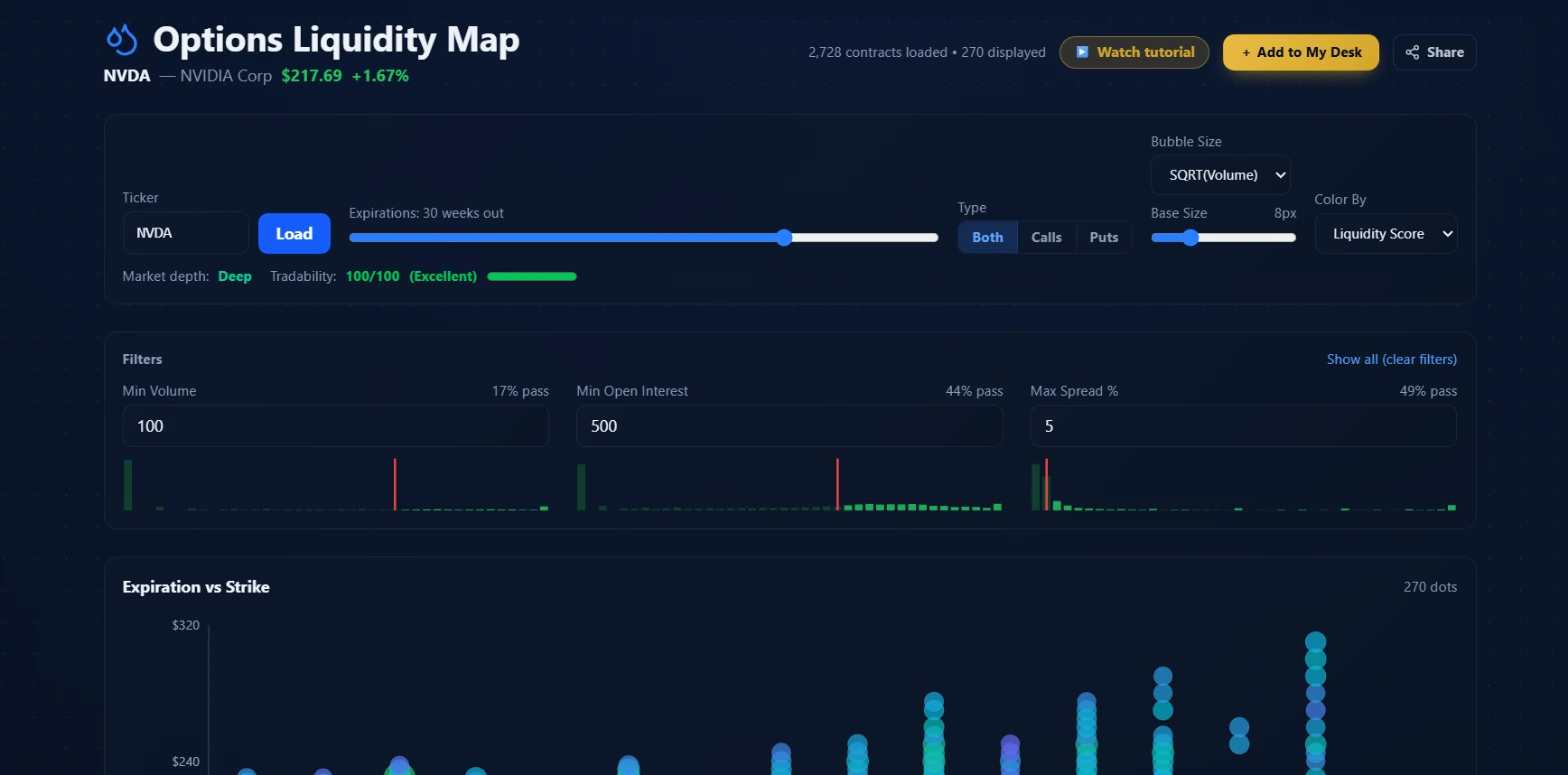 The controls sit above the chart. The two readouts just below the Load button show the chain tier and Tradability Score before you scroll to the chart.
When you land on the page, the first thing to do is enter a ticker and hit Load.
Ticker box
Type any equity or ETF symbol. The backend fetches all available expirations for that symbol, then pulls the chain for every expiration within the horizon you set.
Expirations slider
This controls how far out the page fetches chains, measured in weeks. The screenshot shows NVDA loaded at 30 weeks out, covering everything from the next weekly expiry through roughly March 2027. The hard limit is 40 weeks.
The slider matters because wider horizons return more contracts. NVDA at 30 weeks loaded 2,728 contracts total. At the default 12 weeks the chain is smaller and the chart less crowded. For structures in the 2-to-8 week range, 12 weeks is usually enough. For anything targeting a specific expiration beyond the next two months, extend it.
Type toggle: Both / Calls / Puts
Switches between showing the full chain, calls only, or puts only. The default is Both. If you are looking at a call-only structure, switching to Calls removes puts from the bubble chart and the table. The filter histograms then reflect only the relevant half of the chain, which makes the pass-rate percentages more meaningful for your setup.
Bubble Size and Base Size
The Bubble Size dropdown controls how bubble area scales. SQRT(Volume) means the bubble radius scales with the square root of volume, compressing extreme outliers so one contract with 100,000 volume does not drown out every other bubble on the chart. Base Size sets the minimum bubble diameter in pixels. The screenshot shows 8px.
If the chart looks uniform because one or two contracts dominate, try reducing Base Size. If smaller-OI strikes are too faint to read, raise it slightly.
Color By dropdown
Four options: Liquidity Score, Spread %, Open Interest, Volume.
Liquidity Score uses a three-stop color gradient from purple (low) through cyan to green (high). Spread % inverts the direction so that green is the tightest spreads and red is the widest. Open Interest and Volume each use their own color range.
For execution decisions, Spread % is the most direct metric. A purple bubble in Liquidity Score mode could be low-scoring because of low volume, low OI, or a wide spread. Switching to Spread % tells you specifically whether the cost of entry is the problem.
The two header readouts
Just below the Load button, two labels appear once the chain loads.
Market depth
This shows the tier the backend assigned to the overall chain: Deep, Normal, or Thin. The tier comes from the 75th-percentile volume and OI of all loaded contracts, not from any single strike. In the screenshot, NVDA loaded as Deep. A small-cap with thin options would show Thin here even before you look at individual strikes.
The thresholds the backend applies during a live session:
| Tier | Min Volume | Min Open Interest | Max Spread % |
|---|---|---|---|
| Deep | 100 | 500 | 5% |
| Normal | 50 | 200 | 10% |
| Thin | 10 | 50 | 25% |
After market close, the backend relaxes the spread and volume gates because market makers quote wide one-sided prices outside regular hours. The tier then reflects open interest alone, and the map is most useful during the regular session.
Tradability: [score]/100 ([rating])
The Tradability Score is a 0-to-100 number computed from the ATM region of the chain: contracts within 15% of the current spot price, across the six nearest expirations. Each contract is scored on spread percentage (up to 4 points), spread in dollars (up to 2 points), open interest (up to 2 points), and volume (up to 2 points), for a maximum of 10 points per contract. The median score of the top ten contracts is then scaled to the 0-to-100 range.
Ratings: Excellent is 80 and above; Good is 60 to 79; Marginal is 40 to 59; Poor is below 40.
NVDA in the screenshot scored 100/100 and rated Excellent. That tells you the near-the-money options on this name are as liquid as equity options get: tight spreads, deep open interest, active volume. A name scoring 40 or lower is one where every entry and exit costs real money in slippage.
The Tradability Score reflects the name's overall ATM health, not a specific strike or expiry. A single expiry with a wide spread can exist inside an otherwise-Excellent ticker. Always check the filter histograms and the chart for the specific strikes you actually intend to use.
The three filters and their histograms
Below the main controls is the Filters panel. Three inputs: Min Volume, Min Open Interest, and Max Spread %. Each has a pass-rate percentage in the top right corner and a bar histogram below it.
What the histograms show
Each histogram displays the distribution of that metric across all loaded contracts. The red vertical line marks your current threshold. Bars to the left of the line are contracts that fail the filter; bars to the right pass. The pass-rate percentage tells you what fraction of the loaded chain survives that filter independently.
In the NVDA screenshot: Min Volume set to 100 passes 17% of contracts. Min OI set to 500 passes 44%. Max Spread % set to 5 passes 49%. Combined, those three filters reduce 2,728 loaded contracts to 270 displayed.
The histograms are where you tune filters without guessing. If Min Volume is cutting 93% of contracts, you can see the distribution and decide whether to relax the floor or accept the narrow universe. If Max Spread % is set to 5 and the histogram shows most contracts clustering between 3% and 8%, you can judge precisely what relaxing the threshold to 8% would add.
Try this: Before tightening any filter, look at the histogram distribution. The red cutoff line shows you where your threshold lands relative to the whole chain. A threshold that sits in a dense part of the distribution is filtering out a lot of real options. A threshold in a sparse tail is not costing you much.
Practical starting points
For a credit spread where you plan to hold through expiry, the Deep-tier thresholds (vol >= 100, OI >= 500, spread <= 5%) are the right starting point. That is what the NVDA screenshot shows. You are looking for strikes where the market is genuinely two-sided.
For a single long option where you plan to exit before expiry, Normal-tier thresholds are workable. A 10% spread on a $2 option is $0.20 of slippage per contract. Survivable on a directional trade, but it is still a cost worth knowing before you enter.
The bubble chart
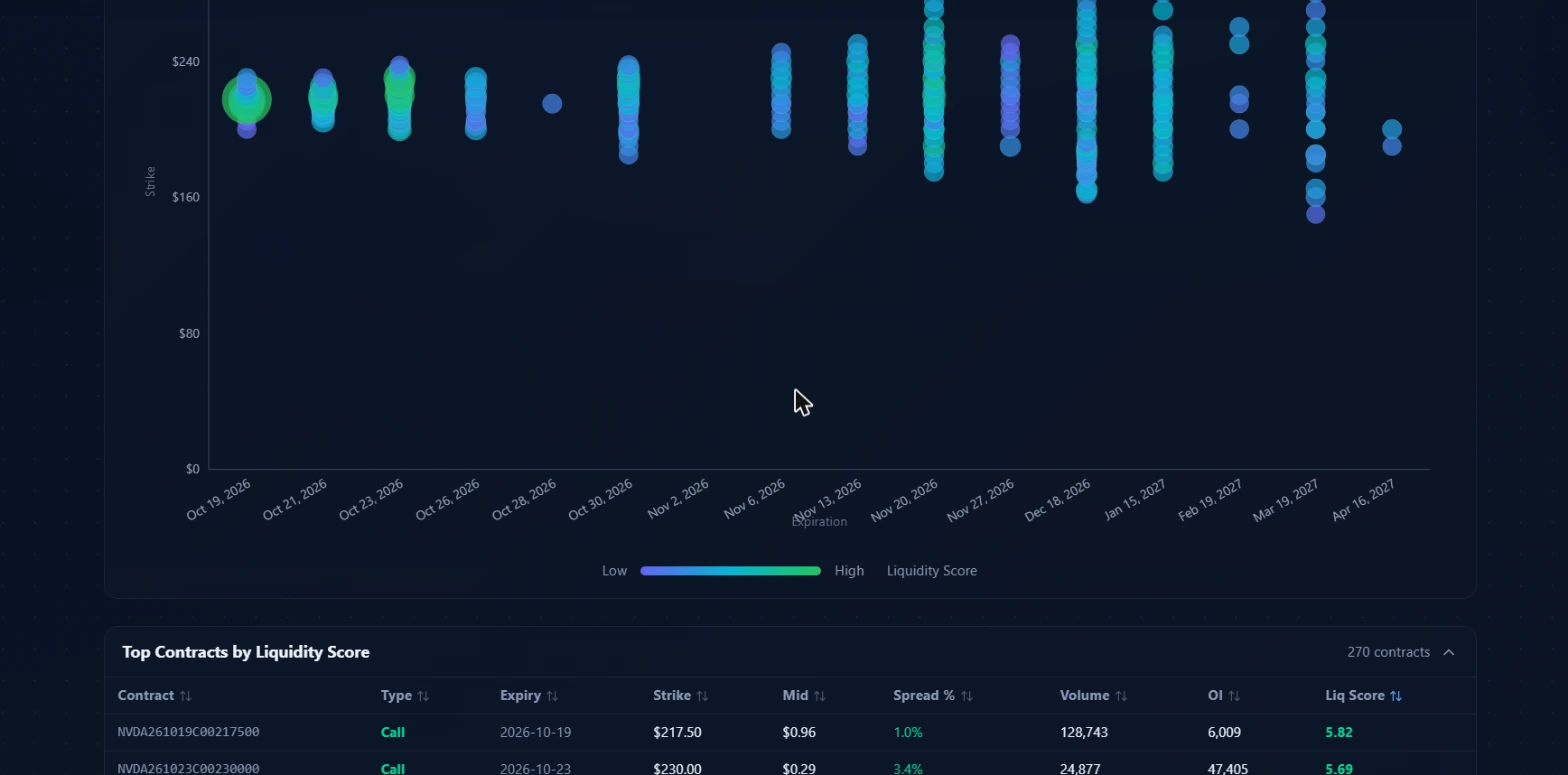 The chart maps every contract that passed your filters in expiration-by-strike space. Larger, greener bubbles are where the chain is deepest. Smaller, purple ones flag strikes where the market is thin.
The Expiration vs Strike chart is the visual core of the tool. The X-axis is expiration date. The Y-axis is strike price. Each bubble is one contract. Bubble size reflects the Size Mode setting. Bubble color encodes the Color By metric.
Reading the NVDA chart at 30 weeks out: the nearest expirations, Oct 19, Oct 21, and Oct 23, show several large bubbles clustered around the ATM strike, all in green to cyan. These are the highest-liquidity near-term contracts. Moving to the right toward November and December expirations, the bubbles spread across a wider strike range and some purple bubbles appear among the green and cyan, flagging specific strikes where the market is thinner.
This pattern is typical for a liquid single-name equity. Liquidity concentrates around ATM at the nearest expirations and thins out as you move further in time and farther from the current price. The chart makes that structure visible at a glance. On a thin name, the chart would be nearly all purple with few large bubbles anywhere on it.
The chart helps you find the liquidity ceiling at any given expiration. If you are targeting a specific date for a structure, scan that column of bubbles vertically. The largest, greenest bubbles in that column are the strikes where you have the best chance of filling at or near mid. The small purple bubbles at the same expiration are strikes worth avoiding even if the payoff diagram looks attractive.
The count in the top-right corner of the chart reads "270 dots" in the screenshot, matching the 270 contracts that passed the active filters.
The top contracts table
Below the chart is the Top Contracts by Liquidity Score table. It ranks every contract that passed your filters from highest Liq Score to lowest.
The columns:
Contract is the OCC symbol. NVDA261019C00217500 breaks down as: NVDA (the underlying), 261019 (expiry October 19, 2026), C (call), 00217500 (strike $217.50).
Type shows Call or Put in color-coded text.
Expiry is the expiration date in readable form.
Strike is the contract's strike price.
Mid is the midpoint of the bid and ask, computed only when both sides are positive and the ask is at or above the bid. This is the realistic fill price to anchor your entry calculation to.
Spread % is the bid-ask spread expressed as a percentage of the mid. Lower is better. The top NVDA ATM call in the screenshot showed 1.0%. The second row, a farther strike, showed 3.4%.
Volume is how many contracts have traded during the current session.
OI is open interest: the number of outstanding contracts, a measure of depth that does not reset daily.
Liq Score is the z-scored composite. In the screenshot, the top contract scored 5.82, sitting roughly six standard deviations above the chain average on the combined metric. A score of zero is the chain average after z-scoring. On a name with uniformly thin options, the top-scoring contracts might only reach +1.5.
You can sort the table by any column. Click a column header to sort ascending; click again for descending. Sorting by Spread % finds the tightest-spread contracts across the visible universe. Sorting by OI finds the deepest markets regardless of current-day volume, which is useful for after-hours or pre-market planning.
Growing strikes
The table above is a snapshot. The Growing strikes panel answers a different question: which strikes have been gaining open interest over time, and which have been losing it.
Pick a window: 1D, 5D or 20D. The Growing tab ranks contracts by how many contracts of open interest were added over that window. The Closing tab ranks the ones that shed the most. Filter by calls or puts and by expiry, sort any column, and export the list to CSV.
Each row shows the open interest at the start of the window (OI then), today's (OI now), the change in contracts and as a percent, and today's volume at that strike. The percent is left blank when the starting open interest is under 100, because 10 going to 40 is "+300%" and means nothing.
A few things to keep straight when you read it:
- Open interest up is not bullish, and open interest down is not bearish. It means more contracts were opened than closed. Every new contract has a buyer and a seller, so the number can't tell you which side started the trade. Pair it with Unusual Activity for that.
- Open interest settles once a day, after the close. Today's volume at a strike is a hint about tomorrow's change, not the change itself.
- Every row says which date it is measured from. We start keeping a ticker's history the first session someone opens it. If a strike's history starts inside your window, the Since column shows the real start date and how many sessions it covers, instead of pretending to be a full 5 or 20 days.
- Brand-new strikes aren't counted as growth. A contract with nothing earlier to compare against is left out, and the footnote says how many there were. Expiring contracts are left out too, because their open interest collapses at expiry no matter what anyone intended.
The "Net across all comparable contracts" line adds up the change for every call and every put in the chain we can compare, not just the rows on screen. It's a quick read on whether positioning built or unwound over the window.
How the score is calculated
The formula that drives everything on this page is:
liqScore = z(log vol) + z(log OI) - z(spread%)
Each input is log-transformed first, then z-scored against the rest of the visible chain at the same snapshot. This means the score is relative to the chain you loaded, not an absolute number across all names. A score of 5.82 for NVDA means that specific contract is roughly six standard deviations above the chain average. On a uniformly thin name, the best-scoring contracts might peak at 1.5.
Volume rewards today's trading activity. High volume relative to the rest of the chain means the market for that strike is active, which gives you a reasonable chance of getting filled without moving the market against yourself.
Open interest provides the depth floor. High OI means there are existing holders on both sides, which keeps market makers from widening spreads aggressively when a new order arrives.
The spread term is subtracted. A wide percentage spread is a direct drag on the score, regardless of how strong volume and OI look. That minus sign is the cost penalty: a 30% spread destroys the score on even a high-volume strike because the spread is what you actually pay.
The log transformation compresses the outliers. A contract with 500,000 volume versus one with 100,000 is not five times as useful in practical terms. The log values are much closer together, keeping the scale interpretable across the full range of the chain.
Three workflows
Checking a spread before entering
You have a view on a name. The Ticker Lab surfaced a spread idea at a specific expiration. Before sizing in, open the Liquidity Map, load the same ticker, and pull that expiration.
Set filters to Deep-tier levels: Min Volume 100, Min OI 500, Max Spread % 5. Check the pass-rate histograms. If only 8% of contracts pass at those levels, the name is thinner than the market depth label suggests and you want to check the bubble chart before committing.
Find the expiration column you are targeting in the chart. Locate both your intended short strike and long strike. Both need to appear as reasonably sized, green-to-cyan bubbles rather than small purple dots. If the long leg is barely visible, that leg is where you will feel the cost on both entry and exit.
Check the Spread % column in the table for both contract rows. The sum of the two spreads is the round-trip slippage cost per contract before the underlying moves at all.
Comparing call and put liquidity
Before a position where the asymmetry between calls and puts might matter, toggle the Type control between Calls and Puts. Watch how the chart and filter pass rates change.
On a high-liquidity single-name like NVDA, call and put chains typically have similar depth in the ATM range. On a name approaching an earnings date, puts can be materially more expensive relative to calls because of defensive put-buying demand. That shows up as worse Spread % on the put side and fewer passing contracts in the filter histogram. The Type toggle makes that comparison direct.
Scoping an expiration for a longer-dated position
Move the Expirations slider to 30 or 40 weeks. The chart extends far to the right. Scan the columns corresponding to expirations 6 to 12 months out. On most names, active options depth thins considerably beyond the front two or three quarterly expirations. The bubble chart makes those empty zones visible before you try to work an order.
For a LEAPS position, you want to see reasonably sized bubbles at your target strike for the relevant expiration. If the chart shows nothing but small purple dots for that strike column, filling at a fair price will require patience, and patience has a cost in edge.
Pairings
| Tool | What it adds alongside the Liquidity Map |
|---|---|
| Ticker Lab (guide) | The Lab's executionScore summarizes fill quality in a single number per strike. When it matches the map's tier for the same contract, both data sources agree. When they disagree, the map is using the live chain and should be trusted. |
| Unusual Activity (guide) | Flow shows where large players positioned. The map tells you whether you can enter the same strike without giving back edge on the bid-ask spread. |
| Apex Magnet Scanner (guide) | A gamma-weighted price level is only actionable if the options at or near that strike are actually liquid. Check the tier before treating an Apex level as a spread target. |
Common mistakes
Checking only the short leg
The most expensive error on multi-leg structures is confirming the strike you are selling and skipping the strike you are buying. The long leg of a spread is typically further from ATM, which usually means thinner. A Normal-tier or Thin-tier long leg means your entire spread inherits that fill problem on both entry and exit. For any spread or defined-risk structure, find every leg in the table before sizing in.
Using the map after hours
After the close, market makers post wide one-sided quotes with no real market behind them. The backend detects this by the clock and shifts to OI-only gating, which removes the volume and spread floors. A contract showing 3% spread at 4:30 PM may look completely different at 9:31 AM the next day when the session opens properly. For after-hours planning, treat the spread column as indicative context at best.
Treating Liq Score as a direction signal
A high Liq Score means the strike is liquid. A low Liq Score means it is thin. Neither says anything about where the underlying is heading or whether the option is cheap or expensive relative to the implied move. The right use is pairing a directional read from flow or the Ticker Lab with the map's fill-quality read. Using the map alone to pick strikes is not what it is designed for.
Ignoring the pass-rate histograms
The filter inputs accept any number, and setting Min Volume to 1,000 on a small-cap's chain will produce a near-empty chart. Checking each histogram before tightening a filter shows you whether the threshold lands in a meaningful part of the distribution or cuts out nearly everything. The red cutoff line is the most direct tool for tuning filters without trial and error.
What the tool doesn't tell you
The Liquidity Map shows fill quality at the moment you loaded the chain. Liquidity at any given strike changes through the session. A contract scoring 5.0 at 10:00 AM might score 2.5 by 3:30 PM if volume dries up or spreads widen into the afternoon. Reload before entering if significant time has passed since you last checked.
The map also does not model market impact. If you are sizing into 200 contracts at a strike where OI is 400, your own order is a meaningful fraction of that market. The Liq Score reflects current depth, not what depth looks like with a large order in flight.
The Tradability Score reflects the ATM region only. A name with an Excellent score can still have Thin-tier contracts further from the money, including strikes relevant to specific spread structures. The header score does not replace the per-strike check.
One practical note on pre-market use: Tradier resets each session's volume to zero before the open, then restores volumes from the prior session's snapshot until the new session begins accumulating its own activity. The page shows whether the volume column reflects a live read or a prior-session restoration. Before the market opens, treat the volume column as directional context from the last session rather than a live read on today.
Options trading involves real risk of loss, including total loss of any premium paid. Nothing in this guide is financial advice; it is an explanation of how the tools work and how to read what they surface. Research every position yourself and manage size carefully, particularly on short-dated options where liquidity can shift quickly through the session.