Loading...

Research deep dive · 14 min read
How to Use Long Term
A complete walkthrough of the Long Term quality screener: the five-block Quality Score, every table column explained, the Value column's fair-value zones, and how to build a systematic underlying-selection routine for wheels, CSPs, and LEAPS.
Open the tool →Hey guys, Art from TraderMatrix here. The page I want to go through today is Long Term, found under the Research section in the nav at /long-term. It does one specific job: it ranks the optionable universe by business quality so you have a structured reason to own or skip a name before you ever look at the options chain.
This guide covers every element on the page, the scoring engine behind the Quality Score, how to read the Value column, and the workflows I use to pick underlyings for wheel positions and longer-dated trades.
The short version:
- The Quality Score is a 0-100 composite built from five fundamentals blocks: profitability, balance-sheet safety, valuation, growth, and payout safety.
- Tiers: 80-plus is high quality, 65-79 is solid, 50-64 is mixed, below 50 is weak.
- The table column is labeled ROE but the score uses ROA (return on assets). ROA is leverage-neutral; ROE can flatter a business with a lot of debt.
- The four Starter Baskets are one-click filter presets. Start there rather than filtering a blank 500-row table.
- The Value column (Buy zone, Fair, Rich) comes from a separate fair-value model. Quality and value are not the same thing, and a high-quality business can still be a poor buy at the wrong price.
- Free accounts see five rows. Premium unlocks the full list and the per-symbol detail page.
What this page is and what it isn't
Before the screen tour, one distinction matters: Long Term is an underlying-quality filter, not a direction signal and not a timing tool.
A lot of traders pick underlyings by habit or familiarity. The names they've traded before, the names showing up in the community, whatever has premium worth selling this week. That approach works until the underlying deteriorates and they either miss the signal or see it too late because they never built a systematic quality read.
Long Term gives you a structured, transparent answer to one question: is this company worth owning if I get assigned? For a cash-secured put or wheel seller, that question is the entry requirement. If the answer is no, a rich premium is not enough reason to sell the put. If the answer is yes and the score is above 80, getting assigned is an acceptable outcome, not a loss.
What the page does not do: it does not tell you whether a stock will go up this month, it does not pick your strike, and it does not replace reading the most recent earnings report. Quality scores are built from quarterly fundamentals snapshots and those snapshots lag. A business that scored 86 last quarter may have reported a miss since then. The score is the starting filter; the earnings call is the confirmation step.
Read this first: Fundamentals lag by one quarter. Always check the most recent earnings before sizing into a new position on any name from this page.
The overview screen
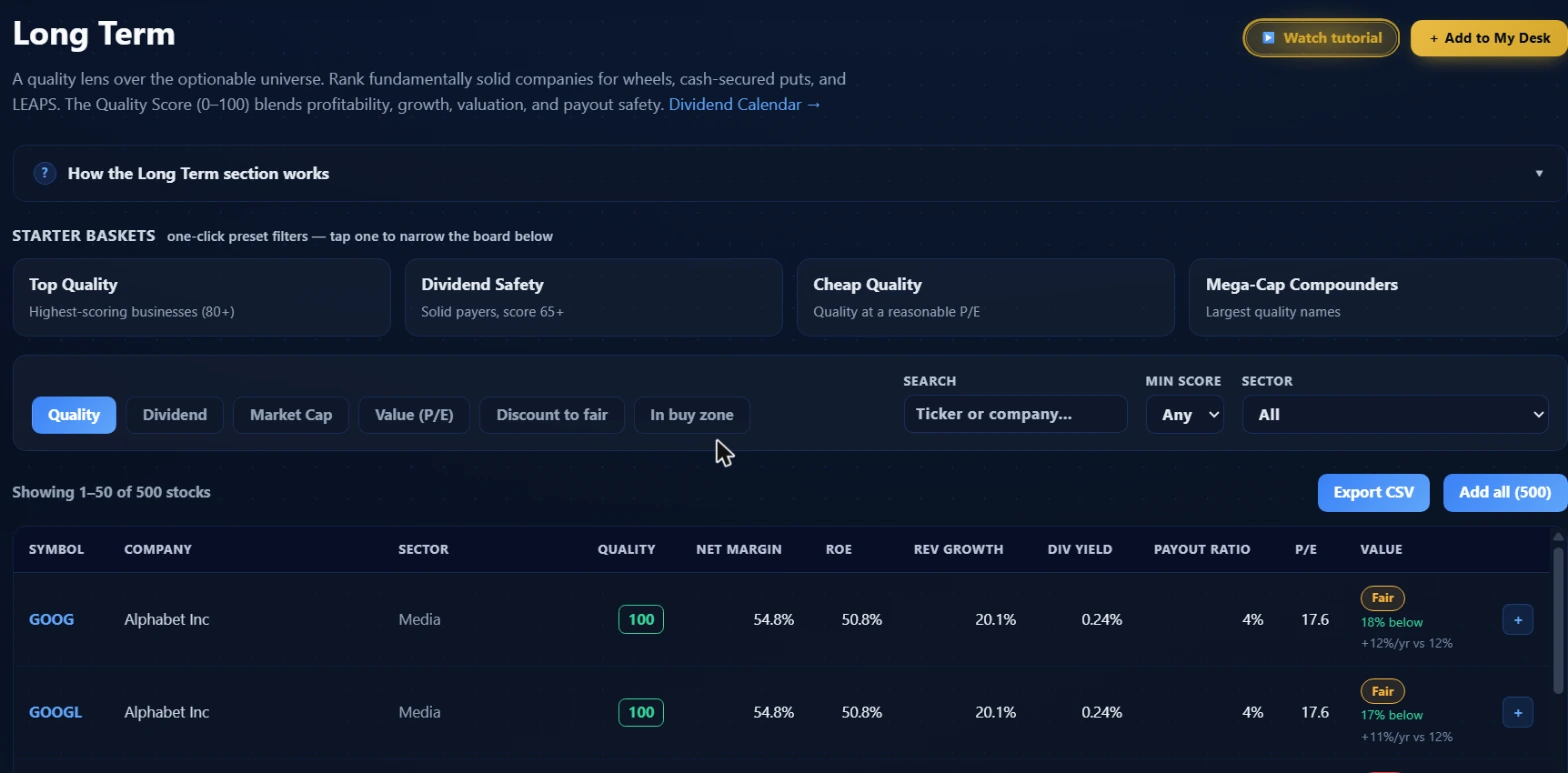 The four Starter Baskets sit above the sort and filter row. The default view shows 1-50 of 500 stocks, sorted by Quality, with Export CSV and Add all (500) options.
The page header links to the Dividend Calendar for ex-dividend date tracking. Two buttons sit in the top right: Watch Tutorial opens the walkthrough video, and Add to My Desk pins this page as a tile on your My Desk layout.
Below the header is a collapsible accordion labeled "How the Long Term section works" that summarizes the scoring blocks. Worth reading once; after that it stays out of the way.
Starter Baskets
The four cards under STARTER BASKETS are one-click presets. Each one sets a specific combination of minimum score, minimum dividend yield, and sort order. Tapping one is the fastest way to narrow 500 names down to a relevant subset.
| Basket | What it filters | Best for |
|---|---|---|
| Top Quality | Score 80 or above, sorted by quality | Wheel and CSP underlyings with the strongest fundamentals |
| Dividend Safety | Score 65 or above, dividend yield 2% or above, sorted by yield | Covered call income on names with a safe, sustained payout |
| Cheap Quality | Score 65 or above, sorted by P/E | Finding quality at a valuation the score does not penalize |
| Mega-Cap Compounders | Score 70 or above, sorted by market cap | LEAPS candidates where liquidity and business durability matter most |
Start with Top Quality when building a new wheel list or looking for a CSP candidate you haven't considered before. Start with Dividend Safety when your primary purpose is generating income from long equity positions. Cheap Quality works for finding names where the fundamentals are solid but the market hasn't pushed the P/E to a premium yet. Mega-Cap Compounders gives you the largest names sorted by size, which is useful when you want a name with deep options liquidity for a longer-dated LEAPS position.
Sorts, filters, and the search
The sort row below the baskets has six options: Quality, Dividend, Market Cap, Value (P/E), Discount to fair, and In buy zone. The first four match the baseline basket presets. Discount to fair and In buy zone are client-side sorts that re-rank using the separate fair-value model driving the Value column.
Three filters sit alongside: a ticker or company name search, a Min Score dropdown (Any, 50, 65, or 80), and a Sector dropdown. The sector filter is especially useful when you want to compare names within a single industry rather than ranking across the whole mixed universe.
The page shows 50 rows at a time. The "Showing N of 500 stocks" counter and the Export CSV button sit above the table. "Add all (500)" adds every currently filtered name to your watchlist in one action.
The ranked table
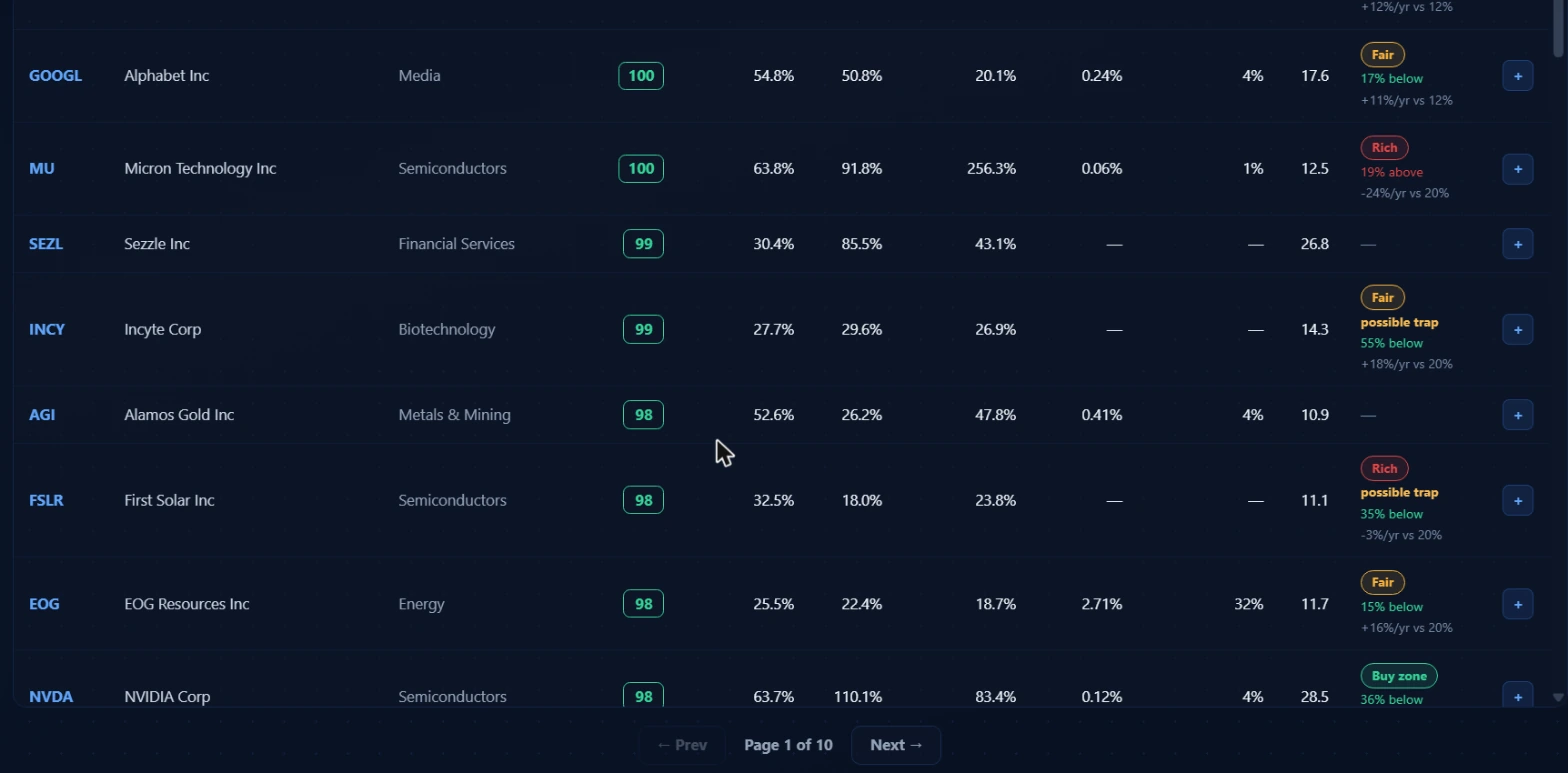 The default Quality sort puts the highest-scoring businesses first. The Value column shows fair-value zone, discount percentage, and expected return versus the required hurdle for each name that has a fair-value snapshot. Page 1 of 10 covers 50 rows.
The columns from left to right:
Symbol and Company: the ticker and full company name. Click any row to open the per-symbol detail page.
Sector: the industry classification from Finnhub. The Sector filter in the header filters against this field.
Quality: the 0-100 score. Color-coded by tier: green for 80-plus, amber for 65-79, orange for 50-64, red for below 50. This is the primary sort column in the default view.
Net Margin: net profit divided by revenue, in percent. This is the most readable single measure of earning power on the table and the largest individual contributor to the quality score (12 of the 30 profitability points). High single-digit margins are acceptable for capital-intensive businesses; double-digit margins are the target for most wheel underlyings. A declining net margin across consecutive quarters is a more important signal than the absolute level.
ROE: return on equity, labeled as ROE on the table. The scoring engine uses ROA (return on assets) internally because ROA is leverage-neutral. A business can show a high ROE by carrying significant debt; ROA strips that effect out. The display column uses ROE for readability, but the score separately penalizes high leverage through the balance-sheet safety block.
Rev Growth: revenue growth year-over-year. Zero or negative here zeroes out the growth block's revenue component. Even modest growth (5-10 percent annually) scores the block fully.
Div Yield: annual dividend yield. Non-payers show a dash. Non-payers do not get penalized in the score; the payout safety block simply does not apply to them.
Payout Ratio: the share of earnings paid out as dividends. Payers with a payout ratio above 80 percent start losing points in the payout safety block. Above 100 percent means the dividend is being funded from reserves or debt, which is a dividend-cut warning, not a reason to chase the yield.
P/E: price divided by earnings. The valuation block rewards names in the 10-25 range and penalizes both extremes. A P/E below 4 loses points because the score treats very low multiples as a potential value trap. A P/E above 50 also loses points. NVDA in the screenshot shows Quality 98 with a P/E of 28.5, which sits just outside the best-scoring band but not far enough into nosebleed territory to materially hurt the overall score.
Value: the fair-value zone from a separate model, covered in the next section.
The Value column
The Value column is doing something different from the Quality Score. It is not a fundamentals rating; it is an estimate of whether the stock is currently trading above or below its fair value.
Three zone labels appear:
Buy zone (green): the stock is trading below the model's estimate of fair value. NVDA in the screenshot shows "Buy zone" with "36% below," meaning the model estimates current price is materially below intrinsic value.
Fair (gold): the stock is trading near fair value. GOOG shows "Fair" with "18% below" and "+12%/yr vs 12%," meaning the model prices it as roughly at fair value with an expected return that approximately matches the 12 percent hurdle rate. GOOGL shows similar numbers.
Rich (red/orange): the stock is trading above the model's fair value estimate. MU shows "Rich" with "19% above" and "-24%/yr vs 20%." The negative expected return against the required hurdle means the model says current price implies weak future returns relative to what the business needs to justify its valuation.
Two sub-labels can appear under the zone badge:
The percentage: shown as "X% below" (stock is below fair value) or "X% above" (stock is above fair value). This is the discount or premium to the model's fair value estimate.
Expected return vs required: shown as "+X%/yr vs Y%" or "-X%/yr vs Y%." The first number is the model's estimate of annualized return at today's price. The second is the required return hurdle for that stock. When the first number beats the second, the stock is a buy on this metric; when it doesn't, it isn't.
Possible trap: a separate warning that can appear alongside any zone label. INCY and FSLR both show "possible trap" in the screenshot. The tooltip reads: "The price implies shrinking cash flow while history says cheap." This warns that a name which looks statistically cheap may be discounting a real deterioration rather than offering a genuine value opportunity.
Quality Score and Value zone are independent. A business can score 100 on quality and show as Rich because the market has fully priced in that quality. A business can score 70 and show as Buy zone because the market is pricing in more pessimism than the fundamentals justify. The useful combination is quality 80-plus with Fair or Buy zone: a strong business at a reasonable price. The "In buy zone" sort re-ranks names by this value signal, useful once you have already filtered by quality.
Not all names have a Value column entry. Names without a fair-value snapshot show a dash.
How the Quality Score is built
The score adds contributions from five blocks. Each block fires only when its inputs are available. When data is partial, the score rescales over the available weight so every name produces a valid 0-100 even if one or two inputs are missing.
Profitability (30 points at full weight): Three components: net margin (12 points), return on assets (10 points), and operating margin (8 points). These form the largest single block and the most direct read on whether the business generates money reliably. The scoring ramps linearly from zero (at 0 percent margin) to full marks (at 25 percent net margin, 15 percent ROA, and 20 percent operating margin).
Balance-sheet safety (24 points at full weight): Three components: debt-to-equity ratio (10 points), current ratio (7 points), and interest coverage (7 points). Debt-to-equity scores highest when leverage is low. Current ratio scores highest above 1.8, meaning the business is liquid enough to weather a slow quarter. Interest coverage scores highest above 8, meaning the business comfortably services its debt from operating cash flow. This block is the assignment-risk dimension: when you sell a CSP and get assigned, you want an underlying that can survive a difficult market without a liquidity crisis.
Valuation (16 points at full weight): A single component: P/E ratio. The 10-25 band scores best. P/E below 4 loses points because the model treats very low multiples as potential distress or value traps. P/E above 50 loses points because the premium is no longer supported by the score's emphasis on current earnings. Negative earnings score zero on this block. The valuation block naturally filters out both speculative growth names and damaged value situations.
Growth (16 points at full weight): Two components: revenue growth year-over-year (8 points) and EPS growth year-over-year (8 points). Growth is intentionally down-weighted compared to profitability. For a premium-selling thesis, earnings stability matters more than high growth. A business growing earnings 20 percent per year scores the growth block fully; anything above that provides no additional points.
Payout safety (10 points at full weight): Dividend payers only. Scores on payout ratio: below 60 percent scores fully, above 100 percent scores zero, and the range between ramps linearly. Non-payers skip this block entirely with no penalty. A non-dividend-paying business can score 90-plus; it simply doesn't earn the extra 10 points that a disciplined dividend payer would.
The detail page
Click any row and you land on the per-symbol page at /long-term/[symbol]. This shows the full fundamentals set for that name, a fair-value breakdown with a chart, an AI-generated underwriting report, institutional fund flow data, and upcoming catalyst dates. Premium is required to see the full detail page.
The underwriting report is generated by an AI model and covers the long-term thesis, key risks, and whether the name fits the criteria for wheel and LEAPS sellers. It is not a trade recommendation; it summarizes the data the quality model is scoring. Regenerating the report counts against a daily quota.
Three workflows
Workflow 1: Building a fresh wheel list
Open the Top Quality basket (score 80-plus). Sort by Quality. You now have the highest-scoring names in the database. Apply the Sector filter to one sector where you have existing knowledge. Scan down the table for names where Net Margin is in double digits, Payout Ratio is under 60 if there's a dividend, and P/E is under 30.
For each name that passes the visual scan, click through to the detail page and check the next earnings date. A name with earnings in the next two weeks is a different entry point than one that just reported. Note any that show as Fair or Buy zone in the Value column. That intersection of quality and price is your tier-one shortlist.
Once you have five to eight names from that process, cross-reference them in Cash-Secured Puts to find strikes with yield and delta characteristics that fit your target return.
Workflow 2: Checking a name before a LEAPS position
You've identified a name from flow or another screener. Before committing to a LEAPS position (typically 12 to 18 months out), open the long-term page and search for that name directly.
The threshold for LEAPS should be higher than for shorter-dated trades because you are exposed to business deterioration over the life of the contract. A score of 70 or above is the minimum worth considering. Below 70, the scoring model says the business has meaningful weaknesses in one or more blocks, and a weakness that exists today can compound over 18 months.
Check the score direction on the detail page. A name that was 85 six months ago and is now 70 is a different proposition from a name that has been consistently 70. Direction of travel matters as much as the current level.
Workflow 3: Monitoring a position you already hold
You are running a wheel on a name you entered at a higher score. The last earnings report was soft. Pull up the name on the long-term page and check whether the score has moved.
One decision framework: score 65 or above and the fundamentals compression looks like one quarter (a margin miss on a temporary input cost, not a structural revenue decline), hold and continue the wheel. Score 50 to 64 or drawdown above 15 percent, reduce the position and pause new strikes until the score recovers. Score below 50, exit fully; a business at that level rarely recovers on the timeline options sellers need.
The Value column is useful here too. A name whose quality score dropped but whose fair-value zone moved to Buy zone may mean the market overreacted to the earnings miss and the business is still fundamentally sound. A name whose quality score dropped and whose zone is still Rich means the market hasn't priced in the deterioration yet.
How Long Term fits with the other tools
Long Term covers the underlying. It does not cover the options structure, timing, or market context. Those come from adjacent tools.
| Tool | Role alongside Long Term |
|---|---|
| Cash-Secured Puts | Take a quality name from Long Term and find the specific strike, expiry, and yield grade. The CSP screener does the options math; Long Term picks the underlying. |
| LEAPS Scanner | Require Quality 70-plus before putting on an 18-month directional position. The LEAPS scanner finds the right delta and expiry after Long Term clears the business. |
| Dividend Calendar | Cross-reference before selecting a covered call strike. Selling a short in-the-money call on or near the ex-dividend date carries early-assignment risk. Check the calendar before locking in the strike. |
| Unusual Activity (guide) | When a high-quality name from Long Term shows up in the flow feed, the two reads together are stronger than either alone: institutional flow on a fundamentally sound business carries more weight than flow on a speculative name. |
| Flow Summary (guide) | Same idea: checking a name's flow card against its quality score gives context that the card alone doesn't provide. A lopsided bullish card on a 90-quality name is a different read than the same card on a 40-quality name. |
A daily routine
Long Term is a slow-moving dataset built on company fundamentals, so checking it every morning adds little new information. A better cadence: review the page once a week, after major earnings weeks, and before entering any new position.
The exception is the Value column. Fair-value zones shift with price movement, so a name's zone can move to Buy zone after a pullback even if the quality score hasn't changed. The "In buy zone" sort is worth a weekly scan for anyone actively looking for entry points into names they already follow.
Around earnings
The score's most important limitation is the quarterly lag. Build a habit of checking every name in your current watchlist on the long-term page within a week of its earnings release. If the score dropped significantly from when you entered the position, run through the hold/trim/exit framework from Workflow 3.
When building a new watchlist
New to the platform, or revising your trading universe: start with the Mega-Cap Compounders basket and export the CSV. That list gives you the largest, most liquid names that clear a 70-plus quality bar. From there, filter to your preferred sectors, then rank by P/E using the Cheap Quality sort within that filtered set. That process takes about 15 minutes and produces a grounded starting universe with a systematic quality filter behind it.
Common mistakes
Treating a high dividend yield as a quality signal
Yield and quality measure different things. A business yielding 7 percent can easily have a quality score in the 40s because the market is pricing in credit or business risk. The Dividend Safety basket automatically combines both filters: it requires a minimum quality score of 65 alongside the yield threshold. Never rely on yield alone to select an income-selling underlying.
Using the score to time entry
A quality score of 86 does not mean the stock goes up this month. The score tells you whether the underlying is worth owning; it does not tell you whether now is the right price or the right market environment to enter. Combine Long Term with the Value column (prefer Fair or Buy zone) and with market-context reads from other pages before sizing into a new position.
Skipping the quality check on names you already know
Familiarity is not a fundamental. A name you've traded successfully for two years can score 42 today because the business has changed. The most common version of this mistake: a covered-call writer selling premium on the same three names for 18 months who never notices when one of those businesses starts deteriorating because they're not checking the score. Open the detail page for any name before you open the next position, especially if it's been more than one earnings cycle since you last checked.
Reading Quality as a buy signal without checking the Value column
A score of 95 on a business trading at a P/E of 60 means you have a great company at a price that may already fully reflect that quality. The Quality Score's valuation block will penalize the P/E somewhat, but the score can still be high if the profitability and growth blocks are strong. The Value column's Rich label is the cleaner flag for overvalued quality names. Check both before entering.
What the tool doesn't tell you
Long Term answers "is this a quality business?" It does not answer whether the stock will go up, whether the options premium is worth the risk at any given strike, or whether now is the right time to add exposure given current market conditions.
The fair-value zones in the Value column are model outputs from a specific discounted cash flow approach. Models make assumptions. The "possible trap" flag is the model's way of marking a situation where the arithmetic looks cheap but the growth signal is concerning. Worth taking seriously.
One honest limitation: the quality score works from public fundamentals data and has no way to incorporate recent management guidance, qualitative competitive changes, or macro shifts that haven't yet appeared in the earnings numbers. A company about to lose its primary customer or face a major regulatory change can score 85 right up until the quarter where those effects hit the income statement. Nothing on this page replaces reading the actual earnings call and filing for any name you're seriously considering.
For the options structure decision after you've cleared the underlying, Cash-Secured Puts and the LEAPS scanner are where that work happens. For the market-level context before you size into any new position, the Market Health and Flow Summary pages give you the broader picture this tool can't provide.
Options trading involves real risk of loss, including the potential for total loss. Quality scores measure business fundamentals on a quarterly cadence; they are not direction signals and do not predict price movement. Nothing in this guide is financial advice. Do your own research and manage position sizing carefully, particularly on long-dated and leveraged structures.