Loading...

Smart Tools deep dive · 15 min read
How to Use the Wheel Tracker
A complete walkthrough of the Wheel Tracker at /wheel. Every tab, button, and field explained alongside the wheeled basis calculation, three concrete workflows, and the common mistakes that break the cost-basis math.
Open the tool →Hey guys, Art from TraderMatrix here. The Wheel Tracker lives at /wheel and it is the page I use to keep my wheel positions honest across brokerages and across months. The wheel strategy sounds simple on paper: sell puts, get assigned, sell calls, get called away, repeat. What gets complicated is tracking your real cost basis after a dozen cycles, knowing when a roll is worth doing versus when it is a mistake, and making sure every leg of a multi-month cycle shows up in one place. This guide walks through every button and tab on the page, explains what the wheeled basis calculation is actually doing, and covers three concrete workflows in sequence.
The short version:
- The Wheel Tracker logs CSP and covered call legs as connected legs, not as standalone trades.
- The wheeled basis is the number your brokerage cannot show you: assignment price minus every premium collected on that name across all linked legs.
- Set your capital first. It drives both position sizing guidance and the weekly premium target on the Dashboard tab.
- Open New CSP and Today's Picks are both on the opening screen, so you can find a candidate and log it without leaving the page.
- The tracker is a premium-tier feature. Free users see an upgrade screen at /wheel.
What this page is and what it isn't
The Wheel Tracker is a position log and cost-basis calculator. It is not a brokerage integration. You enter legs manually, pull them in from the Trade Journal through the Sync feature, or import them from a CSV if you have been tracking elsewhere.
That means it does not show you live unrealized P&L on assigned shares. It knows your wheeled basis and every premium you have collected. It does not reach into your brokerage account and pull the current stock price to compare against your open position. The Active tab shows your wheeled basis and your strike. Whether the stock is above or below that right now, check your broker's interface.
This distinction matters in practice. The tracker answers "what have I actually made on this wheel so far?" It is not a live portfolio monitor. Use it alongside your broker's view, not as a replacement for it.
The tracker is for premium-tier members. If your account is on the free tier, opening /wheel shows a gate screen.
The opening screen
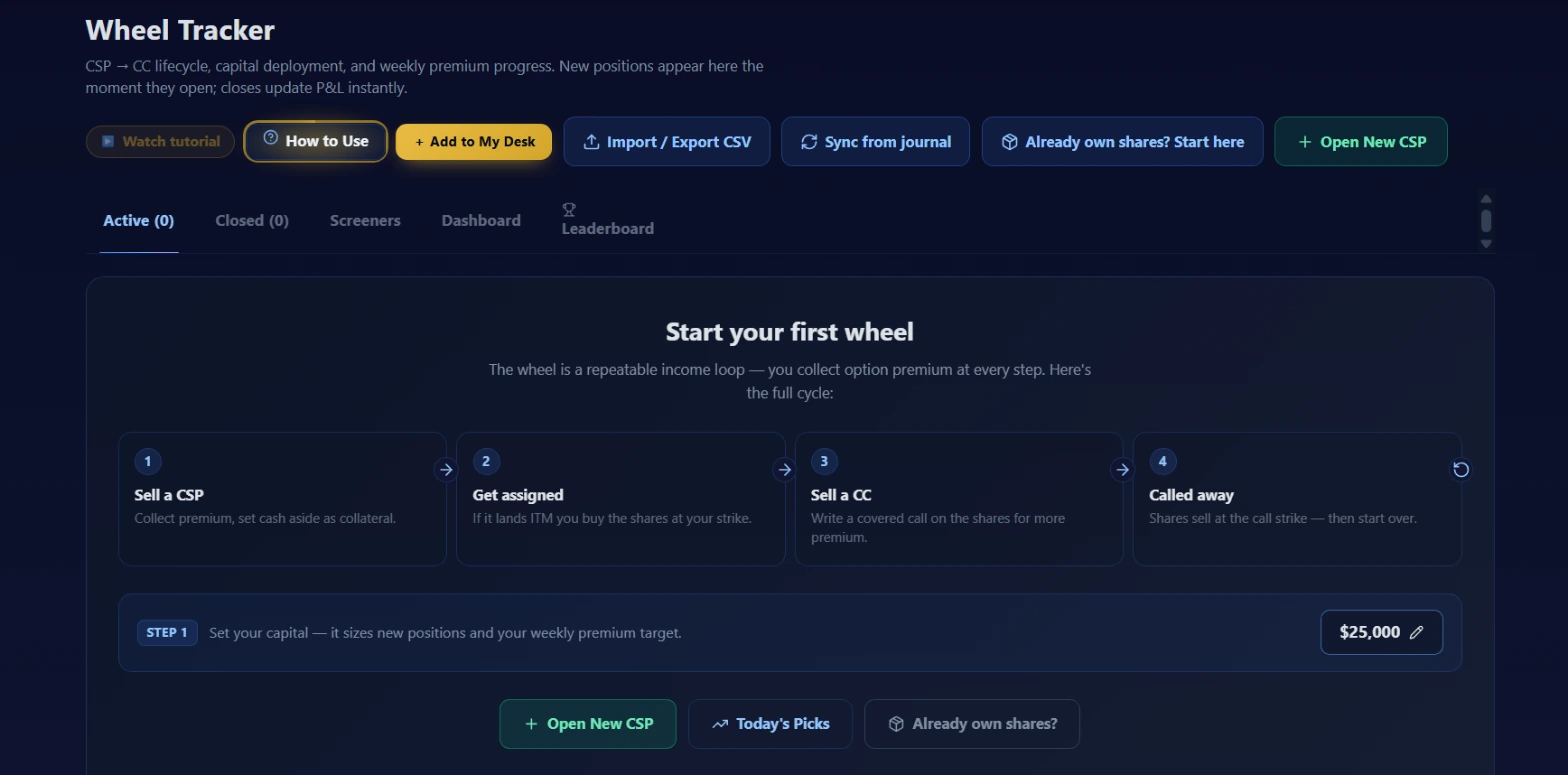 A fresh account with no positions logged. The four-step cycle and the capital prompt are the first things you see. The action bar across the top gives you every data operation before you have entered a single trade.
The page opens on the Active tab. When you have no positions yet, the main panel walks through the cycle with four numbered steps.
Step 1: Sell a CSP. Collect premium, set cash aside as collateral.
Step 2: Get assigned. If it lands in the money, you buy the shares at your strike.
Step 3: Sell a CC. Write a covered call on the shares for more premium.
Step 4: Called away. Shares sell at the call strike, then the cycle starts again.
Directly under that four-step diagram is a capital prompt also labeled Step 1. It reads: "Set your capital -- it sizes new positions and your weekly premium target." A dollar figure on the right has an edit pencil next to it. The screenshot shows $25,000. Set this to whatever you have allocated to the wheel in your account.
Three buttons appear at the bottom of the opening panel: Open New CSP, Today's Picks, and Already own shares. These are also in the action bar at the top of the page, but placing them in the empty state makes them visible on first visit without hunting.
The header action bar
Seven buttons run across the top of the page. Each does a specific job.
Watch tutorial opens the tutorial video for the Wheel Tracker.
How to Use opens the inline guide sidebar.
Add to My Desk pins the Wheel Tracker as a tile on your My Desk home. If you are actively running wheel positions, having it on your desk means it loads the moment you log in without an extra navigation step.
Import / Export CSV opens a modal with two functions. Export builds a CSV of all your current wheel positions. Import takes a CSV in the expected format and loads existing legs into the tracker, with a preview showing which rows would be created and flagging any that would be duplicates. If you have been tracking wheel trades in a spreadsheet and want to move them into the tracker, this is the path.
Sync from journal pulls closed trade journal entries that match the format of wheel legs and asks which ones to add to the tracker. If you have been logging options trades in the Trade Journal but not in the wheel tracker separately, this backfills the wheel positions without requiring manual re-entry for each leg.
Already own shares? Start here is the entry point for a position that skipped the CSP leg entirely. If you already hold 100 shares of a stock and want to start selling covered calls against them, this button opens a form to enter that holding directly. The tracker can then compute wheeled basis starting from your actual share cost and every call premium you collect from that point forward.
Open New CSP is the main action button. It opens the form to log a new cash-secured put position: ticker, put strike, expiry date, premium per contract, number of contracts, and an account label. After you submit, the position appears on the Active tab.
The five tabs
The tab row reads: Active, Closed, Screeners, Dashboard, Leaderboard.
Active is where your open positions live. The tab label shows a count in parentheses: Active (0) on a fresh account. Each position appears as a card or a list row depending on the view mode you select; there is a card/list toggle at the top of the Active panel. An open CSP shows the ticker, strike, expiry, DTE, premium collected, and the number of contracts.
Each position on the Active tab has quick-action buttons. For an open CSP: close as expired, mark as assigned, buy back, roll, or edit. For an open covered call on an assigned lot: close as expired, log called away, buy back, roll, or edit. Everything you need to move a position through its lifecycle is accessible from the row without leaving the tab.
Closed shows every completed leg: expired CSPs, bought-back positions, assigned positions, called-away covered calls. The default sort is newest first. You can also sort by realized P&L, annualized return, premium collected, or alphabetically by ticker. Positions that were rolled before closing show their roll chain rather than just the final leg, so you can see the full sequence from the original entry to the exit with the cumulative premiums and total return for the whole chain.
Screeners is a built-in version of the CSP and covered call screeners filtered to names relevant to your existing positions. It surfaces candidates near your wheeled basis without requiring you to open a separate tab and transfer information back by hand. When you are running a few active wheels and want to find the next CC leg to sell, the Screeners tab is the starting point. For finding entirely new names to start a fresh wheel cycle, /screeners/csp-wheel has the full unfiltered catalog.
Dashboard is the summary view for the whole operation. It shows a cumulative premium chart across all your names, an allocation gauge per position reflecting how much of your set capital each position is using, a weekly premium target progress bar comparing what you have collected this week against a target derived from your capital setting, and a win/loss split across all closed cycles. There is also a settings section on this tab where you can adjust your capital figure. The Dashboard answers "how is the wheel performing this month?" without opening a calculator.
Leaderboard shows your closed cycles sorted by annualized return. After running the wheel across several names for a few months, this tab tells you which names have been most efficient and which have pulled down overall performance. When a cycle closes and you are deciding whether to re-wheel the same name or find a different one, the Leaderboard gives you the historical data to inform that choice.
What the wheeled basis actually calculates
The wheeled basis is the number that matters most in the tracker and the one that is hardest to get from your brokerage's native interface.
When you are assigned on a CSP, your brokerage records your cost basis as the assignment price, the strike you sold. The tracker starts with that same number and then subtracts every premium you have collected across all the legs linked to that assignment: the original CSP premium first, and then every covered call premium collected against those assigned shares until they are either called away or the position is closed.
The formula: assignment price minus CSP premium received equals cost basis. Cost basis minus cumulative CC premiums collected equals the current wheeled basis.
After several CC cycles on the same name, your wheeled basis can be meaningfully below your original assignment price. That gap is your real cushion: the distance the stock has to fall before you are net negative on the full cycle, not just on the most recent leg.
The Active tab shows the current wheeled basis for each assigned lot. Every time you log a new CC premium, the number updates.
Roll chains use a self-referencing link in the database. When you roll a position rather than closing it, the new leg is linked to the old one. The Closed tab shows the full chain when a rolled position eventually completes, so the total return reflects every premium across every leg in the sequence, not just the final exit.
There is one thing the wheeled basis does not capture: the current market value of your assigned shares. If the stock is trading well below your wheeled basis, the tracker shows your premium-adjusted cost basis but does not show the unrealized loss on the shares relative to today's price. You make that comparison yourself against your broker's live quote.
Workflow: opening your first CSP from Today's Picks
Start by setting your capital. Click the edit pencil next to the dollar figure on the opening screen and enter your allocation. This number flows into the weekly premium target on the Dashboard tab, so setting it accurately from the start saves you from recalibrating later.
Then click Today's Picks, either from the bottom of the opening panel or from the action bar at the top. The picker surfaces CSP candidates from the platform's screener, using the same criteria as the Cash-Secured Puts screener. Browse the list and pick a name you want to research further.
Once you have identified a candidate, check the actual options chain on your broker's platform or through the options tools on TraderMatrix to confirm the strike and premium you want to target. The tracker does not pull live quotes for you when opening a new position; you enter the price you actually transacted at.
When you have the details, click Open New CSP from the Today's Picks screen or from the action bar. The form asks for the ticker, put strike, expiry date, premium per contract, number of contracts, and an account label in free text. The account label can be anything that identifies your brokerage account: a name, an abbreviation, whatever you will recognize later. Submit the form.
The position appears on the Active tab with a DTE counter and all the details you entered. You are now tracking an open CSP.
Try this: Sort the Active tab by Expiry (soonest first) once you have a few positions open. It keeps the legs closest to their decision point at the top, so you are not scrolling past positions with 45 DTE to find the one that expires next week.
Workflow: assignment and opening a covered call
When expiry arrives and the stock has closed below your strike, your broker assigns 100 shares per contract. Go to the Active tab, find the CSP, and click Mark Assigned. An inline form captures the assignment details. Confirm the assignment.
The tracker updates the CSP leg to the assigned state and makes the Sell Call action available for the linked assigned lot. The cost basis is computed at this point: assignment price minus the CSP premium you collected.
From the Active tab, click Sell Call on the assigned lot entry. The CC form asks for the call strike, expiry date, premium per contract, and number of contracts. The account label carries over from the CSP leg, though you can edit it.
After you submit, the Active tab shows the open covered call with the wheeled basis displayed. That basis already reflects the CSP premium subtracted. As you collect premium on this CC leg and future ones, the wheeled basis continues declining.
At the next expiry, two things can happen.
If the stock closes below the call strike, the call expires worthless. Click Close as Expired. The CC premium is added to the running total, the wheeled basis drops further by the premium per share, and you can open the next CC leg from the same assigned lot entry.
If the stock closes above the call strike, the shares are called away. Click Called Away. The tracker closes the full cycle, computes the total P&L across every leg in the chain (premiums plus the difference between the call strike and the wheeled basis), and moves everything to the Closed tab with a complete return figure and an annualized return for that chain.
Key point: The P&L on a closed cycle includes every premium from every leg in the chain. When you look at a closed cycle on the Closed tab, the number you see is the full cycle return, not just the final leg. A cycle that ran through four CC legs before callaway shows one total return figure that nets all four premiums and the assignment.
Workflow: rolling a position
Rolling happens when you want to close a leg before expiry and open a new one at a different strike or further out in time without treating it as a completed cycle.
On the Active tab, find the position and click Roll. The roll form asks for the buyback cost (what you pay to close the existing position), plus the new leg's strike, expiry, and premium. When you submit, the tracker closes the existing leg and opens the new one, linking them in the same chain via a roll reference.
If you roll several times before the cycle closes, the Closed tab shows the entire sequence as one chain. The total return reflects every premium collected across all legs and accounts for any buyback costs. This is the correct way to evaluate a rolled position: the full chain return, not the individual leg outcomes. Looking at individual rolled legs in isolation will show debits that do not represent actual losses on the cycle.
Two common situations where rolling comes up.
First: a CSP is running in the money before expiry and you want to avoid assignment at the current price or current timing. Roll the CSP further out in time or down to a lower strike. The roll form shows the net credit or debit of the transaction before you confirm. A roll done for a net credit lowers your effective entry point on the name. A roll done for a debit raises it.
Second: you are assigned and holding shares well below your wheeled basis after a move against the position. Rather than selling covered calls struck below basis and locking in a guaranteed net loss on any callaway, you can effectively roll the whole cycle by selling the shares and starting a fresh CSP at the current market price. The Roll action links the new cycle to the old one so the history stays connected and the total return across the full sequence is preserved.
The net credit or debit display in the roll form matters. A roll for a debit increases your cost and reduces the wheeled basis improvement you get from the new leg. Make sure the new premium is enough to justify the buyback cost before committing.
Pairs with
Cash-Secured Puts screener is where you find candidates for the first leg of a new wheel. The tracker's built-in Screeners tab shows a version of this filtered to your existing positions, but for finding genuinely new names to add, the full screener at /screeners/csp-wheel is the place to start.
Covered Calls covers the selection process for the second leg. Once you are assigned and choosing a call strike and DTE, that guide explains the relevant criteria. The Screeners tab inside the tracker also surfaces covered call candidates once you have an assigned lot open.
Long Term is useful for checking the quality picture on a stock you are considering for the wheel. The strategy works best on names you are genuinely comfortable holding through assignment and through a period of the stock trading below your basis. The Long Term quality score and fair value zones at /long-term give you a second read on whether the name is one you want to own, not just trade.
Dividends overlaps with the wheel on income-oriented names. Some stocks that work well as wheel candidates also pay dividends, and the combination of CC premium income and dividend income on assigned shares changes the total return picture. The tracker focuses on options premium; dividend income from assigned shares does not flow into the wheeled basis automatically. You would account for that separately if you want a complete income picture for those names.
Common mistakes
Opening CC legs as fresh positions instead of adding them to the assignment
This is the most frequent issue. You get assigned, go to the Active tab, and instead of clicking Sell Call on the assigned lot entry, you click Open New CSP and accidentally start a fresh, unlinked position. The tracker now has two separate records with no connection between them. The wheeled basis calculation breaks because it cannot see the assignment leg that should be the starting point for the covered call chain.
The fix: always open a CC from within the existing assigned lot entry. Find it on the Active tab, click Sell Call on that specific row, and fill in the CC details there. A position opened from the top-level button has no parent assignment and cannot compute wheeled basis correctly.
Selling calls below the wheeled basis to generate recovery premium
When a stock has dropped well below your wheeled basis, the temptation is to sell calls at any strike just to bring in more cash. If you sell a covered call struck below your wheeled basis and the shares get called away at that strike, the cycle closes at a net loss even after accounting for every premium collected so far. The wheeled basis is the floor: call strikes need to be above it for a callaway to represent a net gain on the full cycle.
If the stock is below your wheeled basis and you still want to generate income on the position, hold and wait for a recovery, or consider starting a fresh CSP at the current market price. Selling calls below basis to dig out extends your time at risk and guarantees a loss if those calls are exercised.
Skipping the account label or using inconsistent names
The account label is free text. If you are running wheels in two different brokerage accounts, labeling each leg consistently matters because the Dashboard allocation gauge uses it to group capital by account. Inconsistent labels produce an allocation view that does not correspond to your actual setup.
Edit the account label on the Active tab when a position moves between accounts. It takes a few seconds and prevents a reconciliation issue at tax time.
Reading individual rolled-leg outcomes as wins or losses
When you roll a CSP out in time by buying it back at a loss and selling a new one, the tracker records the old leg as rolled and creates a new leg linked to it. Sorting the Closed tab by individual leg P&L will show that buyback as a debit. The full chain return, visible in the Leaderboard and in the Closed tab's chain view, is the meaningful number. Individual leg P&L is a component, not the verdict.
What the tracker does not tell you
The tracker does not know where your assigned shares are trading right now. It knows your wheeled basis and your strike. The distance between your wheeled basis and the current stock price is something you check on your broker's platform.
It does not pull live options quotes for you when entering a new position. When you enter a premium, you type the price you actually received. The Screeners tab surfaces candidates with market-derived data to help find the next leg, but the log itself only reflects what you entered manually or imported.
It does not account for dividends received on assigned shares. If a stock pays a dividend while you hold an assigned lot, that income does not flow into the wheeled basis. You would track that separately if you want a complete income picture.
It does not assess the forward prospects of a name. The Leaderboard shows annualized return on closed cycles by ticker; that is a historical record. A name that performed well over the last few cycles may have changed its options liquidity, volatility profile, or fundamental story. What performed is what the Leaderboard records. What will perform going forward requires your own research.
The tracker also does not tell you when to stop on a losing name. A stock that has fallen well below your wheeled basis may recover or it may not. The tracker keeps the position on the Active tab and records what you decide. The decision to hold, close at a loss, or roll is yours, and no part of the tracker makes that call for you.
Options trading involves real risk of loss. Holding assigned shares through a drawdown means your total loss can exceed any premiums collected if the stock falls far enough below your wheeled cost basis. Nothing here is financial advice; this is an explanation of how the tracker works and how to use its features. Understand the mechanics and risks of cash-secured puts and covered calls before entering them, manage your position sizing relative to your full account, and do your own research on every name you wheel.