Loading...

AI & Automation deep dive · 16 min read
How to Connect Your AI to TraderMatrix (MCP and REST API)
A complete walkthrough of the TraderMatrix MCP endpoint and REST API: three access paths, exact config snippets for Claude Code, Cursor, Claude Desktop, Gemini, and Codex, what the 51-tool server covers, and an honest statement of what the data layer does and does not serve.
Open the tool →Hey guys, Art from TraderMatrix here. This guide is for anyone who has asked their AI assistant what the GEX regime looks like right now and gotten an answer that sounded authoritative and was completely made up. The model knows what gamma exposure is. It has no idea where SPX sits relative to its flip level this morning. That is the problem the Developer API and MCP connection fix.
The short version:
- Free accounts get a 25-call-per-day keyless MCP preview with no card required. Generate a td_live_ key at /developers for full access.
- Claude Code and Cursor connect with three JSON fields: type, url, and an Authorization header.
"type": "http"is not optional. Leave it out and the client silently fails.- Claude Desktop needs mcp-remote as a bridge. The endpoint and key are identical to the Claude Code config; only the wrapper shape changes.
- The public MCP serves derived analytics only: conviction scores, GEX levels, IV rank, sector flow. No raw bid/ask, greeks, option chains, or licensed news content appear in any response.
- The current tools/list has 51 entries. get_unusual_activity, get_gex_ticker, get_apex_levels, and run_screener are the four to start with.
What it is and what it isn't
The MCP endpoint makes TraderMatrix a tool your AI assistant can call directly, the same way it calls a web search or reads a file. When you ask "where is dealer gamma flipping on SPX?" and the client is connected, it calls get_gex_ticker and get_apex_levels, pulls the current derived data, and builds an answer from the live feed rather than from training-data patterns about what GEX usually looks like.
The same connection serves REST clients. If you prefer Python scripts, notebooks, or serverless functions over a chat interface, the base URL is https://api.tradermatrix.pro/api/v1 and the same td_live_ key works as an X-API-Key header on every request.
What this is not: a direct line to raw market data. Most underlying options data on the platform comes from vendors who restrict redistribution to third parties. The public API and MCP carry TraderMatrix's own computed layer. Those derived values are ours to publish. The vendor inputs that produced them are not in any response payload. More on that below.
No order placement. None of the 51 tools can interact with a brokerage account. The connection reads data. Seven watchlist tools write back to your own account's watchlist. That is the full scope of any write access here.
The page, and what the screenshot shows
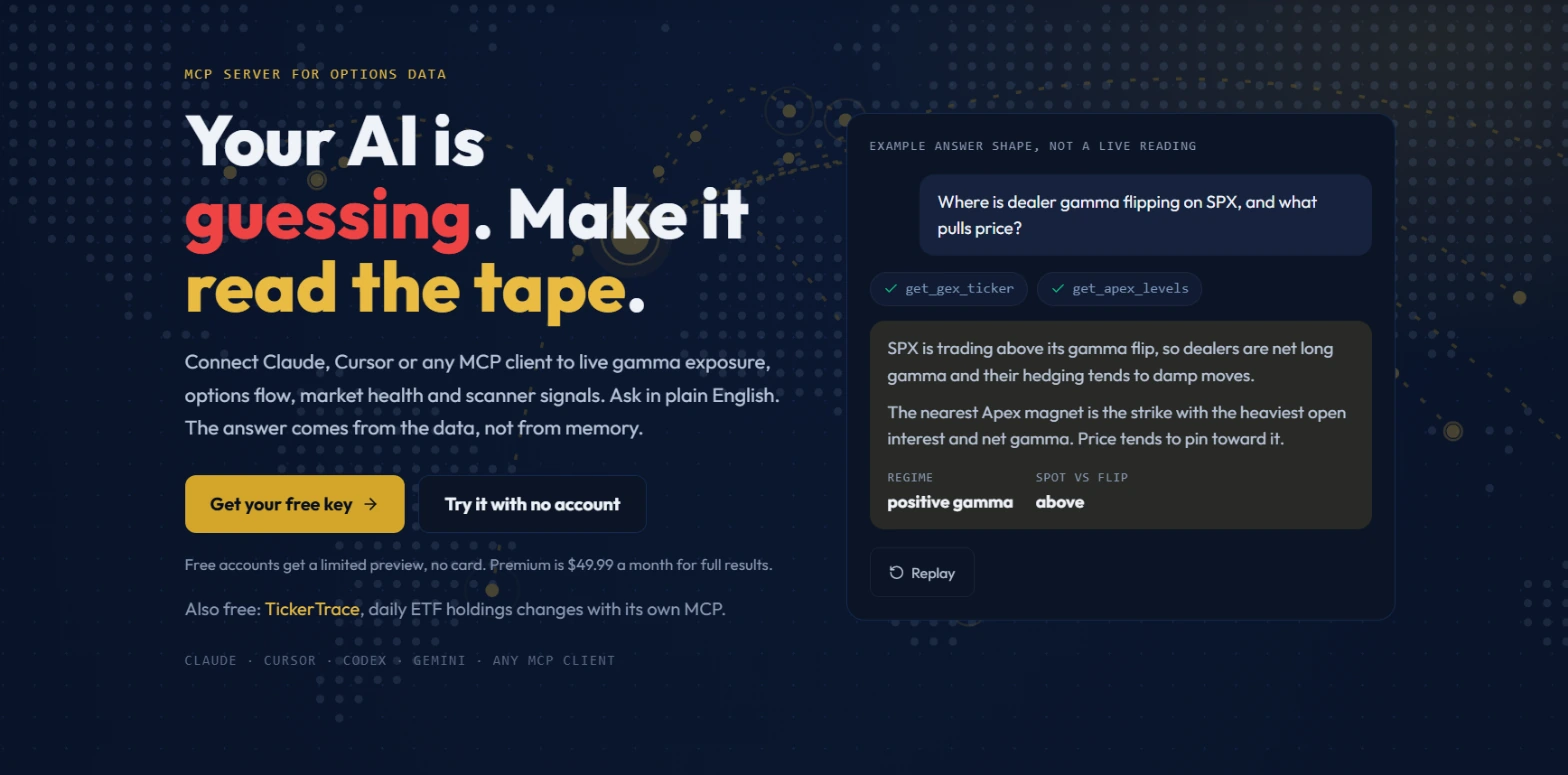 The example panel carries the label "EXAMPLE ANSWER SHAPE, NOT A LIVE READING." The format is real; the values are illustrative. The question asks where dealer gamma is flipping on SPX. Tools called: get_gex_ticker and get_apex_levels.
The page at /arm-your-ai is the entry point. Two buttons: "Get your free key" and "Try it with no account." The second opens a keyless demo at the bottom of the page that runs against a limited version of the MCP without authentication. The example answer panel on the hero shows a positive gamma regime with the spot above the flip level, and names the nearest Apex magnet.
Pay attention to the label on that panel. It says "EXAMPLE ANSWER SHAPE, NOT A LIVE READING" in all capitals. The response structure is real. The specific numbers are not a live quote. I've seen people screenshot it and share it as a current market read. It is not one.
/developers is where the config snippets, the full REST endpoint reference, and the complete tool list live. That is also where you generate a key.
Three access paths
Keyless free preview. No account, no card required. Free accounts get 25 MCP tool calls per day at up to 12 calls per minute. The /arm-your-ai demo uses this path. It covers enough of the tool set to understand what the connection does before committing to anything.
Keyed MCP with a Premium subscription. Premium members get 200 MCP tool calls per day at up to 12 per minute, using a td_live_ key from developer settings. This is the path for connecting Claude Desktop, Claude Code, or Cursor to run flow reads during a real session.
Developer API add-on. Priced at $29.99 per month alongside a TraderMatrix subscription, or $49.99 per month as a standalone plan. This tier unlocks the full REST API at https://api.tradermatrix.pro/api/v1, plus higher call limits beyond the MCP tiers. The REST path works well for scripts, notebooks, and integrations where you want to call endpoints directly rather than through an assistant.
Connecting Claude Code or Cursor
Both clients use the same configuration shape. Add a server block to your .mcp.json (Claude Code) or Cursor's MCP settings:
{
  "mcpServers": {
    "tradermatrix": {
      "type": "http",
      "url": "https://api.tradermatrix.pro/api/v1/mcp",
      "headers": {
        "Authorization": "Bearer td_live_your_key_here"
      }
    }
  }
}
Replace td_live_your_key_here with the key from your developer settings. Reload the client and the tools appear in tools/list.
The field that catches almost everyone the first time: "type": "http" is required. Without it the client interprets the URL as a path to a local stdio executable, fails to find anything, and produces no useful error message. The server block silently does nothing. Add the type field.
Connecting Claude Desktop
Claude Desktop does not natively support remote HTTP MCP servers. The bridge is mcp-remote, a small npm package. Add this to your claude_desktop_config.json:
{
  "mcpServers": {
    "tradermatrix": {
      "command": "npx",
      "args": [
        "-y", "mcp-remote",
        "https://api.tradermatrix.pro/api/v1/mcp",
        "--header", "Authorization: Bearer td_live_your_key_here"
      ]
    }
  }
}
The endpoint URL and the key are the same as the Claude Code config. The outer shape is different because Desktop spawns a local process that bridges to the remote server. npx -y pulls the package on first run without a separate install step.
Watch out: Mixing up the Claude Code config and the Desktop config is the most common setup mistake after the missing type field. Desktop uses command and args. Code uses type, url, and headers. Using the Desktop shape in a .mcp.json file gives Code a stdio server it cannot reach, and again the failure is silent.
Connecting Gemini CLI and Codex
Gemini CLI uses httpUrl instead of url. The distinction matters because url means SSE in Gemini's config, and this endpoint does not serve SSE. The key still goes in headers the same way.
Codex uses a TOML config file. The convention there is to store the name of an environment variable that holds the key, not the key itself. Both full config snippets are on the /developers page under the MCP tab.
OAuth path for web and mobile clients
Claude's web and mobile Connectors UI requires OAuth, not raw headers. The platform has an OAuth shim at the same base URL. During the authorization step, you paste your td_live_ key; the shim stores only a hash of it, never the key itself.
This path matters if you want to connect the platform to Claude.ai directly through the Connectors UI without running a desktop client. For most people working in Claude Code or Cursor, the JSON config above is simpler and the OAuth path is not needed.
What the 51 tools cover
Running tools/list against the endpoint currently returns 51 tools. The count changes as tools are added, so run it against the live endpoint when you need the exact current set. Here is the shape of what is there today, with representative tool names.
Flow tools. get_unusual_activity returns the scored options flow feed with sentiment, conviction tier, and repeat-flow detection. get_directional_flow gives the cumulative session delta-weighted lean per ticker as a bullish, bearish, or balanced read. get_sector_flow returns options premium broken out by GICS sector ETF. get_dark_pool gives rolled-up off-exchange block flow for a ticker: print count, gross and net notional, accumulation versus distribution split, largest print. get_earnings_flow pulls pre-earnings unusual positioning for tickers reporting soon.
Gamma and levels. get_gex_ticker returns dealer gamma analysis for any ticker including the flip level and regime. get_gex_overview covers the tracked index symbols. get_apex_levels returns the composite magnet strike ranking: proximity-weighted open-interest walls plus net gamma, scored zero to 100. get_ticker_snapshot is the one-call derived read that combines GEX regime, nearest Apex level, session flow bias, IV rank, quality score, and the market health headline in a single response.
Market regime. get_market_health returns the composite risk score from nine macro detectors. get_market_breadth gives the percentage of S&P 500 members above their 20, 50, and 200-day averages, plus advancers and decliners. get_market_valuation returns the equity-risk-premium model verdict as percentages only, no index level. get_macro_regime surfaces Treasury, Fed, and CFTC series. get_market_internals covers breadth, correlations, and cross-asset ratios in one call.
Screeners and scanners. run_screener runs any of the eleven named screeners and returns matching tickers with scoring. get_breakout_signals returns active daily breakout and continuation signals. get_breakout_tape_confirmed returns breakout names the live options tape is also buying bullish this session. get_gap_continuation returns market-wide large-cap gap-and-hold plays graded A to D. get_premarket_gappers runs the five-pillar momentum gap scan on the pre-market or after-hours tape.
Intelligence. get_politician_trades and get_politician_trades_by_ticker surface congressional STOCK Act disclosures. get_insider_trades returns Form 4 filings of $25k or more from the SEC, filterable by direction and ticker. get_institutional_activity shows the most actively-traded tickers by institutional options volume today with directional bias.
Ticker tools. get_iv_rank returns the self-relative IV rank with a zone label and an interpretation sentence. get_strategy_ideas returns ranked multi-leg structures priced off the live chain. get_edge_xray gives a whole-chain rich/cheap grade for one expiration. get_hedge_analysis ranks downside-protection structures for a share position you specify. get_ticker_news returns the most decision-relevant recent headline for a ticker plus supporting categorized headlines.
Watchlist tools. list_watchlists, add_to_watchlist, remove_from_watchlist, move_watchlist_ticker, create_watchlist, update_watchlist, and delete_watchlist. These seven are the only tools that modify your account. Everything else is read-only.
Example questions
Any of these work with a connected client. What comes back is derived analytics pulled from the live feed at the moment of the call.
"What is the current GEX regime for SPY, and where is the nearest Apex magnet?"
"Which sectors have the most bullish options flow this session?"
"Pull the repeat flow on NVDA for the past 24 hours."
"Run the momentum-pullback screener and show me the top five results by entry score."
"What is TSLA's IV rank right now, and is it rich or cheap versus its own history?"
"Show me congressional stock disclosures for PLTR in the last 90 days."
"Add MSTR to my default watchlist with the note 'watching for flow confirmation.'"
The last one uses add_to_watchlist. The note persists on the account and comes back with list_watchlists on every subsequent call, so you can record the reason a name is on the list at the moment you add it.
Three concrete workflows
Morning brief through your own AI
Before the market opens, I sometimes open Claude Code and ask something like: "Pull the market health reading, sector flow from yesterday, and the top repeat-flow names from the past 24 hours, then give me a two-paragraph summary of the setup." The assistant calls get_market_health, get_sector_flow, and get_unusual_activity filtered to repeat flow. It synthesizes the three reads in a single turn without me toggling between pages.
This is not a replacement for the platform. The data comes from the same engine. What you lose is the visual layout, the bias bar, and the at-a-glance card format. What you gain is the ability to ask follow-up questions in plain English, compare across data sources in one turn, and pipe the output into a note or a routine script.
One thing worth flagging: the quality of the synthesis depends heavily on how you phrase the question. "What should I trade today?" is too open-ended. "Summarize the sector flow reading and flag any name appearing in both bullish flow and the momentum-pullback screener" is a sharper prompt that makes better use of the structured data the tools return.
Checking gamma regime before a trade
Say I've spotted a name on the flow feed and want to know whether the GEX structure is working with or against a call position. I ask: "What is AAPL's gamma regime right now, where is the flip level relative to spot, and what is the nearest Apex magnet above current price?" The assistant calls get_gex_ticker and get_apex_levels, pulls the current derived state, and comes back with the regime, the flip level, and the dominant magnet strike.
The assistant does not tell me to trade or not to trade. It surfaces the structural data. Whether that regime creates tailwind or headwind for a specific position on a specific day is context the tool cannot provide. That judgment is mine.
A useful follow-up from the same turn: "Now do the same for SPY and QQQ." The assistant calls get_gex_ticker twice more. You get the broad-market picture alongside the single-name read in one conversation, rather than clicking through three separate pages.
Building a watchlist routine
The watchlist tools make it practical to keep a list current from a script or a session. list_watchlists shows everything you have. add_to_watchlist takes a ticker and an optional note. A routine that calls list_watchlists first, then runs get_unusual_activity filtered to those tickers, gives you a snapshot of the session's flow across your specific universe.
The note field holds context that ages well. When I add a ticker based on a flow read, I include a note describing what I saw: "Three-day repeat flow, bullish, prints over $500k." That note comes back in every list_watchlists response. Six weeks later, if I'm wondering why something is on the list, the note tells me.
remove_from_watchlist is the cleanup tool. A name whose thesis has played out or where the setup no longer applies can come off the list with one call. A focused list is more actionable than a long one with stale entries.
What the data layer does and does not serve
This section matters most before you build anything serious on top of this connection.
TraderMatrix licenses most underlying options data from vendors including Tradier and Finnhub, and scrapes other sources. Every one of those sources restricts redistribution to third parties. The public API and MCP are third-party surfaces, which means what they can carry is a licensing question, not a product decision.
The rule is: we license out our own derived layer. We do not redistribute vendor rows.
What the derived layer includes: conviction scores, GEX computed from chain data, Apex magnet strike rankings, sector-flow rollups by dollar premium, IV rank relative to each ticker's own history, screener grades, market health composite scores, breadth percentages, and the macro series from government sources. These are values the platform's own engine produced or values sourced from public-domain government data (Treasury, Fed, CFTC, FINRA, SEC EDGAR).
What is not in any response: raw per-contract bid/ask, greeks (delta, theta, vega), individual option chain data keyed by strike and expiration, news headlines and URLs from licensed news providers, and TradingView scanner fields. Those belong to the data vendors. A response field like ivRank: 68 is a derived value we computed. A field like bid: 1.23 and ask: 1.26 alongside iv: 0.412 would be redistributing vendor data.
The customer-facing statement of this policy lives in two places: the data-usage section at /llms.txt and the matching section on the /developers page. If you are building an integration that will re-serve this data to your own users, read those sections before you ship.
Do not describe data from this API as "public market data." The underlying inputs come from licensed vendor feeds. Public-domain status follows the source. Congressional STOCK Act disclosures, SEC EDGAR Form 4 filings, and Federal Reserve and CFTC series are public domain. Tradier option chains are not.
Common mistakes
Skipping "type": "http". The most common setup failure on Claude Code and Cursor. The client treats the URL as a local stdio path, finds nothing, and reports no useful error. The server block simply does not appear. Add the type field.
Using the Desktop config shape in Claude Code. Desktop uses command and args. Code uses type, url, and headers. Using the Desktop shape in a .mcp.json file gives Code a stdio server it cannot reach, which fails silently.
Treating the /arm-your-ai example answer as a live reading. The panel is labeled "EXAMPLE ANSWER SHAPE, NOT A LIVE READING." The format is real; the numbers are not a current quote. Do not make decisions from a screenshot of that panel.
Polling the flow feed on a tight loop. The per-key limit is 12 tool calls per minute for MCP, shared across all tools on the same key. Calling get_unusual_activity every few seconds spends that limit quickly. Cache responses on your side and space your calls out.
Expecting raw fundamentals or chain data from get_gex_ticker. The GEX tools return gamma-related derived scores: flip level, net gamma, magnet strikes. No earnings dates, no P/E, no per-strike greeks. For a combined view, get_ticker_snapshot includes a quality score field. For fundamentals, the REST endpoint /ticker/:symbol/fundamentals carries the full breakdown.
What the connection doesn't do
No order placement. Not at any tier or with any key. The data is read-only except for the watchlist write tools.
Not a quote feed. get_gex_ticker is an analytics tool, not a price you can trade against. For any trade-execution purpose, verify current prices in your own broker or data source.
No option chains by strike. No endpoint on the public API returns a full chain with all strikes, expirations, bid/ask, and greeks. The closest tool is get_edge_xray, which gives a derived grade for one expiration without serving the underlying chain rows.
No custom analytics. The tools surface the platform's own signal layer. There is no tool to run an arbitrary screener formula, backtest a custom strategy, or compute your own greeks against live chain data.
Pairs with
Arya is the in-app assistant. She uses the internal MCP endpoint with your session context, and no key is required. If you want live data answers without configuring a desktop client, Arya is the simpler path. Arya and the external MCP draw from the same derived analytics layer. The difference is that Arya also knows your watchlist and positions from the session, and does not need a config file.
The /developers page has the full REST endpoint reference, complete config snippets for all five clients, and the data usage statement. Start there before building anything that touches the REST API.
/llms.txt is the machine-readable summary formatted for agents: every public MCP tool with a description, the connect configuration, and the data usage statement in one page.
Options trading involves real risk of loss, including potentially more than the amount invested. Nothing here is financial advice; it is an explanation of how the tools work and what the data they return means. Do your own research. The analytics this connection surfaces are derived signals, not financial recommendations.