AI & Automation deep dive · 17 min read
How to Run the TraderMatrix Flow Bot
A walkthrough for trading Discord server operators: 8 alert types, per-channel routing, conviction score floors, all 26 slash commands, setup steps, and three routing workflows explained with verified numbers from the live page.
Open the tool →Hey guys, Art from TraderMatrix here. This guide is for people who run trading Discord servers, not for individual traders looking for a personal alert feed. If you want alerts routed to yourself, My Alerts and Discord Alerts handle that. The Flow Bot is a different tool: it posts to channels inside your Discord server so every member of your community sees the flow as it happens.
The page lives at /discord-bot. Everything in this guide comes from the live page code and the backend job that actually sends the alerts. I'll explain what gets posted, how routing and score floors work, how to set it up, and how to think about channel structure so your feeds stay useful instead of getting muted by your members.
The short version:
- The bot routes 8 alert types to Discord channels: Big Bet, Unusual Flow, All In, Breakouts, Earnings Flow, Sector Rotation, Dark Pool, and Gap Continuation.
- Each route is a (channel, alert type) pair. The score floor is set per route, not per server.
- At a floor of 85: Big Bet posts about 18 times a day, Unusual Flow about 30, All In about 6, Sector Rotation about 8, Dark Pool about 15. Start high; lower the floor if a channel is too quiet.
- 26 slash commands work for every member with no TD Pro account required.
- One plan: Pro at $99/mo. 14-day trial, no credit card needed.
What this is and what it isn't
The Flow Bot doesn't replace the Unusual Activity page or the Dark Pool screener. It pipes a subset of their output into Discord channels so your community receives it automatically, during the session, without anyone having to be logged into the platform.
The audience it's built for runs servers of 500 to 5,000 members where a steady flow of institutional data is part of why people pay to be there. Once configured, the bot runs automatically on every trading day and requires no daily maintenance. Your members don't create TraderMatrix accounts, don't need subscriptions, and don't have to do anything except read the channels you've set up.
What it doesn't do: it doesn't send personalized DMs, it doesn't track individual member positions, and it doesn't adapt to anyone's watchlist. Every channel gets the same alerts based on the type and floor you set for that route. For personal alert routing, My Alerts covers that. For sending yourself alerts on specific tickers you're watching, Discord Alerts is the right tool.
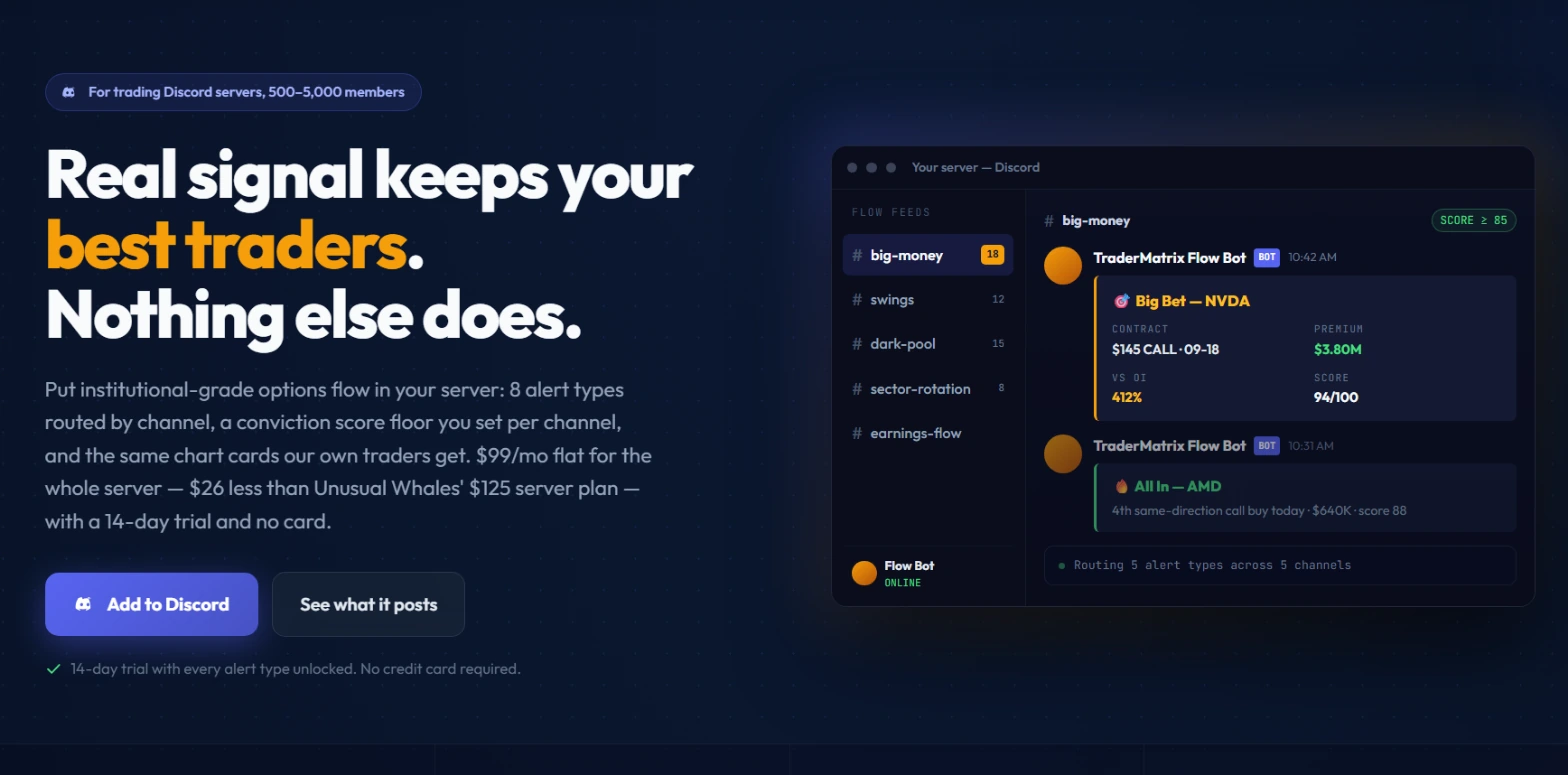 The page's own illustration -- not live output. The source code explicitly marks the Discord mock as a fabricated example whose field set matches what the bot actually sends. The channel sidebar reflects a typical five-route configuration, with daily alert count badges at a score floor of 85.
Reading the page screenshot
The illustration shows a Discord window with a sidebar listing five channels: #big-money (18 alerts), #swings (12), #dark-pool (15), #sector-rotation (8), and #earnings-flow. The count badges reflect the historical daily averages at floor 85 for those alert types.
The #big-money channel is the active one in the mock. Two alerts are visible:
First, a Big Bet on NVDA: $145 CALL expiring 09-18, $3.80M in premium, 412% volume vs open interest, score 94/100. Second, an All In on AMD: "4th same-direction call buy today -- $640K -- score 88." A status line at the bottom reads "Routing 5 alert types across 5 channels."
The field set here is exactly what a live alert carries: contract, premium, volume against open interest, and score. Live alerts also include DTE and implied volatility, fund-flow context when there is some, a plain-English read, and a link back to the relevant TraderMatrix page.
The 8 alert types
Each type fires on a different trigger and routes independently.
Big Bet is the most specific. A single-stock options trade opens with over $2M in premium on a directional position. At a score floor of 85 this posts about 18 times per day. Each alert carries the contract details, premium, volume vs open interest, DTE, implied volatility, fund-flow context when it exists, a plain-English read, and links to the full tape on the platform.
Unusual Flow is the broadest. It's the tape-wide unusual activity feed -- everything that clears the score floor across the whole options market. At floor 85, this fires about 30 times per day. That's why the page specifically recommends giving it a dedicated channel. Route it alongside Big Bet in the same channel and one of them stops being useful within a week.
All In fires when three or more large flows pile into the same name in the same direction. The footer on every All-In alert reads exactly this: "TraderMatrix -- All-In -- 3+ large flows piling same direction." It's rarer than Big Bet, about 6 per day at floor 85, and it describes something different from a single large print. One large options trade could be a hedge, a delta cover, or a position add. Three or more separate large trades on the same name and direction across a session is a pattern.
Breakouts posts technical breakout and continuation signals from the scanner. These are not options flow alerts; they're scanner outputs. Busier on trend-following days and quieter during chop.
Earnings Flow is seasonal. It shows options positioning ahead of upcoming earnings. Busiest in January through February, April through May, and July through August. If you add this route and see nothing for several weeks between seasons, that's expected.
Sector Rotation fires when a sector's options activity surges against its own baseline. Not just "tech is busy today" -- the signal is that a specific sector is running hot relative to how it has been behaving recently. About 8 per day at floor 85.
Dark Pool posts off-exchange block prints over $25M in notional value. At floor 85, about 15 per day. Dark pool prints are a different instrument from options flow, and this alert type works best in its own dedicated channel.
Gap Continuation covers names that gapped at the open and then broke their opening range. Each alert is graded A through D based on how many confirmations lined up: GEX regime, options flow, and sector flow. A and B grades mean more of those confirmed; C and D mean fewer. This is the most recent alert type, and the most specific in what it requires before posting.
The conviction score floor
Every alert carries a score from 0 to 100. The floor you set for a route determines the minimum score required for an alert to post to that channel.
The Pro plan's default floor is 75. At 75 you see more alerts than at 85, and fewer than at 60. The right floor depends on what you want the channel to be.
The floor is set per route, not per server. You can run Big Bet at floor 60 in one channel for volume and Sector Rotation at floor 90 in another for precision. They're independent settings. This is the detail that changes how you think about the whole configuration -- a single server-wide slider would make all the alert types fight each other for attention. Per-route floors let each channel do exactly one job.
There's also a cap on Pro: 30 alerts per hour per channel. Nothing floods regardless of the floor.
If you're adding the bot for the first time, start at floor 85 across all routes. Watch what your channels get for two or three days. If a channel is too quiet, lower the floor by 5. If a channel is getting muted by members, raise the floor or move that alert type to its own channel.
The 26 slash commands
Any member of your server can run these. No TraderMatrix account required. The commands work in any channel the bot has access to and the response embeds there, visible to everyone.
Flow and activity: /flow returns the latest unusual flow for a ticker. /darkpool returns recent dark pool block prints. /institutional shows the most institutionally-traded tickers today. /putcall returns the put/call ratio and sentiment for a name. /shortinterest returns short interest and borrow data.
Levels and regime: /apex returns apex gamma levels for a symbol. /gex returns gamma exposure levels. /gexmatrix covers SPX, SPY, and QQQ gamma regimes together. /markethealth gives breadth and a market health snapshot. /ivrank returns IV rank and volatility context. /edge answers whether the options chain is rich or cheap after costs.
Setups and signals: /screener runs a momentum or squeeze screener. /bounce returns bounce and reversal signals. /bouncescore gives a bounce/reversal score for one ticker. /gaps returns gap continuation plays graded A to D. /gappers returns pre-market gappers.
Context and calendar: /earnings returns upcoming earnings with flow context. /dividends shows the upcoming ex-dividend calendar. /quality gives a fundamental quality and dividend score. /sectors shows the sector flow overview. /directional returns where the money is leaning today. /conviction gives conviction across the signal stack. /ideas suggests strategy ideas for the current setup. /hedge returns ranked ways to hedge a position. /ipo covers private companies closest to filing. /vespryx runs a full options flow X-ray for a ticker.
The commands return TraderMatrix's own derived scores, levels, and summaries, not raw vendor data like individual contract bid/ask prices or greeks. The output is conviction-level data: scores, premium sizes, sentiment direction.
The commands most useful for in-session context are /apex and /gex. A Big Bet fires in #big-money, a member types /gex NVDA in that channel, and the gamma level picture on that name appears in seconds without anyone leaving Discord.
Most commands take a ticker symbol as the primary argument and work with any optionable US stock or ETF.
Setup: three steps
Step 01: Add to Discord
Click the "Add to Discord" button on /discord-bot. Discord's authorization flow opens. The permissions the bot requests are: View Channel, Send Messages, Embed Links, Manage Webhooks, Use Slash Commands. The bot shows up in your server's member list once authorized.
Step 02: Run /setup
Type /setup in any channel. A wizard opens inside Discord. Pick an alert type, pick a channel, and the bot creates the webhook for that route. You don't manage webhooks manually.
Step 03: Tune your channels
Repeat /setup add for each alert type you want to route. Run /setup filter to set the score floor per route. The floor defaults to 75; adjust it per channel based on desired volume.
Two or three routes with individual floors takes under two minutes to configure. Eight routes takes longer, but it's a one-time task.
Three routing workflows
Here are three configurations that work well in practice.
Routing 1: A main flow channel with a tight floor
One #big-money channel receives Big Bet alerts at floor 85. This is typically the most-read channel because the alerts are specific: a named ticker, a named contract, a premium number, a score. Members know exactly what fires there.
Big Bet at floor 85 posts about 18 times per day. All In at the same floor posts about 6. Together they fit in one channel without crowding it, or you can split them. Either approach works.
Don't route Unusual Flow here. At floor 85 it posts about 30 times per day -- that's 48 combined alerts in a shared channel on an average day. At floor 90 or above, Unusual Flow becomes manageable in a shared space, but it tends to get quieter than members expect. Give it its own channel and let it run at the floor that keeps the volume where you want it.
Routing 2: A quiet earnings season channel
Route Earnings Flow to its own channel, separate from everything else. During core earnings seasons (January through February, April through May, July through August) this channel is active. Between seasons it's quiet. Members who track earnings positioning watch it during those windows; everyone else ignores it.
Earnings flow has a different character from intraday activity. It reflects positioning ahead of a catalyst, sometimes days in advance. Mixed into the same channel as same-day Big Bet alerts, both become harder to read.
During active earnings season, consider a slightly lower floor here -- 80 instead of 85 -- to catch more names ahead of their reports.
Routing 3: A dark pool and macro channel
Dark Pool gets its own dedicated channel. Off-exchange blocks over $25M are a different instrument from options flow and read differently. At floor 85, about 15 per day -- a steady but manageable pace.
Sector Rotation can share this channel or get its own. At floor 85, Sector Rotation posts about 8 times per day. Low enough volume that combining it with Dark Pool works without one drowning the other.
Gap Continuation fits in a morning-oriented channel. These alerts cluster in the first two hours of the session based on opening range activity. A #morning-setups channel that also receives Breakouts works well since both are most relevant in the opening session.
How this connects to the platform
The bot is a delivery mechanism. The underlying data comes from the same engines that power the web platform.
A Big Bet that fires in your server comes from the same scoring system that drives Unusual Activity. When that alert lands in your #big-money channel, a member can open the platform and search for that ticker to see every qualifying print behind it: each one scored, with strike, expiry, volume, and DTE visible. The bot posts the summary; the platform carries the full tape.
For the gamma picture on a name the bot just flagged, GEX shows where the gamma exposure sits and what levels matter to market makers. The /gex slash command gives a snapshot inside Discord; the GEX page gives the full historical regime and flip level with context.
Dark Pool on the platform shows the complete dataset behind the bot's Dark Pool alerts, with sorting by name, net notional, and direction.
Every alert the bot posts includes a chart card link back to the relevant TraderMatrix page. Members who want more context click through directly from Discord.
Common mistakes
Starting all routes at a low floor
This is the single most common setup error. Setting all routes at floor 75 or 60 from day one means Unusual Flow alone can post 50 or more times on a busy session. Members get notified constantly, mute the channels, and stop reading them. Once a channel gets muted it almost never recovers. Start at 85, watch what your community engages with, and lower the floor selectively.
Mixing Unusual Flow with Big Bet in the same channel
These two have very different daily volumes at any given floor. At floor 85, Unusual Flow is almost twice as active as Big Bet. Together in one channel they blur into each other, and the alerts that get the most discussion -- Big Bet and All In -- get buried. Unusual Flow at volume becomes background noise. Give it a dedicated channel.
Ignoring Sector Rotation and Gap Continuation
Both alert types are lower volume and less visually dramatic than Big Bet or All In. But Sector Rotation is genuinely useful as context on a day when a sector is rotating hard and the options flow there is building. Gap Continuation is useful in the first two hours of the session for names that have both a technical setup and confirmation from flow and GEX. Both work better in their own channels where members who track them can actually find them.
Expecting the trial to replicate Pro routing
Seven routes is enough to evaluate the alert quality and see what your community responds to. It's not enough to run the full channel structure you'd want long-term. Plan your full routing during the trial; don't judge routing capacity based on trial limits.
What the bot doesn't do
It doesn't know which members own what positions. It doesn't adapt to individual watchlists. It doesn't send direct messages to individual members. It doesn't tell anyone whether to buy or sell anything.
The alerts carry context -- conviction score, fund-flow context when available, a plain-English read from the scoring engine. That read is pattern recognition: the engine can identify that a print looks like a new directional position rather than a close. It can't tell you whether the person placing that trade was right.
The Flow Bot pipes the same institutional options flow data your members would find by logging into TraderMatrix and watching the Unusual Activity feed. It makes that data available inside Discord without requiring individual accounts.
One thing I don't have a clean answer to yet: what floor actually produces the best engagement in a server of a given size. The historical averages at floor 85 tell you volume, not what your particular community responds to. Whether a server of 500 members reacts better to a floor of 80 that gives them 25 Big Bet alerts a day or a floor of 90 that gives them 12 very clean ones is something you find out by running it for a few weeks, not by reading a guide.
Options trading involves real risk of loss. Alert content is derived from platform analytics and does not constitute financial advice or a recommendation to buy or sell any security. Volume estimates at score floor 85 are based on historical averages and vary with market conditions. See /discord-bot for current plan pricing and trial terms.