Loading...

Calendars & Intel deep dive · 16 min read
How to Read Insider Activity
A complete walkthrough of the Insider Activity feed: two tabs, every column, how to filter out routine selling, and how to build useful research workflows around Form 4 filings sourced from OpenInsider.
Open the tool →Hey guys, Art from TraderMatrix here. The page I want to walk you through is Insider Activity, at /insider-activity, under Smart Money in the nav. It shows Form 4 insider trades: the SEC filings that corporate officers, directors, and 10% owners are required to submit within two business days of a transaction. This guide covers both tabs, every column, and how to use the feed in a way that doesn't treat every sell as a warning sign.
The short version:
- Roughly nine of every ten filings are sells. Routine selling from pre-scheduled 10b5-1 plans, option exercises, and tax needs is not a bearish signal. Filter to Buys first.
- The Cluster Buys tab is higher signal than Latest Filings. Multiple insiders buying the same company in the same window is unusual in a way a single purchase is not. Three or more insiders is the meaningful threshold.
- Own Change percentage matters as much as the dollar value. A $200K purchase representing a 15% increase in someone's holdings reads very differently from a $200K purchase that barely moves a multi-million-dollar stake.
- The data is sourced from OpenInsider, which scrapes SEC Form 4 filings. It is not a direct EDGAR feed.
- Stock Return is computed server-side from the trade date. It is historical context, not a predictive number.
What this page is and what it isn't
Insider Activity shows you Form 4 filings from the past 21 days. These are the legally mandated disclosures that corporate insiders must file whenever they buy or sell their own company's stock. Officers (CEO, CFO, COO and so on), directors, and anyone who owns more than 10% of a company's shares all fall under this requirement. The two-business-day filing window is federal law.
The page does not pull directly from EDGAR. It sources its data from OpenInsider, a third-party aggregation service that scrapes SEC Form 4 filings. Both sides are scraped: purchases and sales. The minimum value threshold is $25,000 per filing, and penny stocks are excluded. The rolling window is 21 days, capped at 5,000 rows by OpenInsider's own server limits.
One number frames everything on this page: roughly nine of every ten Form 4 filings are sells. You can see this in the chip counts at the top of the table. In a typical 21-day window, the Sells count will be five to ten times the Buys count. That does not make the sellers bearish. It reflects how executive compensation works at public companies.
Most corporate insiders hold large portions of their wealth in company stock, acquired through restricted stock unit grants, stock option awards, and direct compensation plans. They diversify this concentration over time, meet tax obligations when shares vest, and follow pre-scheduled 10b5-1 programs that set a fixed disposal schedule well in advance. None of these transactions are statements about where the stock is going. They are balance-sheet management by executives with concentrated wealth.
Buying is categorically different. An insider writing a personal check to purchase company shares on the open market is making an elective, out-of-pocket decision with money they already have. There is no grant schedule, no vesting trigger, no external plan driving it. They chose to put more of their own capital into this company at this specific price, at this specific moment.
That distinction is the reason the feed exists. The Latest Filings tab shows everything. The filters and the Cluster Buys tab let you isolate the signal.
The two tabs
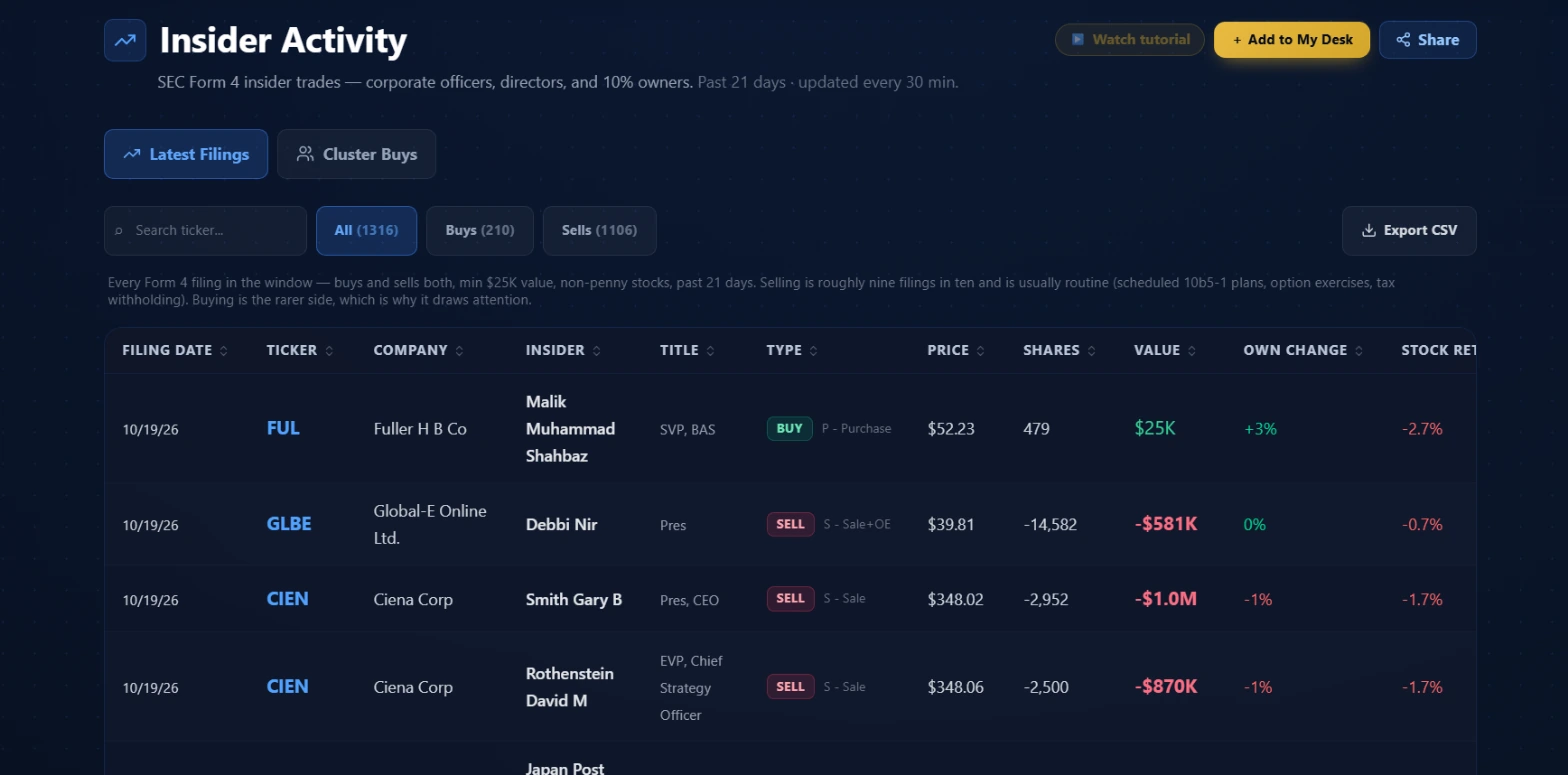 The Latest Filings tab on October 19, 2026. All (1316), Buys (210), Sells (1106): sells are 84% of that window. The Type column pairs a color-coded BUY or SELL direction badge with the raw SEC transaction code, so you see both the side and the exact mechanism in one cell.
Latest Filings is the full feed: every Form 4 filing in the 21-day window that clears the $25K value floor, buys and sells both. The page description below the controls says it directly: "Selling is roughly nine filings in ten and is usually routine (scheduled 10b5-1 plans, option exercises, tax withholding). Buying is the rarer side, which is why it draws attention."
The direction chips show the breakdown for the current window. In the screenshot above, 1,106 of 1,316 total filings are sells, 84%. On most 21-day windows you'll see closer to 90%.
Cluster Buys is a filtered view built from the same underlying data. When multiple officers or directors at the same company file Form 4 purchases within the same window, those filings surface here as a single cluster row. The # Insiders column shows the headcount. The Cluster Buys tab is buy-side only: OpenInsider does not publish a cluster-sell equivalent, and the feed description on the page states this explicitly.
The two tabs share most columns but differ in the middle section. Latest Filings has individual Insider and Title columns naming the specific filer and their role. Cluster Buys replaces those with an Industry column and the # Insiders count, since the cluster row aggregates multiple filers from the same company.
Switching tabs resets the direction filter to All automatically. Since the Cluster Buys feed is already buy-side only, a Sells filter carried over from Latest Filings would silently empty the table with no visible control to undo it.
Controls
Direction chips: All / Buys / Sells
These filter the loaded window client-side. The entire 21-day fetch is already in memory after the initial load, so switching between All, Buys, and Sells requires no network round-trip. Each chip shows a live count reflecting the current window. An "Other" chip appears only when the window contains filings the parser could not classify as a clean buy or sell. Under normal conditions you won't see it, but OpenInsider occasionally adds new transaction codes without notice, and any unrecognized row surfaces under "Other" rather than disappearing from the feed.
Ticker search
The search box filters the table to rows whose ticker contains your query string. It stacks on top of the direction filter: if you've already selected Buys and then type a symbol, you see only purchases for that name. Clearing the search restores the direction-filtered view. The search runs against the full 21-day window in memory, not just the visible page.
Export CSV
The Export button downloads the rows you're currently viewing. It respects the active direction filter and any ticker query, but exports every page of the matching result, not just the 25 rows on screen. Dates export in raw ISO format and values export as unformatted numbers, so your spreadsheet can sort and sum them correctly. The filename includes the feed type, the active filter, and the date.
Sorting
Every column header has a sort toggle. The default on load is newest filing date first. You can sort ascending or descending by any column. Stock Return sorts null values to the bottom rather than mixing them with real returns.
Premium gate
Free accounts see the first six rows of the current view. The full 21-day window and the Cluster Buys tab both require a Premium subscription. The gate shows a blurred preview of the next several rows along with the total filing count.
Column by column
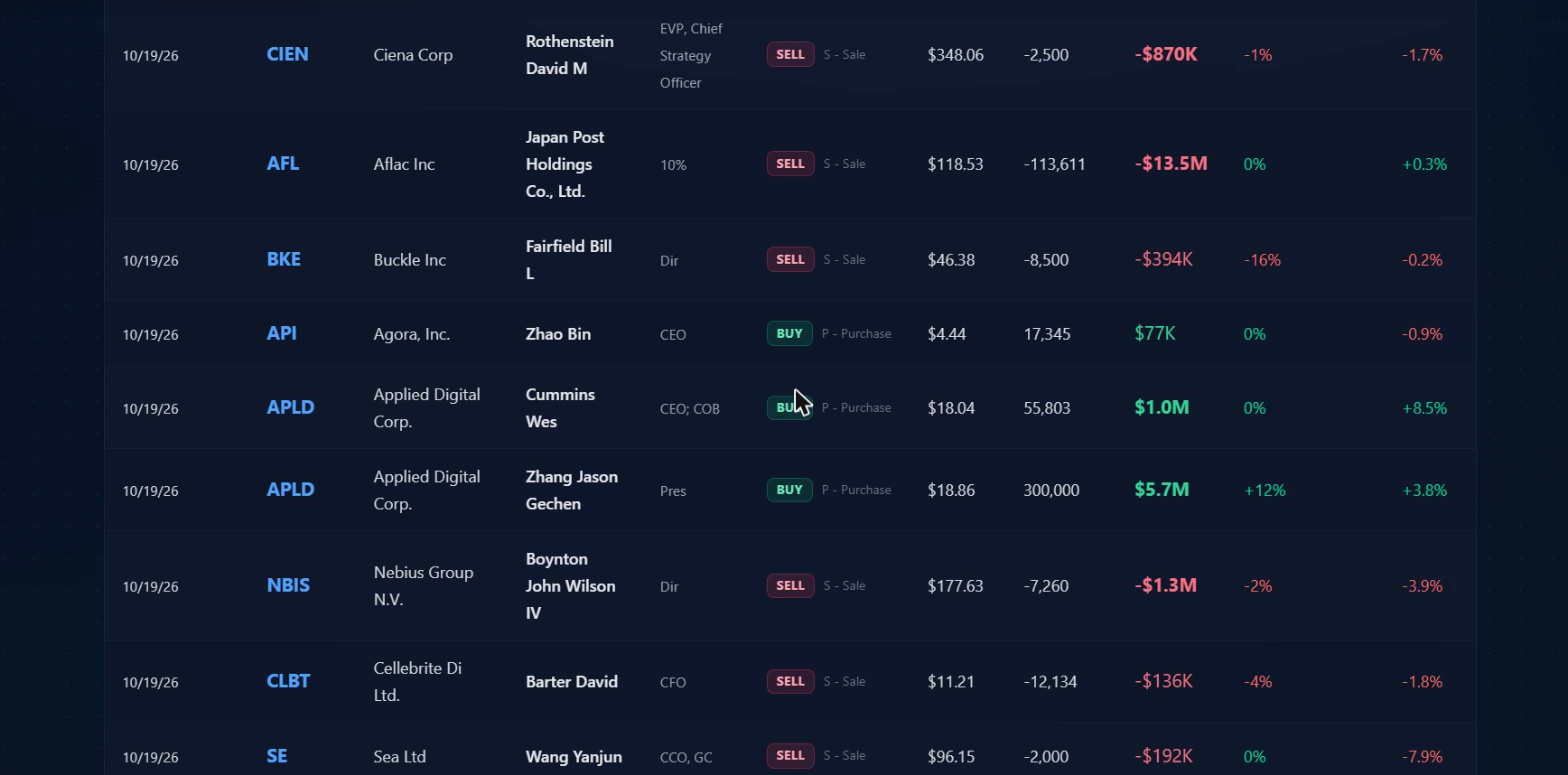 A closer look at the table from October 19, 2026. The Value column is color-coded by side: green for buys, red for sells, with larger bold text for transactions above $500K. The Type column carries both the direction badge and the exact SEC code, so a sale following an option exercise reads S - Sale+OE rather than a plain S - Sale. When the same company appears twice with two different buyers, that's the raw data behind what surfaces in Cluster Buys.
Filing Date
The date the Form 4 was submitted to the SEC. This is not the trade date. The SEC requires filing within two business days of the transaction, so the actual purchase or sale happened one or two days earlier. The filing date is the standard reference point for Form 4 research, but the Price column reflects what the insider actually paid or received on the trade date. Both dates are included in the CSV export.
Ticker
The ticker is a link that goes directly to Ticker Search pre-filtered to that symbol. Clicking it opens the full fundamentals, options data, and flow history for that name without you losing your place in the filings feed. This is the fastest path from a notable filing to a complete picture of the company.
Company
The company name as it appears in the SEC filing. This is the registered legal name from the submission, which sometimes differs from the common shorthand. The ticker is the more reliable identifier.
Insider / Title
The insider's name and their role at the company, both taken from the filing. Title is raw text: you'll see abbreviations like Dir for director, Pres for president, and spelled-out roles for longer titles. This column only appears in Latest Filings. On the Cluster Buys tab these two columns are replaced by Industry and # Insiders.
The title matters for signal strength. A CEO making an open-market purchase is a different signal from a junior officer buying the same dollar amount. The CEO has deeper visibility into the business and is making a personal bet on top of the compensation exposure they already carry.
Type
This column does the most work in the table. It shows two pieces of information side by side: a colored direction badge (BUY in green, SELL in red) and the raw SEC transaction code.
The most common codes:
| Code | What it means |
|---|---|
| P - Purchase | Open-market buy at the prevailing market price. The highest-signal type in the feed. |
| S - Sale | Straightforward open-market sale. |
| S - Sale+OE | Sale following an option exercise. The insider exercised vested options and sold the resulting shares. Compensation mechanics, not a directional bet. |
The P - Purchase versus S - Sale+OE distinction is the most important read in this column. A large sell next to an OE code almost always means the insider exercised options that were expiring or vested and liquidated immediately. This is standard equity compensation practice. It carries no information about the insider's view on where the stock is headed. When you're filtering for buy signals, you're looking for P - Purchase specifically, not just any BUY badge.
Price
The per-share price as reported in the filing. For buys, this is what the insider paid on the trade date. For sells, it's what they received. Use this alongside the filing date to understand where the insider transacted relative to current price.
Shares
The number of shares in the transaction. Sell rows show negative values; buy rows show positive values. Shares alone can mislead: a 300,000-share purchase at a low per-share price may be a smaller transaction than a 2,000-share sale at a high price. The dollar value and ownership context matter more than raw share count.
Value
The total dollar value of the transaction. The column is color-coded by direction, green for buys and red for sells, and uses larger bolder text for transactions above $500K and above $1M. When scanning Latest Filings for buys worth investigating, sort by Value descending to put the largest open-market purchases at the top, then look at the title and Own Change percentage those rows carry.
Own Change
The percentage change in the insider's total reported holdings as a result of this transaction. This is the column that converts a dollar figure into a proportional signal.
A purchase representing a +15% increase in reported holdings is a meaningful personal commitment, regardless of the absolute dollar amount. A purchase that moves someone's stake by 0.1% tells you they have a very large existing position and this transaction barely registered in it. Both can look the same in the Value column. They read very differently here.
Own Change can show 0% or near-zero for large transactions where the insider holds a very large position. Read it alongside Value, not as a replacement for it. On buy rows it shows green; on sell rows it shows red.
Stock Return Since Trade
This column is computed server-side. The upstream Form 4 data from OpenInsider does not include performance figures, so the server calculates the percentage change from the insider's trade date price to the current quote. It shows what happened to the stock after the filing.
It is a historical reference, not a predictor. A row showing +8.5% Stock Return means the stock is up 8.5% from that insider's trade date. It does not mean the next similar buy will produce the same result. The column is most useful when looking at a cluster: if multiple insiders at the same company all bought in the same week and the column is uniformly positive, that's context for your research, not a formula.
Three workflows worth building
Filtering out routine selling
The fastest way to use Latest Filings as a buy-signal screen is to hit the Buys chip immediately after the feed loads. You cut the 80 to 90 percent of rows that are sells and look at a much smaller, cleaner list. Then sort by Value descending to put the largest purchases at the top.
What to look for in that filtered list: P - Purchase in the Type column rather than S - Sale+OE (which is compensation mechanics), a meaningful Own Change percentage, and a senior title. A director buying $40K worth of shares is not a particularly strong signal. A CEO or CFO buying $1M with a +10% Own Change is a different category. Senior executives with large ownership stakes are putting significant personal capital at risk with a discretionary open-market purchase.
The ticker link in each row opens Ticker Search with that symbol pre-loaded. Use it to check the fundamentals and recent stock behavior after you spot a notable purchase. An insider buying into a sharp drawdown on a quality business is one context. An insider buying after a 40% run-up is another.
Scanning Cluster Buys for coordinated activity
Switch to the Cluster Buys tab. This feed removes everything except events where multiple officers or directors at the same company filed purchases in the same window. The # Insiders column shows the headcount.
Individual insider buys happen constantly across hundreds of public companies. Multiple insiders at the same company all buying within the same period is much rarer. Three or more insiders in a single cluster is the threshold where the pattern becomes genuinely unusual rather than coincidental timing, two board members each making a routine annual purchase land here as a cluster too.
Sort the Cluster Buys table by # Insiders descending to put the most-coordinated clusters first. Then look at Value: a cluster of four insiders each buying $20K is a different story from three insiders collectively putting in $8M. The dollar size and the title of each participant both matter. A CEO, CFO, and two directors all buying the same week is more notable than four directors on a routine schedule.
After a cluster surfaces a name, go to Ticker Search and look at the options flow history. An insider cluster that coincides with elevated unusual options activity on the same name is two separate data sources pointing in the same direction. Neither source confirms the other on its own. Both pointing the same way reduces ambiguity.
Cross-checking an insider buy against flow and context
Say the Latest Filings Buys view surfaces a name where a CEO filed a P - Purchase representing a meaningful Own Change. Here's a research sequence that uses more of the platform.
Start with Ticker Search for that ticker. Check the fundamentals: earnings trajectory, balance sheet, analyst estimates, and any upcoming catalysts. An insider buying the week before a major product announcement is one scenario. An insider buying into a multi-year earnings decline is another. The filing tells you the transaction happened. The fundamentals tell you what the business looks like.
Then check Unusual Activity for that ticker around the same filing date. Call sweeps or elevated premium coinciding with an insider buy is convergent data. The options market and corporate insiders are completely separate participants with completely separate information sources. When both show the same direction on the same name in the same period, the combined read carries more weight than either alone.
Finally, check Politician Trades if the name is in a regulated sector or has significant government contract exposure. Congressional STOCK Act disclosures are separate from corporate Form 4 filings and run on different timelines. Convergence between the two on the same company in a short period is uncommon enough to be worth noting.
Pairing insider data with other tools
| Tool | Why to pair it |
|---|---|
| Unusual Activity | An insider cluster buy alongside unusual call activity on the same ticker is a double-signal. Neither confirms the other. Together they reduce ambiguity about direction. |
| Politician Trades | Congressional STOCK Act Form 9 disclosures are separate from corporate Form 4 filings. Convergence on the same ticker from both sources is unusual and worth investigating. |
| ETF Tracker | If an insider buy surfaces in a company heavily held by a sector ETF, check whether that ETF is seeing institutional accumulation or distribution. The sector context can support or undercut a single-name signal. |
| Ticker Search | Every ticker cell in the filings table links directly here. Use it to pull fundamentals, options flow, and price history on any name surfaced by the feed. |
Common mistakes
Treating sells as bearish signals
The numbers say it most clearly. In a typical 21-day window, 80 to 90 percent of Form 4 filings are sells. Executives sell to diversify concentrated positions, pay tax bills on vesting events, and follow pre-scheduled 10b5-1 disposal plans established months or years in advance. A CFO selling $2M of stock under a plan filed eight months ago is not signaling anything about where they think the stock goes next week.
The only sells worth a closer look are those where Own Change shows a meaningful reduction in position size from a senior executive at a company with no obvious scheduled event. Even then, that's a weaker signal than the inverse. Selling is almost always supply management. Open-market buying is almost always a discretionary bet.
Ignoring the filing lag
The filing date is not the trade date. The insider transacted one or two business days before the Form 4 appeared. This matters when you're trying to understand what the insider paid relative to current price: use the Price column and the Trade Date in the export, not the Filing Date, to anchor the entry point. On volatile days, the stock can move meaningfully between when the insider transacted and when the filing showed up.
Treating a two-person cluster as a strong signal
The Cluster Buys tab shows any case where multiple insiders bought at the same company. Two insiders buying in the same window can be coincidental: board members who each buy a fixed annual amount, or two executives with the same vesting schedule making routine purchases. Three or more insiders in a single window without an obvious mechanical explanation is the threshold where coordination becomes the more likely interpretation.
Ignoring Own Change
A $1M purchase looks like a strong signal. At a company where the buying executive holds $600M in shares, that purchase is a 0.17% addition to their position. The Own Change column is the correction. A purchase that moves an insider's reported stake by 10% or more is meaningful regardless of absolute dollar size. A purchase that moves it by 0.1% is a much thinner signal, even if the nominal amount sounds large.
Reading Stock Return as a forward prediction
The Stock Return column shows what happened after the filing. It is backward-looking context. Using it to argue "this insider's last buy returned 12%, so this new buy will too" is not supported by anything in the data. It is useful for understanding the historical outcome of past purchases in a cluster, not for projecting the next one.
Not accounting for transaction type
The BUY badge in the Type column covers all purchase classifications, including transactions tied to compensation events. The S - Sale+OE code is the tell for a non-discretionary sale following an option exercise. Look for P - Purchase specifically when you want open-market discretionary buys. Option-exercise-related transactions are compensation events, not directional bets.
What this page does not tell you
The feed shows you what was filed and when. It does not explain why.
An insider buying $500K of stock could be a CEO who believes the market is underpricing the company after a poor quarter. It could be a board member on a quarterly plan to buy a fixed dollar amount regardless of price. It could be a required holding purchase under a compensation arrangement. The Form 4 records the transaction. The motivation is not part of the disclosure.
Form 4 filings also carry a structural lag. The insider transacted one to two business days before the filing appeared, and you're seeing it after that. Market conditions can shift meaningfully between when the insider bought and when you read about it.
One thing the feed cannot establish: whether the insider traded on material non-public information. Form 4 is a disclosure mechanism, not a compliance certification. The data surfaces the fact of the transaction. Whether any given buy was informed by information not yet available to the market is a legal question outside the scope of any data feed.
The OpenInsider row cap is 5,000 rows per 21-day window. In very active periods this cap may truncate older filings from within the window. The filings at the top of the default sort are always complete. Filings from earlier in the window may be partially missing if total volume exceeded the cap during that period.
How it fits with the rest of the platform
Insider Activity sits in the Smart Money section of the nav alongside Politician Trades and ETF Tracker. All three are disclosure-based data sources rather than market-derived signals. Form 4s, STOCK Act filings, and 13F holdings are all legally required disclosures. They are lagged, imperfect, and not primary signals on their own. But they are independent of options flow, price action, and sentiment. When they align with data from the flow side of the platform, the combined picture carries more weight than either data source alone.
The "+Add to My Desk" button in the page header adds the Insider Activity module to your desk layout. If this feed is part of your pre-market research routine alongside flow and unusual activity, having it on your desk means it loads with everything else at the start of every session.
Data on this page is sourced from OpenInsider, a third-party service that aggregates SEC Form 4 filings. OpenInsider is not affiliated with the SEC. Form 4 filings are legally required disclosures; this feed is a third-party aggregation of that public data, not a direct EDGAR feed. Nothing here is financial advice. Insider transactions are one data point among many and should be part of broader research, not a standalone basis for any investment decision.