Calendars & Intel deep dive · 13 min read
How to Read the Hedge Fund Tracker
A walkthrough of every section on the Hedge Fund Tracker: the three header counters, the Morning Brief, Cross-Provider Agreement, Divergences, and Activity. Includes how to read pp weight changes, what the conviction bar actually measures, and how to build a pre-market routine around it.
Open the tool →Hey guys, Art from TraderMatrix here. The page I want to walk through is the Hedge Fund Tracker, which lives at /etf-tracker. The name says hedge fund, but what it's actually doing is pulling daily holdings files from actively managed ETFs and diffing them every morning. When several fund families move the same name overnight, the page flags it before the opening bell. This guide goes through every section, every number, and how to build a routine around it.
The short version:
- The Hedge Fund Tracker diffs ETF holdings files daily. It is not a 13F tracker.
- "pp" throughout the page means percentage points of portfolio weight, the unit every weight change is measured in.
- The Morning Brief is the first thing to check: four quadrants covering top buys, top sells, multi-provider signals, and active streaks.
- Cross-Provider Agreement requires two or more independent fund families moving the same ticker in the same direction. That is the conviction filter.
- A single fund adding a name is one data point. Two independent families adding the same name on the same morning is structurally different.
- Divergences show the opposite: funds disagreeing. An intra-shop conflict, where two funds from the same provider family go in opposite directions, is the strongest version.
- Free users see the header, the Morning Brief, and the full Cross-Provider Agreement list. Activity, Signals, and Divergences sit behind the premium gate.
What this page is and what it is not
The platform's own comparison strip on the page puts it plainly: your broker shows you 13F filings, updated quarterly, published 45 days after the reporting period ends. By the time you read a 13F, the trade is 90 days old or more. The move already happened.
Actively managed ETFs are different. They are required to publish their full holdings every market day. That means when an ETF adds or removes a position, the change appears in the next morning's holdings file. The Hedge Fund Tracker pulls those files, normalizes them, and diffs each one against the prior day's version. Every new buy, added position, trim, and full exit shows up in the Activity section. The Morning Brief and Cross-Provider Agreement sections distill those raw changes into signals.
One thing worth being explicit about: the tracker is not watching actual hedge funds in the traditional sense. The word "hedge fund" is used in the product name because the underlying ETFs hold professionally managed long equity portfolios built from institutional research. ARK Invest, Avantis, Roundhill, YieldMax, Amplify, Global X, First Trust, and Corgi Funds are independent professional managers. Their allocation decisions reflect research and conviction, not passive index-following. That is the relevance. The underlying instrument is an ETF.
The 13F contrast is not a data source claim. 13F filings come up because they are what most retail investors reach for when they want to know what institutions own. The ETF tracker uses daily holdings files from the ETFs themselves. The comparison is context for how much earlier this information arrives.
Also worth knowing before you read the page: the diff shows the net change between yesterday's holdings file and today's. A fund that bought and sold a name several times intraday would show only the end-of-day net position change. Direction and size are correct. The timing of individual trades within a day is not visible.
The three header counters
At the top right of the page, three numbers sit in small stat cards.
FUNDS TRACKED is the count of actively managed ETFs in the tracking universe. The screenshot below from October 16, 2026 reads 148.
HOLDINGS TRACKED is how many tracked positions exist across all those funds combined. On the same date that reads 10,187. The same stock can appear across many funds, so this is the raw count of tracked positions, not distinct tickers.
FUND OPTIONS P/C is the put-call ratio drawn from the funds' own options positions. On October 16 it shows 0.41. A reading below 1 means the fund universe holds more calls than puts in aggregate. This is the collective directional lean of the tracked ETF universe at the options layer, not a market-wide reading.
These three numbers frame the page before you look at anything else. The funds-tracked figure tells you the coverage. The holdings number confirms the data loaded cleanly. The P/C ratio gives a quick read on whether the managers, taken together, are positioned more for upside or protection at the derivatives layer.
The value prop strip
Below the header is a collapsible panel labeled "Hide" when expanded. It shows two columns: "Your Broker Shows You" and "What We Show You."
The left column describes 13F filings: updated quarterly, published 45 days after the quarter closes, 90 days old by the time you read them.
The right column describes what the tracker does instead: normalize and diff daily holdings files so the net position change from last night is visible before the open.
Below that comparison table is the fund family grid. Every tracked ETF, grouped by provider. The screenshot shows the full roster: YieldMax with its large suite of covered-call products, Amplify, Corgi Funds, Roundhill, Avantis, Global X, First Trust, ARK Invest, Neos, Rex Shares, Capital Group, Kurv, Tidal/Nestyield, and Sprott, among others. Each provider manages independently. That independence is why cross-provider agreement matters as a signal.
The panel can be collapsed after you have read it. On first visit, it is worth reading the full thing.
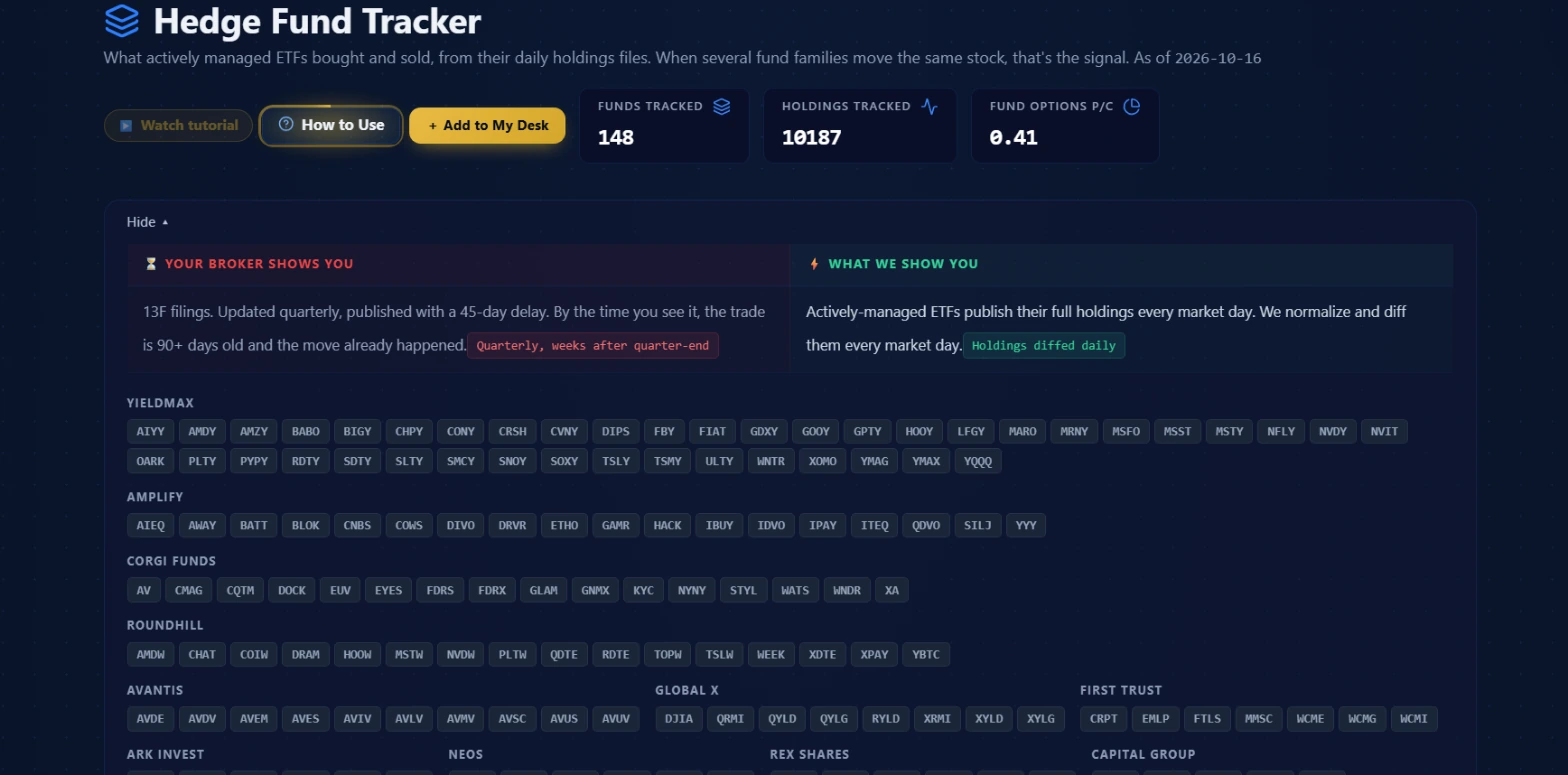 The page header from October 16, 2026: 148 funds tracked, 10,187 holdings tracked, Fund Options P/C at 0.41. Below that, the daily comparison strip and the full provider family grid.
The Morning Brief
The Morning Brief is the section I open first every morning. It sits below the value prop strip and is labeled "Biggest institutional moves since yesterday's close." Four quadrants lay out the key moves in parallel.
Top Buys shows the largest weight additions across all tracked funds. The unit on the right side of each row is pp, which stands for percentage points of portfolio weight. A +1.16 pp entry means the fund added 1.16 percentage points of its total portfolio to that name since the prior filing. This is not a share count. It is not a dollar amount. It is the fraction of the fund's entire holdings that shifted toward that ticker overnight. Below each ticker is the list of responsible funds, and a conviction score to the right.
Top Sells is the same structure in reverse. Largest weight reductions across all tracked funds, listed with the pp change as a negative number and the responsible funds named below the ticker.
Multi-Provider is the quadrant I weight most heavily. The description on the page reads "Multiple independent fund families moving the same ticker." A number shows how many providers are involved, and the BUYING or SELLING direction badge makes the signal immediate to read. In the screenshot below, one name shows 2 providers buying; others show 4 and 5 providers selling. A 5-provider signal means five distinct, independently managed fund families all reduced the same position overnight. That is not a coincidence, and it is not one desk following another.
Active Streaks is the fourth quadrant. These are tickers where a single fund has been buying or selling the same name on consecutive days. A flame icon and a count like "9d down" means a fund has been trimming or exiting that name for nine consecutive trading days. Streaks show persistent single-manager conviction over time, not a single-morning allocation decision.
A fifth element can appear in the fourth quadrant when relevant: New Options. When funds open new options positions in their underlying holdings, those appear there with a directional note.
The Morning Brief collapses when you click the header. Once you have read the key signals, collapsing it gives you a cleaner view of the rest of the page.
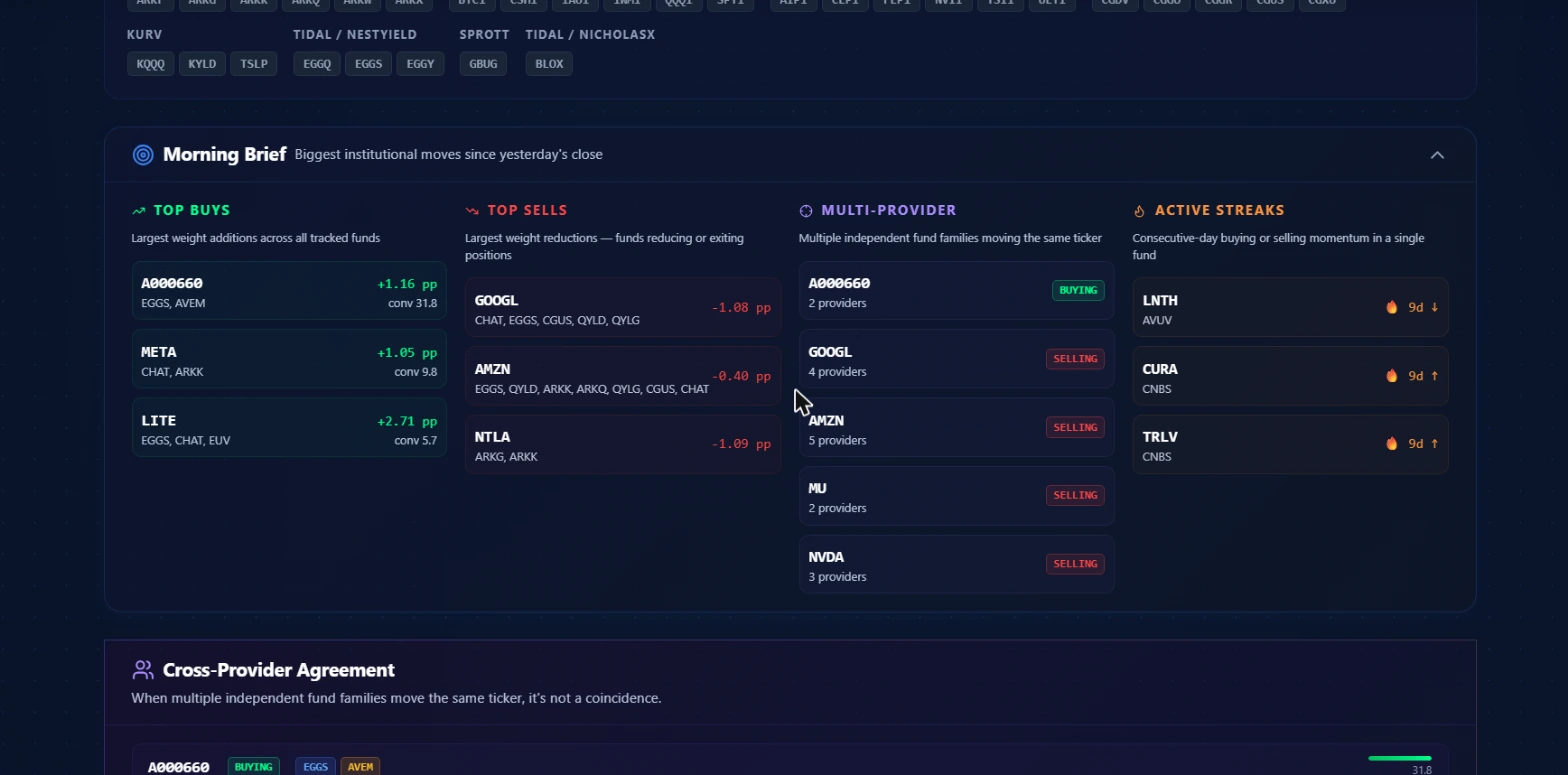 The Morning Brief from October 16, 2026. Top Buys (green) and Top Sells (red) show the largest pp weight moves. Multi-Provider (purple) lists names where multiple fund families agreed on direction. Active Streaks (orange) surfaces consecutive-day momentum within a single fund.
Cross-Provider Agreement
Below the Morning Brief sits the Cross-Provider Agreement section. The subtitle reads: "When multiple independent fund families move the same ticker, it's not a coincidence."
The conviction filter is a minimum provider count of two. A signal only appears here when at least two independent provider families moved the same name in the same direction on the same morning. BUYING rows show names where multiple families added weight. SELLING rows show names where multiple families reduced.
Each row shows the ticker, a direction badge, the individual ETF fund badges responsible, and a conviction bar on the right side. The bar is relative, not absolute. The strongest signal in the current list fills the bar completely. The number beside it is the raw conviction score. The score is unbounded on any given day, so it scales to the leader in the list. Read the bar as a comparison within the day's signals, not as a fixed absolute threshold from session to session.
The conviction score itself is AUM-weighted. A large fund moving 2% of its portfolio weighs more than three small funds each moving 0.1%. That weighting is computed on the server side by the data provider. What matters for reading the page is that a high score reflects meaningful allocation movement across funds with genuine scale, not just several small ETFs each making a tiny trim.
When this section shows no signals, it means no two fund families moved the same name in the same direction on that day. That happens on quiet mornings. It is useful data on its own: it tells you there is no convergent institutional signal in the current session.
The premium sections
Free users see everything above. The sections below require a premium subscription.
Activity is the raw feed of position changes. A toggle switches between Today and This Week. A filter bar lets you narrow by type (Accumulating, Reducing, Options) and by individual fund. Each row shows the fund ticker, the underlying stock ticker, company name, a signal type, the weight delta in pp, the weight transition from the prior filing to the current one shown as a before/after percentage, and the shares delta as a percentage change.
Four signal types appear:
- NEW means the fund opened a fresh position in this name.
- ADDING means an existing position grew.
- TRIMMING means the fund reduced but did not exit.
- EXITED means the position was closed entirely.
The difference between TRIMMING and EXITED matters when reading a morning brief signal. A 5-provider signal where all five funds show TRIMMING is a different read from one where all five show EXITED.
Signals shows the aggregated buying and selling table ranked by conviction score, without the two-provider filter applied. Signals with two or more providers get a purple provider count badge. This gives you the full picture of what the tracked universe did, not just the names where multiple families agreed.
Sector Flow nets every fund's weight change by sector in percentage points to show which sectors are gaining and losing allocation. If Technology is gaining net weight while Energy is losing it, that rotation shows up here. The numbers are not the same as what the main Sectors page shows, which is based on options flow. This is portfolio allocation movement at the fund level.
Divergences surfaces names where fund families went in opposite directions. One family buying while another sells the same name. The most notable version is an intra-shop conflict: two funds from the same provider family on opposite sides. An intra-shop conflict gets an orange badge. Each divergence row has a History button that pulls a 90-day timeline of how long that particular disagreement has persisted. The Intra-Shop Conflicts banner surfaces every same-family clash from the last 30 days at the top of the section.
Upcoming Rebalances lists scheduled index reconstitutions over the next 90 days. Index rebalances produce mechanical, predictable buying and selling as funds tracking an index must adjust constituents to match updated weights. WisdomTree publishes its planned ticker lists roughly one to two weeks before each reconstitution; when that data is available, the row shows a count badge you can click to see the names. Foreign listings are noted but do not trade on US exchanges.
Three workflows
Morning pre-market routine
Open the Hedge Fund Tracker before 9:30 AM ET. Read the Multi-Provider quadrant in the Morning Brief first. If names appear there with three or more providers, those go on the pre-market watchlist. Then check Active Streaks: a name on a nine-day streak is a fund expressing sustained conviction, not a one-morning allocation. Add those to the same list. Collapse the Morning Brief, scroll to Cross-Provider Agreement, and see if any streak names also appear there. A name showing up in both streaks and cross-provider agreement has convergent evidence from two different angles of the same data. That is the version worth having ready when the open comes.
Looking for multiple fund families on one name
Start with a name you already care about. Use the Activity section with the fund filter to pull every tracked ETF that touched that ticker this week. Look at the signal types across funds: is one family trimming while two others are adding? Or are all the moves going the same direction? If three funds from different families show ADDING on the same name over two or three consecutive days, that pattern is worth comparing against the Multi-Provider column to see whether it already surfaced as a signal. The distinction between one family and three matters because independent managers cannot coordinate.
Checking a name from options flow against the ETF picture
You see a name in Unusual Activity with a lopsided bullish lean or a significant sweep. Before treating that flow as a directional bet, pull up the Activity section and search the ticker. Has any tracked ETF opened or added to that position in the past week? If yes, the options flow and the ETF positioning are pointing the same direction. Both sources reflect real capital committed through different instruments. If the Activity section shows TRIMMING or EXITED on the same name from multiple funds, you have conflicting signals and should look deeper before committing.
How it pairs with other tools
Unusual Activity is the most direct complement. Options flow shows what traders expect a stock to do in the near term. ETF positioning shows what institutional portfolio managers have committed capital to over recent sessions. When both lean the same way, the combined case is stronger than either alone.
Ticker Search is the starting point for any ticker that surfaces in the Morning Brief or conviction table. Pull up the name to see fundamental context before drawing conclusions from ETF positioning alone. The ETF signal tells you direction and recent commitment; ticker search tells you what the company does and where it sits in its sector.
Insider Activity shows SEC Form 4 filings from executives and directors. If a company's insiders are buying at the same time ETF managers are building positions, that is another layer of alignment. Both sources have their own timing and context. They do not replace each other, but the combination narrows the interpretation.
Politicians tracks congressional trading disclosures. The data is sourced from official government filings, which are public domain. A name appearing in ETF buying and in recent congressional disclosures is a data point worth flagging before you form a view.
Common mistakes
Reading pp as a percentage return
Weight delta is not a gain or loss on the stock. A +1.05 pp entry on a name means the fund added 1.05 percentage points of portfolio weight to that position, not that the stock moved 1.05%. This is a portfolio sizing change, measured in the fund's own allocation units. Reading it as price performance produces a wrong interpretation of the data.
Treating a single-fund signal as conviction
The Activity section shows every ETF's individual moves, including funds acting alone. One fund opening a new position is one manager's decision. Cross-provider agreement requires two or more independent families moving the same way. A single fund can be wrong, hedging, or rebalancing for reasons having nothing to do with a stock's near-term direction. Two independent families who cannot coordinate are harder to explain away.
Ignoring direction on divergences
A divergence is not a sign that nobody knows what to do. It means two groups with different research and portfolios reached opposite conclusions about the same name. Divergences tend to resolve in the direction of the larger buyer. Looking at the weight deltas on each side in pp tells you which side committed more capital. The larger commitment is the more relevant data point when the two camps disagree.
Not checking Activity after a Morning Brief signal
The Morning Brief gives you the summary. Activity gives you the raw rows. A 5-provider selling signal in Multi-Provider is notable, but going into Activity and checking whether those funds show TRIMMING versus EXITED changes the interpretation. A full exit from five providers carries different weight than a slight trim from five providers. That distinction lives in the Activity table, not the summary.
Treating the conviction bar as a fixed scale
The bar in Cross-Provider Agreement is relative to the strongest signal in the current list. A bar that is 80% filled on a quiet day represents a smaller absolute conviction score than a bar that is 40% filled on a busy day. The number beside the bar is the actual score. Read both together, not the visual bar alone.
What the tracker does not tell you
The diff shows net end-of-day position changes. It cannot show you when within a trading day a fund made its move, or how many individual transactions composed the net change.
Conviction scores are AUM-weighted and computed by the underlying data provider. The formula is not exposed in the platform. Scores are best read comparatively within a single day's signals, not as fixed absolute thresholds from session to session.
The fund universe covers the actively managed ETFs in the tracker's roster. There are other institutional investors, including unlisted hedge funds, pension funds, and mutual funds, whose positioning is not visible here at daily granularity. 13F coverage is broader but delayed. This is one source of institutional allocation data, not a complete market picture.
The Fund Options P/C counter reflects the tracked funds' own options positions. It tells you about this specific universe of actively managed ETFs, nothing outside it.
Foreign tickers can appear in Activity when a tracked fund holds non-US listings. These do not trade on US exchanges. US-listed tickers are the actionable ones for most readers.
The tracker cannot tell you why a fund moved. A position added this morning could be fresh conviction, a rebalance to maintain target weights after a prior price move, a substitution trade, or a response to a redemption. The data does not distinguish between them. Whether conviction-score thresholds have consistent predictive value across different market regimes is something I have not measured yet, and neither has anyone published on it in the context of this specific dataset. That question is still open.
Options and investments involve real risk of loss, including the potential to lose more than you put in. Nothing in this guide is financial advice or a recommendation to buy or sell any security. Read the data, form your own view, and manage your position sizing carefully.