Loading...

Calendars & Intel deep dive · 14 min read
How to Use the Economic Calendar
A complete walkthrough of the Economic Calendar: every column, every impact tier, the Kalshi prediction-market overlay, and how to build a Sunday prep routine that keeps macro events from blindsiding your open positions.
Open the tool →Hey guys, Art from TraderMatrix here. The page I want to walk through today is the Economic Calendar, found under Calendars & Intel in the nav. It lives at /economic-calendar and the honest description is: it's a table of macro releases and Fed speaker events for the current week, sorted by date and time, with a forecast column, a previous-value column, and an actual column that fills in live once each report prints.
That sounds simple. The reason it earns its own guide is what you actually do with it, which is something most traders either skip entirely or get backwards.
The short version:
- Three impact tiers: High (red), Medium (amber), Low (green). Only High ones require active planning.
- Markets price the forecast before release. The actual number matters far less than how far it misses the forecast.
- Forecast column shows consensus; Previous shows the last reading. The gap between the two tells you how much surprise is possible.
- The Actual column fills in once each report prints. High-impact rows also get a Kalshi prediction-market overlay with probability-weighted outcomes.
- Three tabs: All, Economic Reports, Fed Speakers. Use the tabs to isolate scheduled data prints from speaker events.
- CSV export is on the right. The page shows this week only.
What this page is and what it isn't
The Economic Calendar is not a trading signal. It doesn't tell you whether to buy or sell anything. What it tells you is which macro events are scheduled this week, how market-moving each one has historically been, and what the consensus expects from each one before it prints.
That information changes how you manage existing positions. If you're holding short premium into Thursday and there's a high-impact jobs report at 8:30 AM on Thursday morning, you need to know that before Tuesday, not after it happens. That's the job this page does.
A lot of traders treat economic calendars as noise and tune them out. The ones who come back to me with questions about why their spread blew up on a random Thursday morning are usually the ones who didn't look. The correlation between high-impact prints and volatility spikes isn't perfect, but it's real enough to be worth ten minutes every Sunday.
The page covers U.S. events. Data comes from ForexFactory. Release times are in Eastern Time. The calendar shows the current week; it doesn't let you browse months forward.
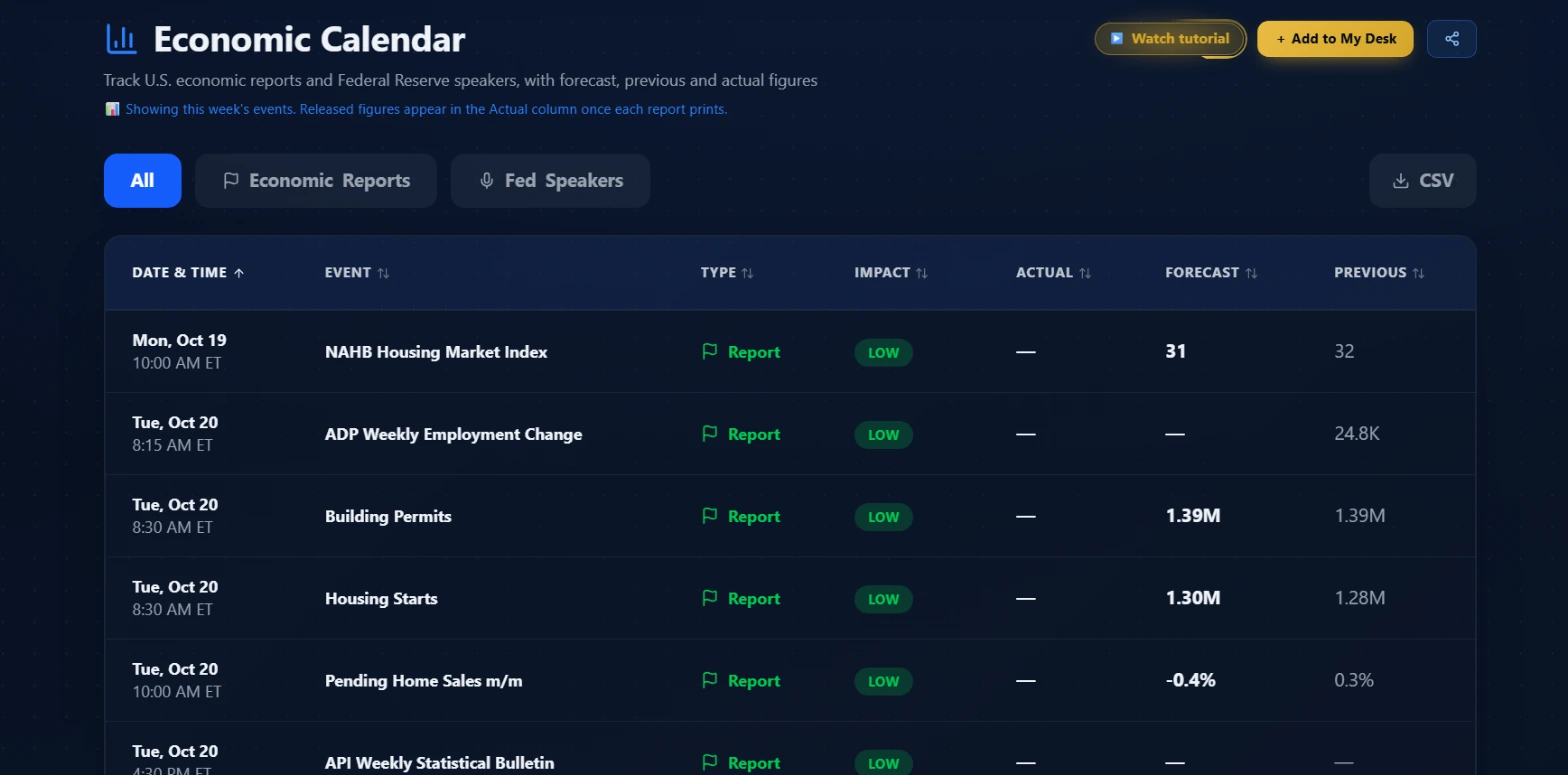 The header reads "Track U.S. economic reports and Federal Reserve speakers, with forecast, previous and actual figures." Released figures appear in the Actual column once each report prints. Date and Time columns are sortable.
The three impact tiers
The Impact column is the most important thing on the page. Every row carries one of three labels.
High (red badge)
These are the prints that move the broad market. CPI, FOMC rate decisions, Nonfarm Payrolls, GDP, PCE. When a high-impact event is scheduled, the options market knows it's coming: implied volatility on index ETFs and macro-sensitive names expands in the days leading up to the release, then collapses immediately after the number hits. That IV expansion and collapse pattern matters whether you're long or short premium.
If you hold options positions that expire within two sessions of a high-impact event, you need a plan for that position before the release. The plan might be to close before, to hold through and accept the binary risk, or to hedge. Whatever you decide, decide it in advance rather than scrambling at 8:20 AM.
Medium (amber badge)
These move sectors, not the whole market. Retail sales moves consumer discretionary and staples names. Manufacturing PMI hits industrials. Initial jobless claims is a Thursday staple that moves rate expectations when it surprises sharply. If you hold concentrated positions in names that directly touch the release category, treat medium prints the same way you treat high prints for your specific names.
Low (green badge)
Regional surveys, secondary housing data, Fed speakers outside FOMC windows, commodity inventory numbers. These are background information. They rarely cause market-wide moves. If a Fed governor is speaking on a Thursday when the Chair spoke Tuesday, and there's no FOMC meeting in sight, the Low badge is usually right.
The one exception worth noting: any Fed speaker gets elevated when markets are skittish about the rate path. A normally low-impact speech can move things when the environment is tense. Use the Low badge as a starting screen, not a guarantee.
Key point: High-impact events require active position management. Medium events require sector awareness. Low events can usually be ignored unless the market climate is unusual.
The columns
Date & Time
All times are in Eastern Time. The column is sortable; the default is chronological.
Event
The release name as ForexFactory titles it. High-impact rows have an info icon next to the name. Click it and you get a plain-English explanation of what the release measures and how it tends to move markets. Those tooltips cover FOMC decisions, CPI, PCE, NFP, jobless claims, GDP, retail sales, PMI surveys, PPI, consumer sentiment, JOLTS, and Fed Chair testimony with tailored copy. Any other high-impact event falls back to a generic "elevated volatility around this release" explanation.
Type
Either Report (a data release) or Speaker (a Fed official speaking publicly). The Economic Reports tab filters to data only; the Fed Speakers tab filters to speaking events. The All tab shows both.
Impact
The badge described above.
Actual
Empty until the report prints. Once the number is released, it fills in here. This is what the market actually received, versus what it was expecting from the Forecast column.
Forecast
The consensus analyst estimate going in. Markets trade the forecast, not the unknown. By the time the number releases, the consensus has been priced for days. What moves the market is how far the actual deviates from this column.
Previous
The reading from the last reporting period, sometimes revised at the time of the new release. The trend in the previous column matters. A jobs report showing three consecutive months of slowing payroll additions is a different context than a single weak month after two strong ones.
Watch out: The Previous value can be revised upward or downward at the same time a new number is released. The column on the calendar shows the originally-published previous value, which may differ from what gets cited in news coverage if a revision landed with the new print.
The Kalshi overlay on high-impact rows
For events classified as high-impact, the info tooltip also shows live prediction-market odds from Kalshi. This is a probability-weighted view of outcome scenarios based on real-money market activity on the prediction platform, not analyst consensus.
What you see in the tooltip: a headline that summarizes the market, then a list of outcome buckets with their current probabilities as percentages. These update as Kalshi markets trade.
This matters for options traders specifically because Kalshi odds reflect where money is positioned for specific outcome ranges, not just a point estimate. If the consensus forecast is 0.3% and Kalshi shows most of the probability weight above that number, the market is skewed toward an upside surprise. That context is different from the single-number consensus estimate.
Kalshi odds are matched to calendar rows by keyword, with the most specific match chosen when a release name overlaps multiple markets. The source label in the tooltip reads "Live odds from Kalshi prediction markets, a crowd forecast, not advice." The Kalshi fetch runs separately from the main calendar data, so a Kalshi outage never breaks the calendar itself. The tooltip shows the educational content either way; the odds section only appears when a live match exists.
The three tabs
All
Every USD event for the current week: data reports and Fed speakers together. This is the default view and the one to start with.
Economic Reports
Filters to data releases only. This is what I use when doing pre-week position review, because the real question is "what data hits this week and when." Speaker events are separate noise.
Fed Speakers
Filters to speaking events. Useful when FOMC week is approaching or when the rate path is actively in question and you want to track every official comment. Outside of those windows, a standalone look at speakers is lower priority for most setups.
Sorting the table
Every column header is clickable and sorts the table. The default sort is chronological by date and time. Clicking Impact sorts highest-impact events to the top on first click. Clicking Actual, Forecast, or Previous sorts by magnitude with a parsing layer that handles ForexFactory's mixed display formats: percentages like "0.3%", scaled figures like "225K" or "-1.5B", and plain numbers like "52.3" each sort within their own unit type and don't mix across unit types in the same sort pass.
Missing values, rows where Actual isn't in yet or where Forecast is unavailable, always sort last in both directions. Flipping the sort direction doesn't bury real numbers under a wall of dashes.
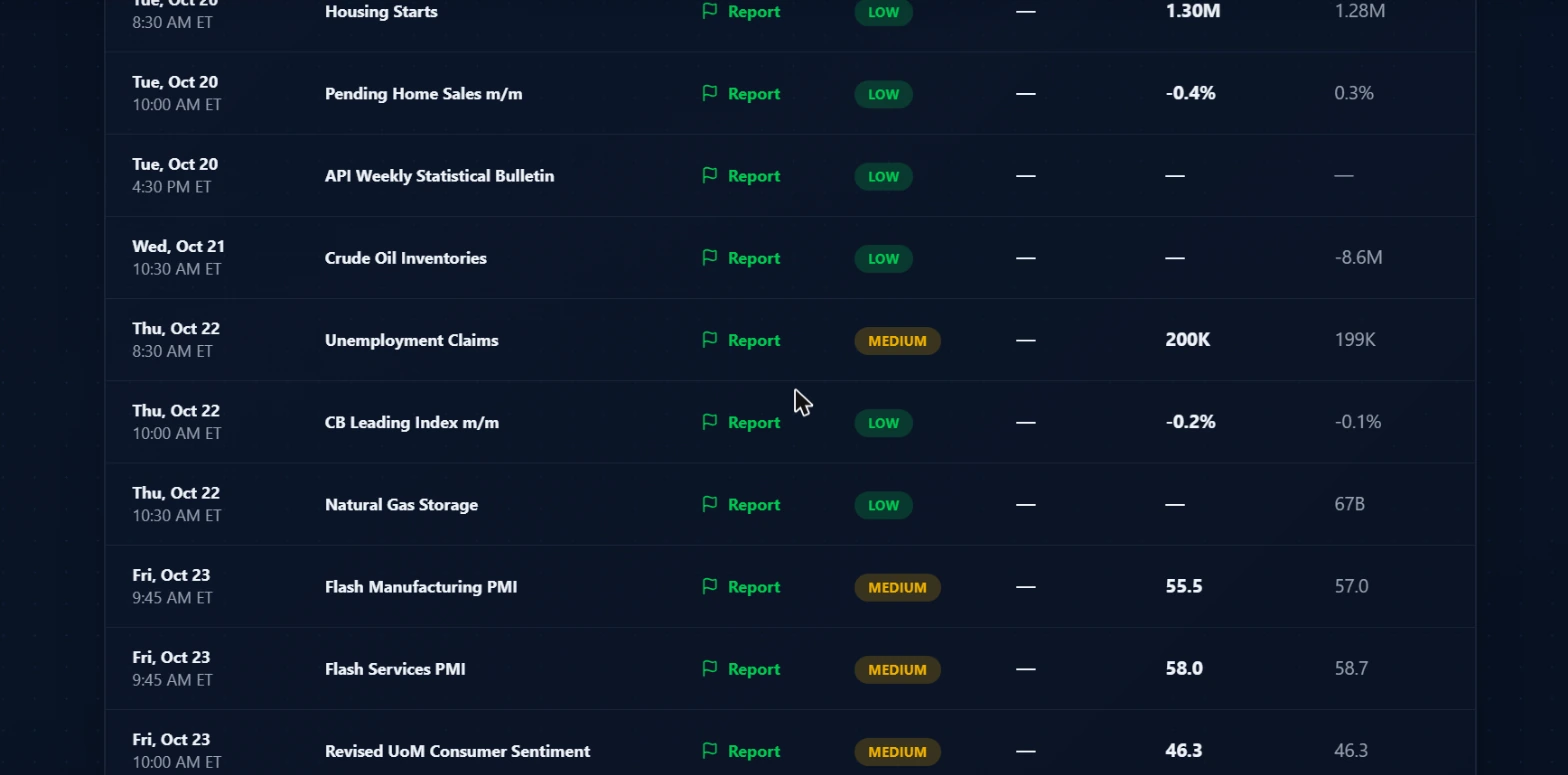 Mid-week releases from the same week. Unemployment Claims on Thursday, Flash PMI prints on Friday. All Actual cells are empty because these haven't printed yet. The Forecast column is the only forward-looking number visible before release.
CSV export
The Download CSV button at the right end of the tab bar exports exactly the rows currently visible in the table, in the order they're currently sorted. If you have the Economic Reports tab selected and sorted by Impact descending, that's what goes into the file.
The CSV includes: Date, Time (ET), Event, Type, Impact, Actual, Forecast, Previous. The filename stamps the filter and the ET date. Useful for pre-week prep in a spreadsheet or for building a log of how actuals compared to forecasts over time.
The Add to My Desk button
The gold "+ Add to My Desk" button at the top right adds the Economic Calendar as a tile to your home at My Desk. If macro awareness is part of your daily routine, having it on your desk means it's visible immediately on login without navigating separately to it.
Three workflows
Sunday week prep
This is the most valuable workflow on the page and the one that takes the least time to do right.
Open the calendar before the new trading week starts. Go through the High-impact events first. For each one, note the date, the time ET, the event name, and the forecast.
For each high-impact event, check your open positions. Ask two questions: does this position expire within two sessions of this event, and is this position in a name that would move hard on this specific release? A consumer staples spread has different CPI exposure than a tech spread. CPI moves rate expectations broadly; it's not sector-neutral, but it hits some positions harder than others.
For every position that overlaps with a high-impact event, make the decision now. Close early, hold through and accept the binary risk, or put a hedge on. Any of those is better than scrambling at 8:20 AM when the event is ten minutes away.
Medium-impact events get a second pass. If you hold positions in names directly tied to the release category, give them the same check.
Low-impact events: skim and move on. This whole review takes about ten minutes.
Try this: Before Monday open, open the Economic Reports tab, sort by Impact descending, and scroll to every High row. Those are the only ones that need active position review. Copy the date, time, and name into wherever you track your week.
Event-day risk check before holding short premium
On a day where a high-impact event is scheduled, the practical question before the open is whether you're holding short premium that can get blown out by an IV spike or a gap move.
Short premium on high-impact days runs a specific risk. In the days leading up to a high-impact event, IV typically expands because the market is pricing the uncertainty. If you've already sold into that elevated IV in the days before the event, you're in a structurally better position. If you're entering new short premium on the morning of the event itself, you're selling into the spike: you collect more premium, but you're also taking the binary outcome risk without the prior days of time decay.
After the number prints and IV collapses, the directional move is made. Adding to existing positions in the post-print trend, with lower IV and known direction, is usually the lower-friction version of an event-driven trade. The calendar shows you three days in advance which mornings carry this dynamic.
Watch out: Opening short premium on the morning of a high-impact event means taking on binary outcome risk without the prior days of time decay. Decide the night before, not at 8:25 AM.
Pairing with Market Health and GEX
The Economic Calendar answers "what's scheduled." It doesn't answer how amplified the market reaction might be on a given day.
Two tools on TraderMatrix provide that context.
Market Health shows the current composite regime reading. A high-impact event landing on a High Stress day in the Market Health regime versus a Calm day produces different environments. On a Calm day with positive breadth, a jobs report miss might cause a few minutes of volatility and then recover. On a High Stress day with deteriorating breadth, the same miss can extend into a multi-hour selloff. Check the Market Health reading before a high-impact event for context on how the backdrop might absorb or amplify the surprise.
GEX (Gamma Exposure) shows where dealer gamma exposure sits on the index and major single names. High-impact macro events that land on high-GEX days tend to produce larger realized moves because dealers need to rehedge in bulk as price moves through strike clusters. When spot crosses a large gamma cluster, dealers who are short gamma buy or sell aggressively to stay hedged, which adds to the move's size. The calendar tells you when a catalyst is coming; GEX tells you how much structural amplification exists in the current options market.
Pairing all three is straightforward. Open the calendar to identify the event and timing. Check Market Health for regime context. Check GEX for structural amplification. Then decide whether open positions need adjustment before the release.
Common mistakes
Treating the forecast as the move
The forecast is not the number. The forecast is what's already priced. A CPI print of 0.3% when the forecast was 0.3% is a non-event. The same 0.3% print when the forecast was 0.2% is a miss that can move rates, bonds, and equities in seconds. The table shows you both numbers; the gap between them is the actual risk you're taking.
Ignoring Low-impact speaker events during sensitive periods
The Low badge is calibrated for normal environments. During FOMC weeks, in the middle of an inflation data streak, or when markets are actively pricing a rate-path shift, a Fed official comment that would normally be low-impact can move things. Use the Low badge as a filter, but apply judgment when the environment is elevated.
Not using the tabs
The All tab is useful for a first pass. But if you're specifically asking "what data releases hit Thursday?" the Economic Reports tab gives you a cleaner answer faster. The tabs save you from scrolling past speaker events when you don't care about them.
Looking at it on the event day
The point of the calendar is pre-positioning, not event-day reaction. If you're opening the page at 8:20 AM because you heard something is coming at 8:30 AM, you've missed the window. The value is in seeing the week's events on Sunday and making decisions days in advance.
Assuming the previous value is final
Previous readings get revised. The Nonfarm Payrolls number from last month gets revised alongside this month's release. If the revision is significant, it can move markets even before the new number is reported. The Previous column on the calendar shows the originally-published figure; revisions show up in the news and in market reactions but not retroactively in the calendar.
What the tool doesn't tell you
The Economic Calendar shows what's scheduled, what was expected, and what printed. It doesn't show the market's initial reaction, how long that reaction lasted, or whether the move was orderly or gapped.
It also doesn't tell you which specific sectors or names are most exposed to each release. That context comes from knowing your positions and understanding which data points drive the categories you're trading. A real estate options position has a different CPI exposure than a tech options position, even if CPI moves both broadly.
For names you're watching before a high-impact event, pairing the calendar with the Unusual Activity feed in the 48 hours before the release can show whether large traders are already positioning for a specific outcome. Sweeps on TLT or GLD heading into a CPI print are someone's read on where the number lands. The calendar gives you the event; Unusual Activity gives you the current positioning around it.
The calendar covers USD events only. International releases, EUR CPI, BOE decisions, Bank of Japan, are not included and need a separate source if you trade names with significant international exposure.
For company earnings announcements, the calendar doesn't cover those. Those are on the Earnings page, which is a separate data surface. If you're managing a book with both macro releases and individual earnings dates, you need both pages open together.
Options trading involves real risk of loss, including potentially more than the amount you invest. Nothing in this guide is financial advice; it's an explanation of how the tool works and how to build a routine around macro risk. Do your own research, manage your position sizing carefully, and make decisions about high-impact event exposure before those events happen rather than reacting to them afterward.