Loading...

Signal Scanners deep dive · 16 min read
How to Read the Breaking Out Triangle Scanner
Walk every field, filter, and card on the Breaking Out Triangle page, with a full explanation of the descending-triangle pattern and how the detection engine scores and surfaces setups.
Open the tool →Hey guys, Art from TraderMatrix here. Today we're walking through the Breaking Out Triangle scanner, and I want to take you through it properly because there's more going on under the hood than most people notice from a quick look.
Before we get into the page itself, I need to explain what a descending triangle is and what it means when one breaks out. If you're already deep in technical analysis, skim ahead. If you're newer to chart patterns, read this part carefully.
The short version:
- A descending triangle is a compression pattern: lower highs converging toward a flat support floor. The scanner tracks the bullish break only.
- CONFIRMED means price already closed above the falling resistance. FORMING means the pattern is still building.
- The STRENGTH badge reflects the triangle score (0-100): STRONG is 70 or above, weighted 70% on structure quality and 30% on breakout quality.
- The invalidation on every confirmed card is the old resistance level: a close back below says the breakout failed.
- After the close, enable Tight coils, set STRENGTH to Strong, and filter THROUGH TRIANGLE to 80%+ for the most time-sensitive situations.
What a descending triangle is
Price doesn't move in straight lines. It swings, reacts, and compresses while buyers and sellers fight to establish control. A descending triangle is a compression pattern where that fight has a recognizable shape.
The structure has two converging lines. The bottom line is flat, or close to it: buyers keep stepping in at the same general price level session after session, refusing to let the stock close below that floor. The top line is descending: every time the stock rallies, sellers come in at a slightly lower level than the time before. The result is a series of lower highs compressing toward a flat support floor.
Those two lines converge toward a point called the apex. The longer the triangle runs, the less room price has between them. At some point the structure has to resolve. Either buyers finally capitulate and the floor breaks (bearish), or sellers run out of steam and price closes above the falling resistance line (bullish). This scanner tracks the bullish outcome only: a confirmed close above that falling resistance ceiling.
Most people don't see a breakout coming because they weren't watching during the compression. By the time the break is obvious and the news is buzzing, the move has already happened. The scanner catches the structure during formation, so when it confirms, you already know the support level, the resistance level, how compressed the range is, and you have a clearly defined line to watch for failure.
One thing worth saying clearly: the descending triangle can and does resolve downward too. The scanner only flags the upside break. Whether that break holds or fails is a judgment call you make using flow, GEX, and your own market read.
Key point: This scanner tracks the bullish outcome only. The same compression that can break out upward can also break the floor and fail downward. Flow and GEX are what you use to judge which is more likely.
What the scanner does that a chart alert can't
You could set a breakout alert on a stock you're already watching. What you can't easily do manually is scan hundreds of names every session, identify every active descending triangle structure, rank them by how tight the coil is, measure how much room is left before the apex, and tell you the exact support and resistance levels at the time the break fires.
That's what this page does. It runs the detection engine across the full ticker universe, pulls out every name with an active descending triangle (either forming or already broken out), and lays them out in cards with the full geometric context attached.
The page lives at /breaking-out-triangle under Find Setups in the nav.
The page, top to bottom
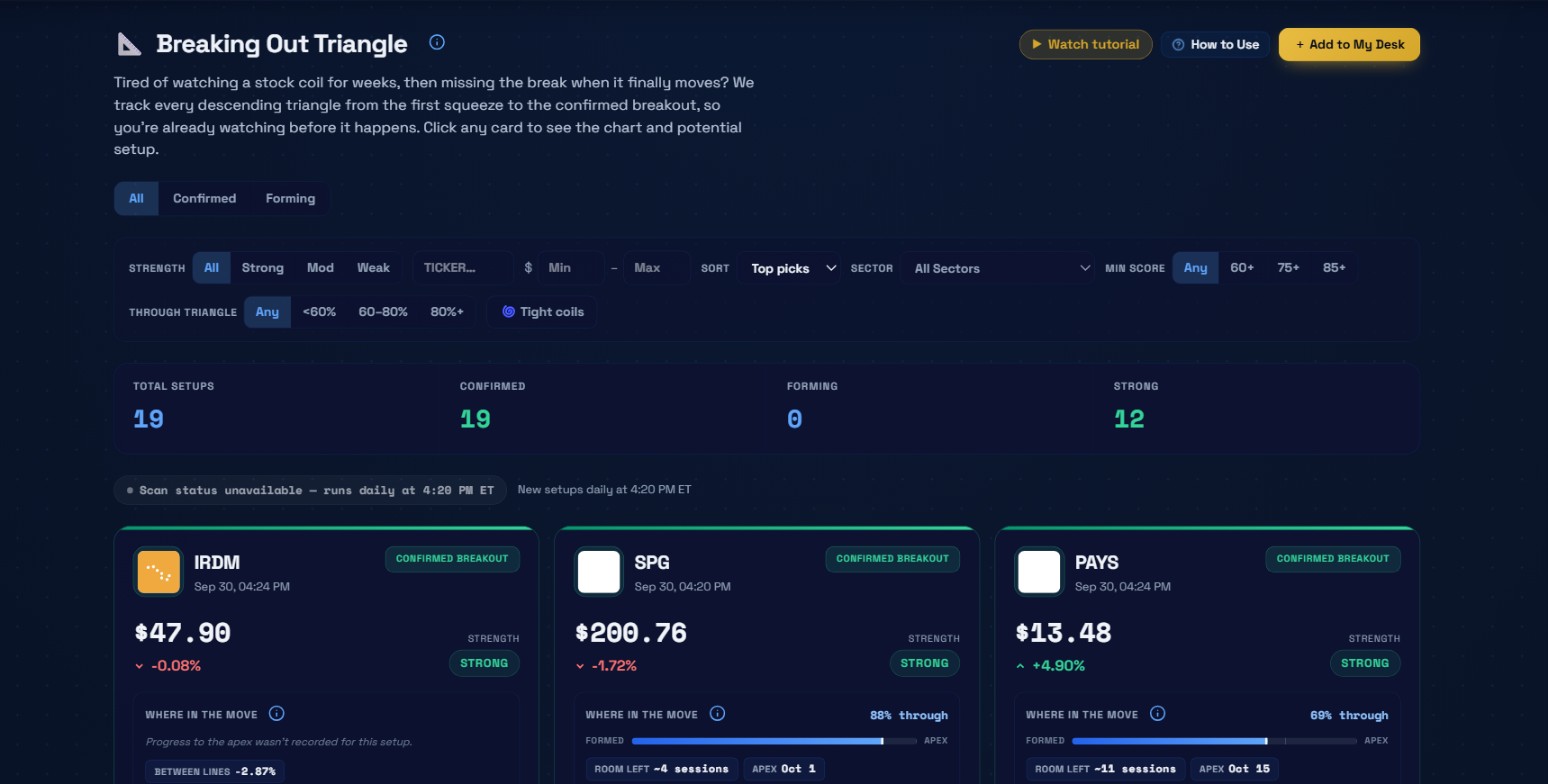 The full page from the September 30, 2026 session. All 19 setups are confirmed breakouts that day. IRDM, SPG, and PAYS lead the first row.
At the top is the title and blurb: "We track every descending triangle from the first squeeze to the confirmed breakout, so you're already watching before it happens."
Three action buttons to the right: Watch tutorial, How to Use, and Add to My Desk. How to Use opens a sidebar with definitions for every field on the cards. Add to My Desk pins the scanner to your home screen.
Tabs: All, Confirmed, Forming
Below the blurb are three tabs: All, Confirmed, and Forming.
All is the default and shows both pattern states together. Confirmed filters to only the setups where price has already closed above the falling resistance line. Forming shows only the setups still inside the compression, where no break has happened yet.
On September 30, all 19 setups were confirmed and 0 were forming. That varies a lot by session. A strong market day can flip several forming setups to confirmed in one go. A quiet or weak session might produce no new breakouts at all.
A forming setup is a watch list item: the structure is there, you set an alert above resistance, and you wait for the trigger. A confirmed setup is a live situation: the break already happened, and your choices are to chase the initial move, wait for a retest, or skip it.
Try this: Use the Forming tab as a watch list. Set an alert above the resistance level and check back rather than watching live. The card will show as CONFIRMED when the break fires.
The filter bar
The filter bar has more levers than it looks like at first glance.
| Filter | What it does |
|---|---|
| STRENGTH | All, Strong, Mod, Weak. Filters by signal quality tier based on the triangle score. |
| Ticker | Plain text search for a specific name. |
| $ Min / Max | Filter by last price. Useful when targeting names in a specific range for options liquidity. |
| SORT | Top picks (default, confirmed before forming then by score), Percent Change, Volume, A-Z. |
| SECTOR | Queries the full universe for that sector, not just the loaded cards. Same taxonomy as Sector Flow. |
| MIN SCORE | Any, 60+, 75+, 85+. Filters by triangleScore, a 0-100 quality rating for the triangle geometry. |
| THROUGH TRIANGLE | Any, less than 60%, 60-80%, 80%+. How far through the formation-to-apex lifecycle the setup is. 80%+ means the apex is close. |
| Tight coils | Client-side toggle. Narrows to setups with a compressionRatio of 0.40 or below (recent range compressed to 40% of what it was at formation). |
Stat tiles
Four tiles: Total Setups, Confirmed, Forming, Strong. These update as you apply filters. On September 30 unfiltered: 19, 19, 0, 12. The 12 Strong tells you that two-thirds of the confirmed breakouts that session had a STRONG quality rating.
The card anatomy
Each card packs a lot into a small space. Here's every piece.
A thin color bar runs across the very top. Green gradient means confirmed breakout. Blue gradient means forming.
Below that: the company logo, ticker, timestamp, and the pattern badge in the top right corner.
Then: the current price in large monospace text, the day's percentage change in green or red, and the STRENGTH badge on the right showing STRONG, MOD, or WEAK.
WHERE IN THE MOVE
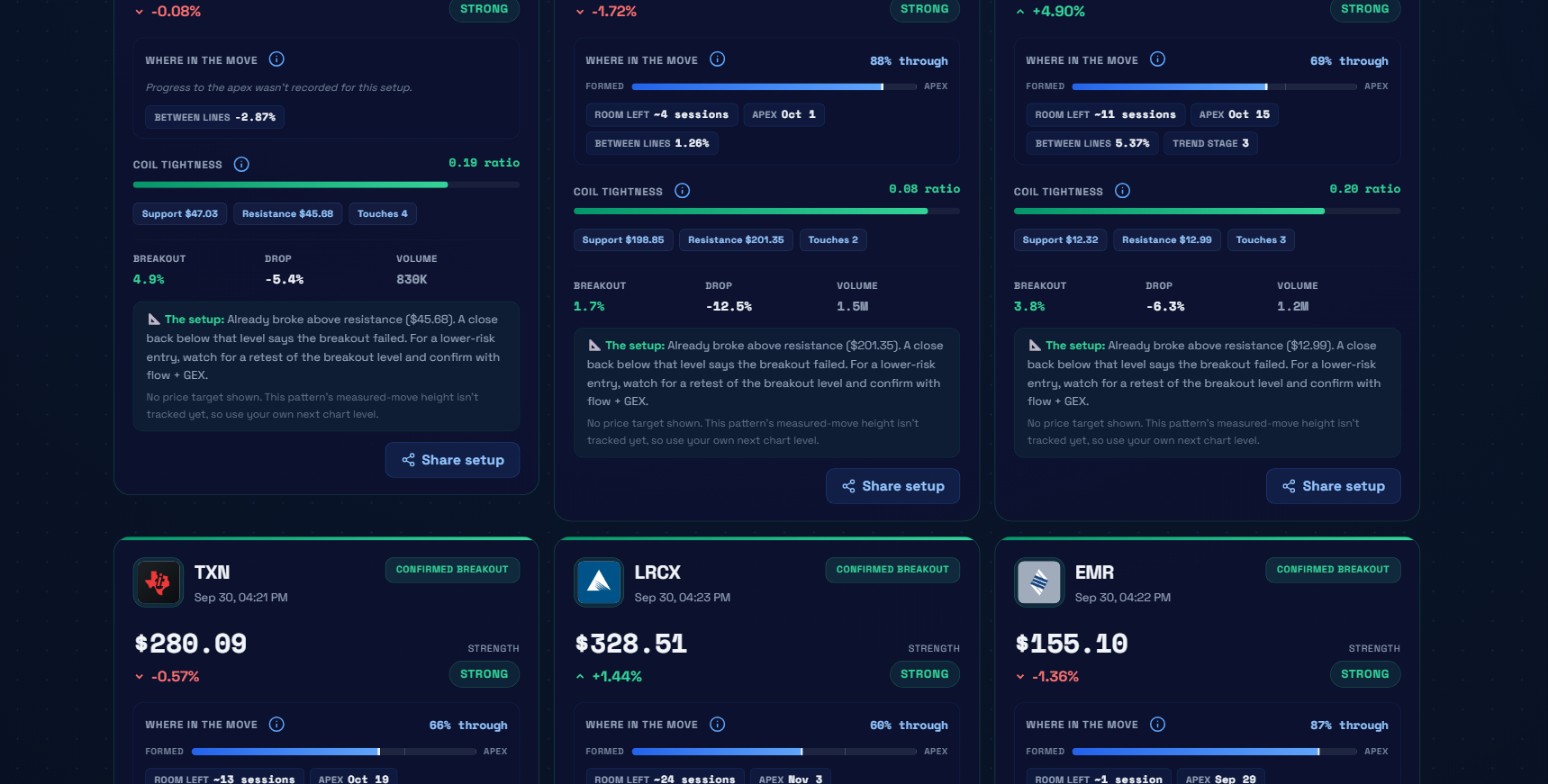 IRDM (ratio 0.19, 4.9% breakout), SPG (ratio 0.08, 1.7% breakout), and PAYS (ratio 0.20, 3.8% breakout) in full. Below them: TXN with 13 sessions of room left at 66% through, LRCX with 24 sessions at 60% through, and EMR at 87% through with only 1 session remaining.
The percentage at the right edge of this strip is triangleProgressPct: what percentage of the distance from the triangle formation to its apex has already been covered. SPG on September 30 was 88% through. PAYS was 69%. TXN was 66%. LRCX was 60%.
Below the percentage is a progress bar from FORMED to APEX.
Below that bar are up to four data points.
Room left is how many daily sessions remain before the two trendlines converge at the apex. This comes from the bars_to_vertex field in the detection engine. SPG showed 4 sessions of room. PAYS showed 11 sessions. TXN showed 13 sessions. LRCX showed 24 sessions. When it says "at the apex," the structure has run out of room.
Apex is the calendar date when the lines would converge at their current slopes. Computed from the trendline geometry, not from any price forecast.
Between lines is the current gap between the resistance line and the support floor, expressed as a percentage of price. This is vertex_gap_pct. SPG showed 1.26%. PAYS showed 5.37%. As the triangle tightens, this number shrinks. Under 2% is extremely compressed.
Trend stage, when shown, is the raw 1-4 classification the engine assigned to the anchor. The platform shows the number without a label because no outcome data has validated what each stage predicts. It's absent on setups where the engine didn't record one.
The tooltip on the page puts it plainly: "This describes the pattern geometry, not its odds." The band filters are for slicing the list by timeline, not for deciding which position in the range has better odds.
Watch out: THROUGH TRIANGLE at 90%+ with the setup still FORMING means the structure is running out of room without resolving bullishly. The longer no break fires at this stage, the higher the odds of a bearish breakdown instead.
Coil Tightness
The Coil Tightness bar shows the compressionRatio field. The display inverts the ratio so that tighter means fuller bar. The number shown to the right is the actual ratio.
SPG on September 30 had a ratio of 0.08. IRDM had 0.19. PAYS had 0.20. TXN and LRCX both showed 0.27.
The tooltip: "A tighter coil (lower ratio) means energy is building for a bigger break."
The geometry chips
Three chips below the coil bar: Support, Resistance, and Touches.
Support is the current price of the flat floor. Resistance is the current position of the falling ceiling. IRDM: Support $47.03, Resistance $45.68, Touches 4. SPG: Support $198.85, Resistance $201.35, Touches 2. PAYS: Support $12.32, Resistance $12.99, Touches 3. TXN: Support $254.45, Resistance $264.03, Touches 4. LRCX: Support $270.04, Resistance $302.93, Touches 2.
Touches counts how many times price tested the flat support floor. Four tests means four separate sessions where buyers stepped in at that level.
Bottom stats row
Three columns for each card:
- Breakout % (confirmed setups): how far the latest close sits above the resistance line. IRDM was 4.9% above. SPG was 1.7%. PAYS was 3.8%. TXN was 6.1%. LRCX was 8.4%. EMR was 10.1%.
- Vs Upper (forming setups): replaces Breakout % and shows how far price sits below the resistance ceiling.
- Drop %: how far the resistance line has fallen from its starting anchor. TXN showed -9.4%. LRCX showed -10.6%.
- Volume: the day's raw volume for context.
The setup note
For confirmed setups: "Already broke above resistance ($X). A close back below that level says the breakout failed. For a lower-risk entry, watch for a retest of the breakout level and confirm with flow + GEX."
For forming setups: "Entry trigger: a confirmed close above resistance ($X). A close below support ($Y) breaks the pattern down instead. Consider setting an alert above resistance rather than watching it live."
Every card also says: "No price target shown. This pattern's measured-move height is not tracked yet, so use your own next chart level."
The pattern height calculation is computed by the engine but not exposed through the API.
Reading the September 30 session
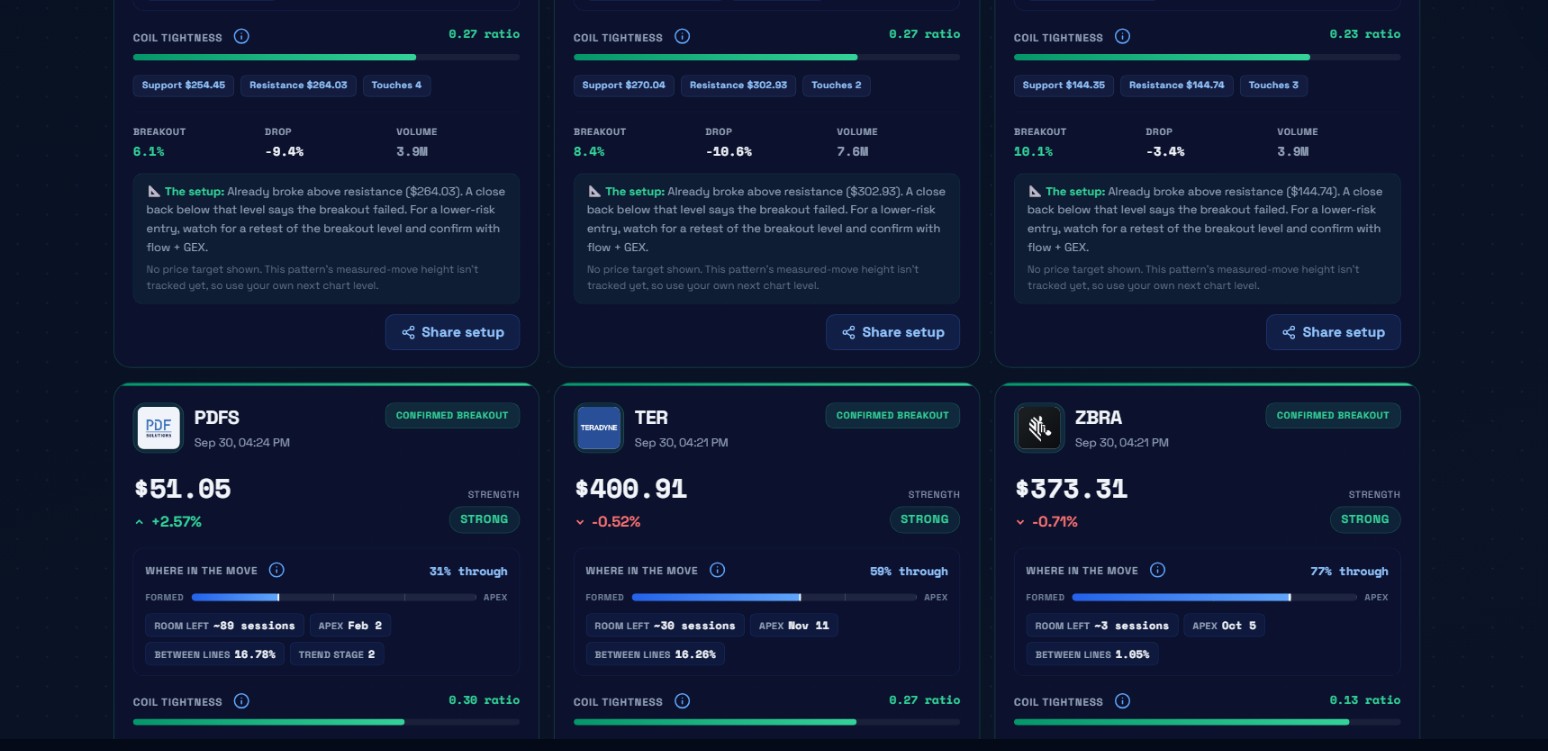 Three setups at different stages on the same session: PDFS is early (31% through, apex Feb 2), TER is mid-range (59% through, apex Nov 11), and ZBRA is late-stage (77% through, apex Oct 5, 3 sessions remaining, coil ratio 0.13).
The September 30 session shows how the same scan surfaces setups at very different stages.
PDFS at $51.05 was only 31% through its triangle, with 89 sessions of room left before an apex date of February 2. Between lines was 16.78%. Coil ratio 0.30.
TER at $400.91 was 59% through, 30 sessions of room, apex November 11. Between lines 16.26%. Coil ratio 0.27.
ZBRA at $373.31 was 77% through, only 3 sessions of room left, apex October 5. Between lines 1.05%. Coil ratio 0.13.
ZBRA is the one I'd pay closest attention to on that session. Three sessions to the apex. Between lines compressed to under 2%. Already confirmed above resistance. That setup has to resolve within the week. Either the move extends or it fails back below resistance and the structure collapses. There's no more waiting, and PDFS's 89 sessions of room gives you no frame of reference for how different that urgency feels.
Key point: A late-stage setup with only a few sessions before the apex forces a decision this week. Either the move extends or the structure collapses back below resistance. There is no more compression time available.
The chart modal and Apex levels
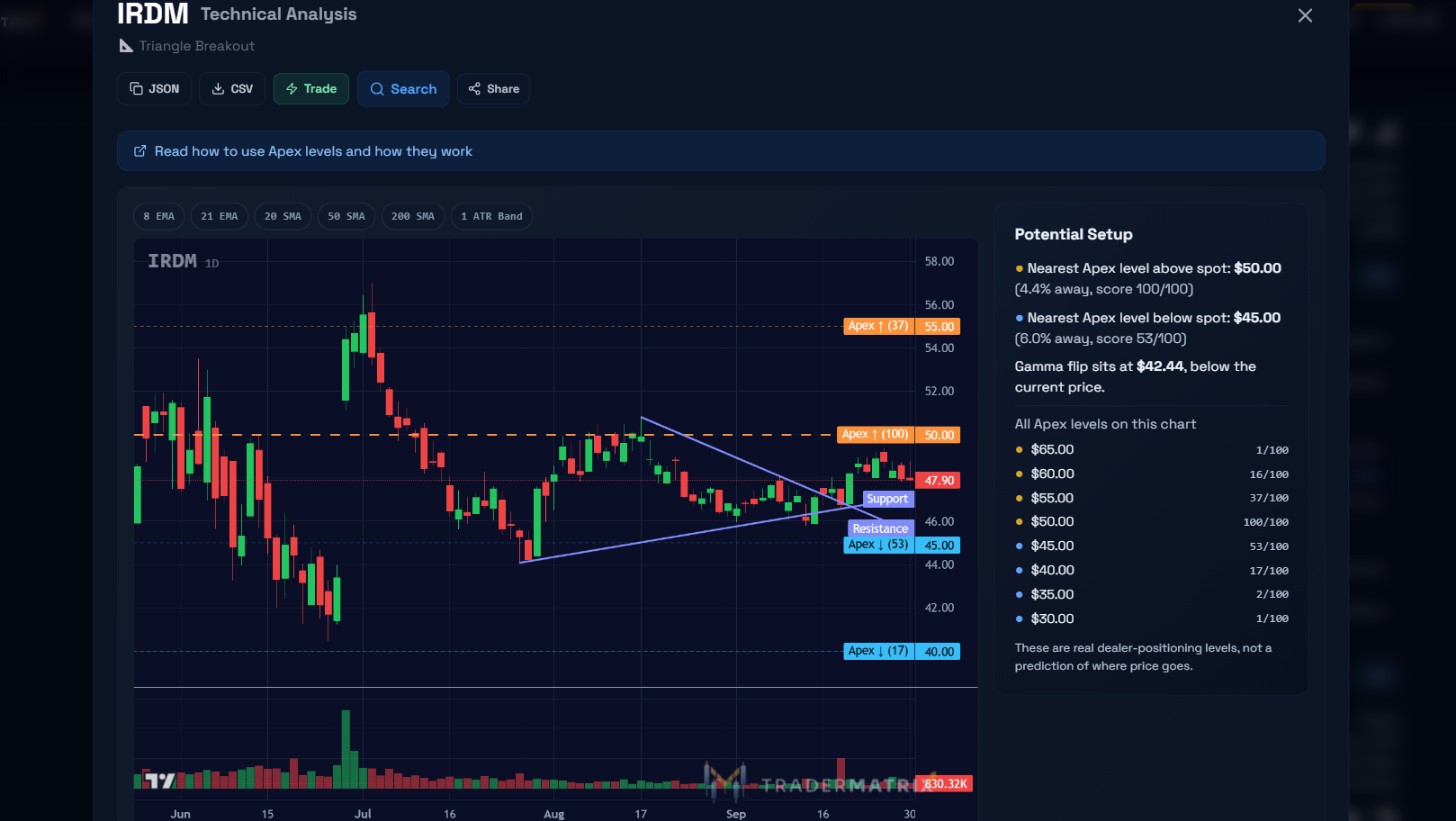 The IRDM chart modal from October 1, 2026. The two trendlines are drawn directly on the daily chart. The Potential Setup panel shows the nearest Apex levels above and below spot, plus the gamma flip at $42.44.
Click any card and a Technical Analysis modal opens.
At the top: JSON, CSV, Trade, Search, and Share buttons.
A banner below the buttons says: "Read how to use Apex levels and how they work."
The chart is a daily candlestick view with the detection engine's two trendlines drawn on it as blue lines. EMA, SMA, and ATR Band toggles let you overlay moving averages.
On IRDM, the chart shows the coil from mid-July through late September, with the breakout firing as price closed above the resistance line.
The Potential Setup panel
The right side of the modal pairs the triangle geometry with the GEX-derived Apex Levels system. For IRDM on October 1:
Nearest Apex level above spot: $50.00, 4.4% away, score 100/100. Nearest Apex level below spot: $45.00, 6.0% away, score 53/100. Gamma flip at $42.44, below the current price of $47.90.
All Apex levels on the chart: $65.00 (1/100), $60.00 (16/100), $55.00 (37/100), $50.00 (100/100), $45.00 (53/100), $40.00 (17/100), $35.00 (2/100), $30.00 (1/100).
The score next to each level is the concentration of dealer GEX contracts at that strike. A score of 100/100 at $50 means the maximum dealer hedging concentration is there. That's a natural magnet and a likely area of resistance if IRDM continues higher.
The gamma flip at $42.44 is below current price, meaning dealers are in a long-gamma zone relative to where IRDM is trading. Long gamma creates a damping effect: dealers hedge by selling into rallies and buying into dips, which tends to suppress volatility while the stock sits in that zone.
The panel notes: "These are real dealer-positioning levels, not a prediction of where price goes."
How the detection works
The engine runs on daily OHLCV bars and requires at least 300 bars of history per ticker. That minimum keeps out recent IPOs and thinly traded names.
It builds the triangle by finding an upper anchor and connecting lower highs into a descending resistance line. The flat support floor is identified separately.
Two gates added by the TraderMatrix implementation:
First, a geometry gate. If the resistance line's slope exceeds 0.45% of the stock's price per bar, the setup is dropped. This removes "cliff" patterns, where a sharp recent selloff gets misidentified as a triangle ceiling. A real descending triangle has a gently declining ceiling. A stock down 30% in two weeks would fail this gate.
Second, a recency gate. For confirmed breakouts, the scanner only surfaces the signal within 3 candles of the actual breakout bar. Old breakouts don't show up as current setups.
The TD Triangle Score drives strength classification on a 0-100 scale. Structure quality accounts for 70% of the score. Breakout quality accounts for 30%. Strong means 70 or above. Moderate is 50 to 69. Weak is below 50.
For confirmed breakouts, the engine also measures relative volume on the breakout bar versus the 20 bars before it. A reading of 1.5x or above earns the volume-confirmed annotation. This is currently a measure-first phase: all breakouts are recorded regardless of volume while the eval collects enough data to determine whether low-volume breakouts have worse outcomes. Whether that eventually becomes a hard filter, I genuinely don't know yet.
Watch out: The recency gate means confirmed breakouts only appear within 3 candles of the actual break. Old breakouts do not accumulate in the feed, so every card you see is a recent signal.
Confirmed vs forming: what to do next
The CONFIRMED BREAKOUT tag fires when the engine sees that "TD Triangle" is active and the signal is within 3 candles of the breakout bar. Price has closed above the falling resistance line.
The setup note gives you the framework: "A close back below that level says the breakout failed." The resistance level, now acting as support, is your invalidation line.
Two approaches: entry at the breakout (the momentum approach, accepting a fill near the initial spike) or wait for a retest. I tend to prefer the retest when I can get it, though plenty of moves don't give you one.
For forming setups, your job is to have a plan ready before the close above resistance fires. Setting an alert beats watching it live.
What to look for before acting
A few things I weigh before entering a setup from this page.
Look for:
- STRONG badge with 3 or more support touches and a clearly defined descending resistance line.
- Between lines under 3% with sessions still remaining before the apex. Compressed but not yet exhausted.
- Bullish flow in Unusual Activity on the same name, especially call sweeps that appeared during the compression phase. They were positioned before the break.
Skip when:
- THROUGH TRIANGLE is at 90%+ and the setup is still FORMING. The structure is running out of room without resolving.
- Earnings within the next week. Binary events invert triangles.
- WEAK rating with only 2 touches. Structural integrity is weak.
- Volume on the breakout bar is well below average. Participation was thin. Treat those confirmations with skepticism.
Try this: Before acting on any confirmed setup, check Unusual Activity for the same ticker. Call sweeps that built during the compression phase were positioned before the break. That overlap between options tape and chart structure is harder to dismiss than either alone.
Common mistakes on confirmed setups
Assuming the breakout will extend immediately is the biggest one. Many of the cleaner entries come after a brief retest of the old resistance level. Chasing the initial spike sometimes means being the buyer into which early traders are selling.
Using the coil ratio as a certainty signal is another. A compressionRatio of 0.08 (SPG on September 30) is extremely tight. It tells you the range is nearly zero. It doesn't tell you the break is imminent or that it'll follow through. Tight coils in weak sector environments can also break down or chop sideways.
And ignoring the broader context: a confirmed breakout during a session with broad selling pressure faces headwinds the geometric data alone doesn't show. Cross-reference Sector Flow and the overall market environment before sizing in.
Pairing with other tools
Unusual Activity shows every scored options print above $20k, one row per trade. When a triangle confirms, check this page for the same ticker. Call sweeps that appeared during the compression phase are already positioned before the break.
Live Flow rolls up the $20k+ options tape per ticker: total premium, trade count, a bull/bear split bar, and the biggest recent print. If a name from the triangle scanner is also showing heavy bullish premium in Live Flow on the same session, the two surfaces are agreeing.
GEX provides dealer positioning context. The chart modal already surfaces the nearest Apex levels and the gamma flip for each setup. For a deeper look, open the full GEX page.
Sector Flow maps institutional flow by sector. When multiple triangles in the same sector confirm on the same session, check whether that sector is attracting fresh bullish positioning.
Dark Pool covers off-exchange block prints. Accumulation lean in the dark pool for a name that's also showing a confirmed triangle means both the shares and the options market are potentially in agreement.
After the close
After the close, open on the All tab. Enable Tight coils and set STRENGTH to Strong. Then run THROUGH TRIANGLE at 80%+. Three sessions of room. One session. At the apex. These are the situations that need a decision this week.
Click into the chart modal for the ones that look interesting. Where's the nearest Apex level above? Where's the gamma flip? If the gamma flip is below the current price and the nearest Apex level above is 3 to 5% away, you have concrete reference points.
Then pull up Unusual Activity for the same ticker. Were there call sweeps building during the compression phase? Write down the exact resistance level from the card before you enter anything. That's your stop.
Nothing in this guide is investment advice. Descending triangles can resolve in either direction, confirmed breakouts can fail, and no win-rate data is published for this scanner because the outcome evaluation is still recording. Options trading carries the risk of losing the entire premium paid.